
Sublime Text is a great editor. It’s lightweight, fast, and extremely customizable. However, one downside to it compared to a full blown IDE is it doesn’t come with support for running your PHPUnit tests directly from the test class you are working with.
To solve this problem, Adam Wathan created and released a free package named Sublime PHPUnit that allows you to run your tests from a keyboard shortcut. Let’s take a look at how to add this package to your arsenal.
Sublime PHPUnit Installation
Installing is just a matter of cloning the repo to your Packages directory. First, cd to that directory:
cd Library/Application\ Support/Sublime\ Text\ 3/PackagesThen clone the repo:
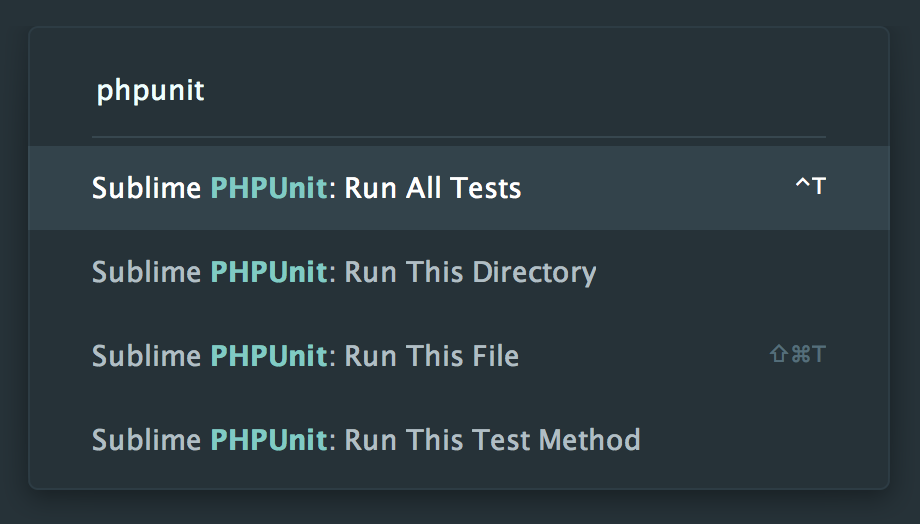
git clone git@github.com:adamwathan/sublime-phpunit.gitAfter this, it’ll be installed and ready to be used by opening up the command palette by hitting command + shift + p and type “phpunit” to see a list of available commands:
Customizing Sublime PHPUnit
The default install works great by going through the command palette, but that can be slow when you are running tests over and over. To make this process faster you can define your keyboard shortcuts by going to preferences -> key bindings and adding your own.
Here is how I setup the two tests that I regularly run:
[ { "keys": ["ctrl+t"], "command": "run_all_phpunit_tests" }, { "keys": ["shift+super+t"], "command": "run_phpunit_test" },]You can also add keyboard shortcuts for the other commands as well and here is a full list of all the options:
run_phpunit_testrun_phpunit_tests_in_dirrun_single_phpunit_testrun_all_phpunit_testsJust make sure your key combo doesn’t interfere with any existing that you use.
Sublime PHPUnit with iTerm
By default, the package opens the Mac terminal app when you call a command, but you can tell Sublime Text to use iTerm by opening up the preferences and adding:
"phpunit-sublime-terminal": "iTerm",If you’ve been wanting to streamline your test running through Sublime Text give this package a try. I think you’ll enjoy the speed improvements.












