Outsource Laravel Development Partner - $3200/Month | Bacancy

Add Useful Info to the Laravel About Command

Published on by

Add Useful Info to the Laravel About Command image

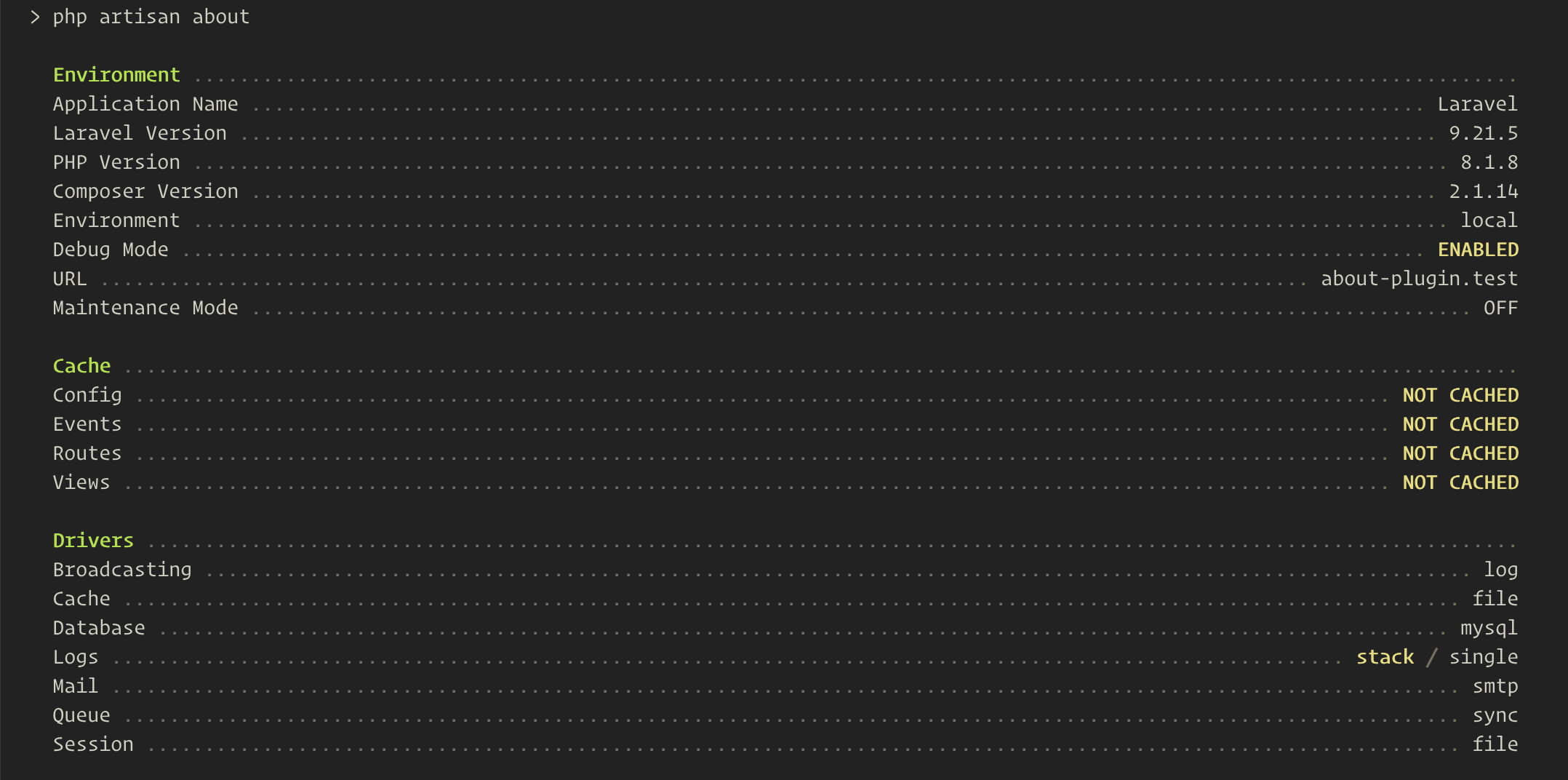
The Laravel about command released in Laravel 9.21 provides an excellent overview of important configurations for your application. Out of the box, it lists environment details, cache status, and configured drivers:
Another neat feature of the new about command is the ability for packages to add helpful information too. For example, we've covered Filament components here on Laravel News; after the release of Laravel 9.21, Ryan Chandler opened a pull request to add useful plugin details to Filament.

I think we'll see a lot of package authors add helpful details to the about command. Hopefully, the end-user doesn't get overwhelmed with too much info, or perhaps package developers make the inclusion of data in the about command configurable.

With that intro out of the way, how would you add custom data to the about command?

You can do so in a service provider, using the AboutCommand::add() method within the service provider's boot() method.

In the following example, let's say I wanted my package or application to output specific XDebug configuration values:

use Illuminate\Foundation\Console\AboutCommand;
 
// ...
 
public function boot()
{
AboutCommand::add('XDebug Settings', [
'Client Port' => fn() => ini_get('xdebug.client_port'),
'Client Host' => fn() => ini_get('xdebug.client_host'),
'Start With Request' => fn() => ini_get('xdebug.start_with_request'),
'Max Nesting Level' => fn() => ini_get('xdebug.max_nesting_level'),
'Mode' => fn() => ini_get('xdebug.mode'),
'Output Dir' => fn() => ini_get('xdebug.output_dir'),
'Log' => fn() => !empty(ini_get('xdebug.log')) ? ini_get('xdebug.log') : 'No Value',
]);
}

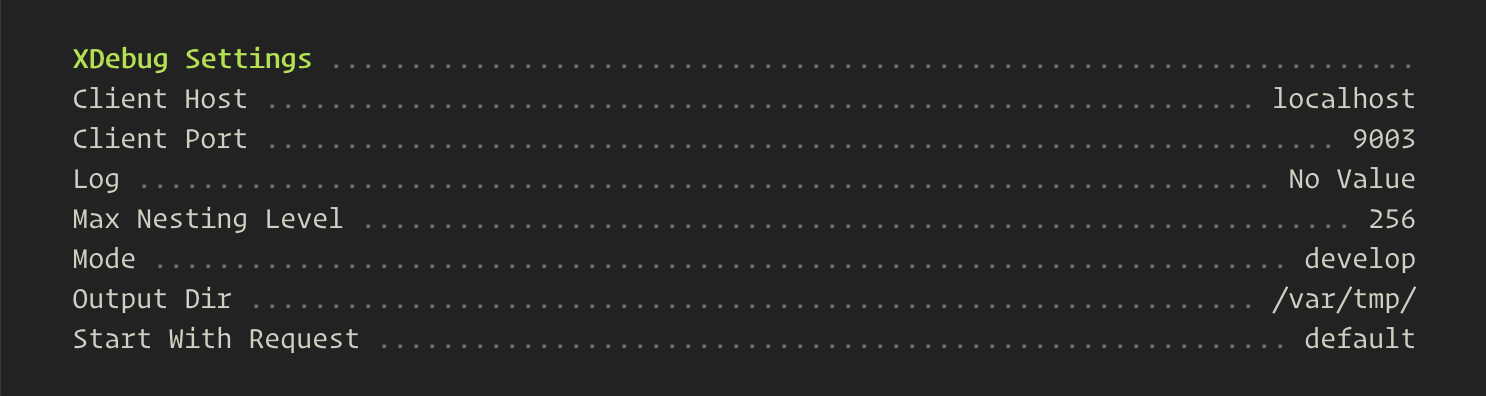
The above might look like the following locally, depending on your XDebug configuration:
Lazy Loading

One thing to note when creating custom about commands is that you should lazy load the output by wrapping the settings in an fn() => arrow function. For example:

-'Client Port' => ini_get('xdebug.client_port'),
+'Client Port' => fn() => ini_get('xdebug.client_port'),

I am excited to see what helpful information package authors start adding to this command!

Paul Redmond photo

Staff writer at Laravel News. Full stack web developer and author.

Cube

Laravel Newsletter

Join 40k+ other developers and never miss out on new tips, tutorials, and more.

image
Tinkerwell

Enjoy coding and debugging in an editor designed for fast feedback and quick iterations. It's like a shell for your application – but with multi-line editing, code completion, and more.

Visit Tinkerwell
Bacancy logo

Bacancy

Supercharge your project with a seasoned Laravel developer with 4-6 years of experience for just $3200/month. Get 160 hours of dedicated expertise & a risk-free 15-day trial. Schedule a call now!

Bacancy
Tinkerwell logo

Tinkerwell

The must-have code runner for Laravel developers. Tinker with AI, autocompletion and instant feedback on local and production environments.

Tinkerwell
Get expert guidance in a few days with a Laravel code review logo

Get expert guidance in a few days with a Laravel code review

Expert code review! Get clear, practical feedback from two Laravel devs with 10+ years of experience helping teams build better apps.

Get expert guidance in a few days with a Laravel code review
PhpStorm logo

PhpStorm

The go-to PHP IDE with extensive out-of-the-box support for Laravel and its ecosystem.

PhpStorm
Laravel Cloud logo

Laravel Cloud

Easily create and manage your servers and deploy your Laravel applications in seconds.

Laravel Cloud
Kirschbaum logo

Kirschbaum

Providing innovation and stability to ensure your web application succeeds.

Kirschbaum
Shift logo

Shift

Running an old Laravel version? Instant, automated Laravel upgrades and code modernization to keep your applications fresh.

Shift
Harpoon: Next generation time tracking and invoicing logo

Harpoon: Next generation time tracking and invoicing

The next generation time-tracking and billing software that helps your agency plan and forecast a profitable future.

Harpoon: Next generation time tracking and invoicing
Lucky Media logo

Lucky Media

Get Lucky Now - the ideal choice for Laravel Development, with over a decade of experience!

Lucky Media
SaaSykit: Laravel SaaS Starter Kit logo

SaaSykit: Laravel SaaS Starter Kit

SaaSykit is a Multi-tenant Laravel SaaS Starter Kit that comes with all features required to run a modern SaaS. Payments, Beautiful Checkout, Admin Panel, User dashboard, Auth, Ready Components, Stats, Blog, Docs and more.

SaaSykit: Laravel SaaS Starter Kit

The latest

View all →
Statamic 6 Is Officially Released image

Statamic 6 Is Officially Released

Read article
Livewire 4 and Blade Improvements in Laravel VS Code Extension v1.5.0 image

Livewire 4 and Blade Improvements in Laravel VS Code Extension v1.5.0

Read article
Manage PostgreSQL Databases Directly in VS Code with Microsoft's Extension image

Manage PostgreSQL Databases Directly in VS Code with Microsoft's Extension

Read article
NativePHP for Mobile Is Now Free image

NativePHP for Mobile Is Now Free

Read article
Fuse for Laravel: A Circuit Breaker Package for Queue Jobs image

Fuse for Laravel: A Circuit Breaker Package for Queue Jobs

Read article
Generate Complete Application Modules with a Single Command using Laravel TurboMaker image

Generate Complete Application Modules with a Single Command using Laravel TurboMaker

Read article