
Danger JS

Published on by

Danger JS image

Danger is a CI tool by Orta Therox with JS and Ruby implementations that run during your Continuous Integration (CI) process. The JS version describes itself as follows:

Danger is an NPM module that evals a Dangerfile. You set up a Dangerfile per-project. The Dangerfile contains a collection of home-grown rules specific to your project as a dangerfile.js or dangerfile.ts.

What does this mean? An example from the documentation mentions enforcing that the changelog must be modified in a pull request:

// Add a CHANGELOG entry for app changes
const hasChangelog = includes(danger.git.modified_files, "changelog.md")
const isTrivial = contains((danger.github.pr.body + danger.github.pr.title), "#trivial")
 
if (!hasChangelog && !isTrivial) {
warn("Please add a changelog entry for your changes.")
}

If the changelog file isn’t modified, Danger will comment with a warning on the pull request automatically. This task is something you might find valuable to your project, however, is a manual process either lost in the contributing guidelines or depends on humans ensuring changelog updates are included.

Instead, Danger can do this for you and automatically update a pull request, notifying the submitter of potential warnings and issues.

Here’s an example of some of the messages you might create:
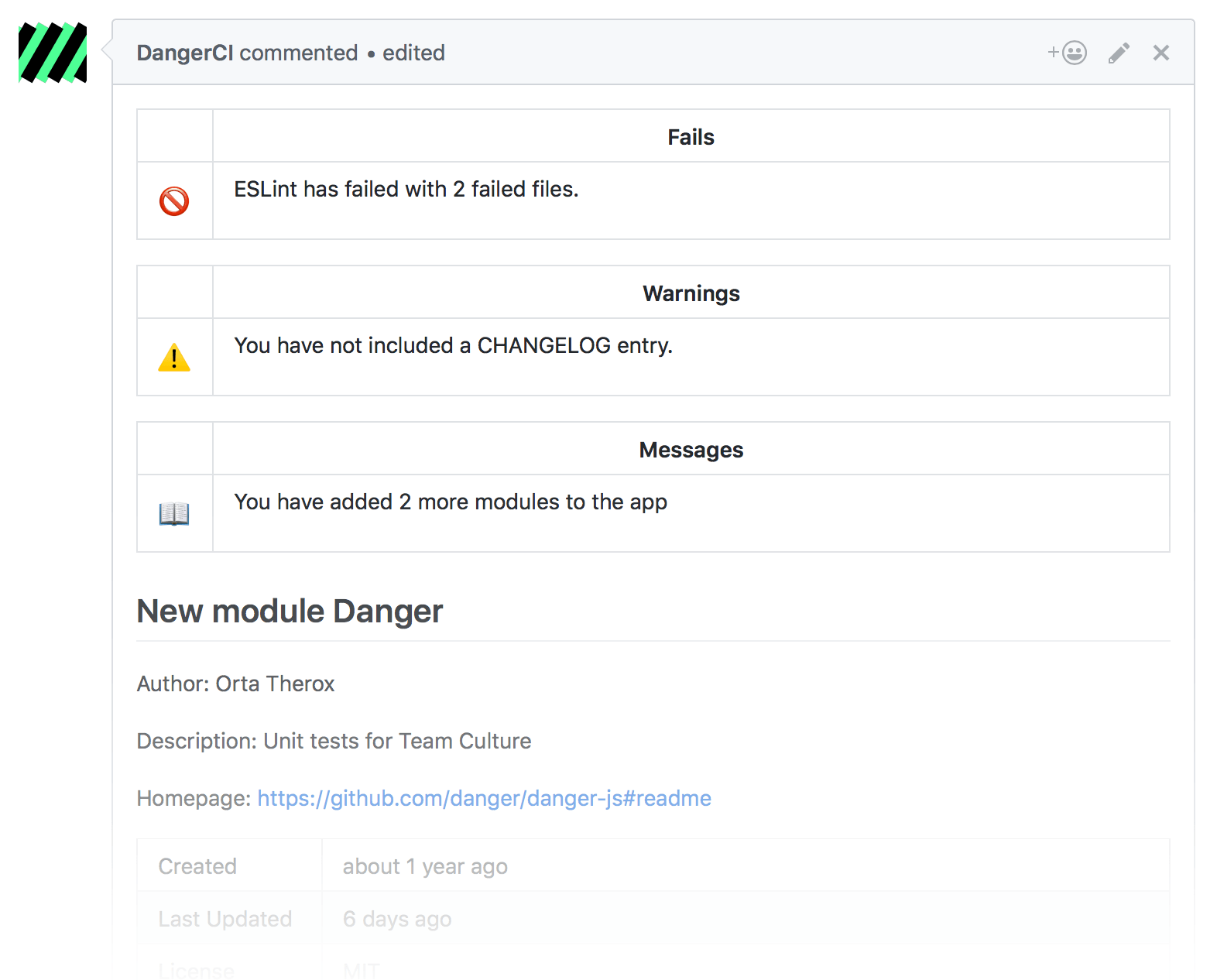
Think of Danger as an automated butler for menial, repetitive tasks that are important for your project’s PR process, but create some mental overhead for contributors and project owners.

Another example from the documentation checks for tests:

const hasAppChanges = modifiedAppFiles.length > 0;
 
const testChanges = modifiedAppFiles.filter(filepath =>
filepath.includes('test'),
);
const hasTestChanges = testChanges.length > 0;
 
// Warn if there are library changes, but not tests
if (hasAppChanges && !hasTestChanges) {
warn(
"There are library changes, but not tests. That's OK as long as you're refactoring existing code",
);
}

If you want to see an example in the wild, the apollographql/apollo-client Dangerfile has some excellent examples.

Caveats

Danger has both a Ruby and a Node version. You can see the differences of Danger JavaScript and Danger Ruby, and I think the most significant caveat I noticed was that Danger JS only works with GitHub at the time of writing. The author also mentions the JS platform “has a bigger potential for growth.”

On the other side, the Ruby version is more stable, is supported on multiple platforms, has a healthy plugin ecosystem.

Learn More

You can learn everything you need to know about Danger on the official site. Both the Ruby and JS implementations have good documentation once you pick one.

Paul Redmond photo

Staff writer at Laravel News. Full stack web developer and author.

Filed in:
Cube

Laravel Newsletter

Join 40k+ other developers and never miss out on new tips, tutorials, and more.

image
Tinkerwell

Enjoy coding and debugging in an editor designed for fast feedback and quick iterations. It's like a shell for your application – but with multi-line editing, code completion, and more.

Visit Tinkerwell
Kirschbaum logo

Kirschbaum

Providing innovation and stability to ensure your web application succeeds.

Kirschbaum
Acquaint Softtech logo

Acquaint Softtech

Acquaint Softtech offers AI-ready Laravel developers who onboard in 48 hours at $3000/Month with no lengthy sales process and a 100 percent money-back guarantee.

Acquaint Softtech
No Compromises logo

No Compromises

Joel and Aaron, the two seasoned devs from the No Compromises podcast, are now available to hire for your Laravel project. ⬧ Flat rate of $9500/mo. ⬧ No lengthy sales process. ⬧ No contracts. ⬧ 100% money back guarantee.

No Compromises
Laravel Cloud logo

Laravel Cloud

Easily create and manage your servers and deploy your Laravel applications in seconds.

Laravel Cloud
Shift logo

Shift

Running an old Laravel version? Instant, automated Laravel upgrades and code modernization to keep your applications fresh.

Shift
Lucky Media logo

Lucky Media

Get Lucky Now - the ideal choice for Laravel Development, with over a decade of experience!

Lucky Media
SaaSykit: Laravel SaaS Starter Kit logo

SaaSykit: Laravel SaaS Starter Kit

SaaSykit is a Multi-tenant Laravel SaaS Starter Kit that comes with all features required to run a modern SaaS. Payments, Beautiful Checkout, Admin Panel, User dashboard, Auth, Ready Components, Stats, Blog, Docs and more.

SaaSykit: Laravel SaaS Starter Kit
Harpoon: Next generation time tracking and invoicing logo

Harpoon: Next generation time tracking and invoicing

The next generation time-tracking and billing software that helps your agency plan and forecast a profitable future.

Harpoon: Next generation time tracking and invoicing
PhpStorm logo

PhpStorm

The go-to PHP IDE with extensive out-of-the-box support for Laravel and its ecosystem.

PhpStorm
Tinkerwell logo

Tinkerwell

The must-have code runner for Laravel developers. Tinker with AI, autocompletion and instant feedback on local and production environments.

Tinkerwell

The latest

View all →
Monitor and Control Schedules, Queues, and Errors in Laravel with Watchtower image

Monitor and Control Schedules, Queues, and Errors in Laravel with Watchtower

Read article
Showcase Your PhpStorm Expertise on LinkedIn image

Showcase Your PhpStorm Expertise on LinkedIn

Read article
Privacy Filter: Detect PII in Text from Laravel image

Privacy Filter: Detect PII in Text from Laravel

Read article
NationForge: A Self-Hosted Admin Panel for Civic Organizations image

NationForge: A Self-Hosted Admin Panel for Civic Organizations

Read article
Monitor Laravel Queues, Commands, and Schedulers on Any Driver with Vigilance image

Monitor Laravel Queues, Commands, and Schedulers on Any Driver with Vigilance

Read article
Watch the Teaser for 'The Story of PHP' Documentary image

Watch the Teaser for 'The Story of PHP' Documentary

Read article






