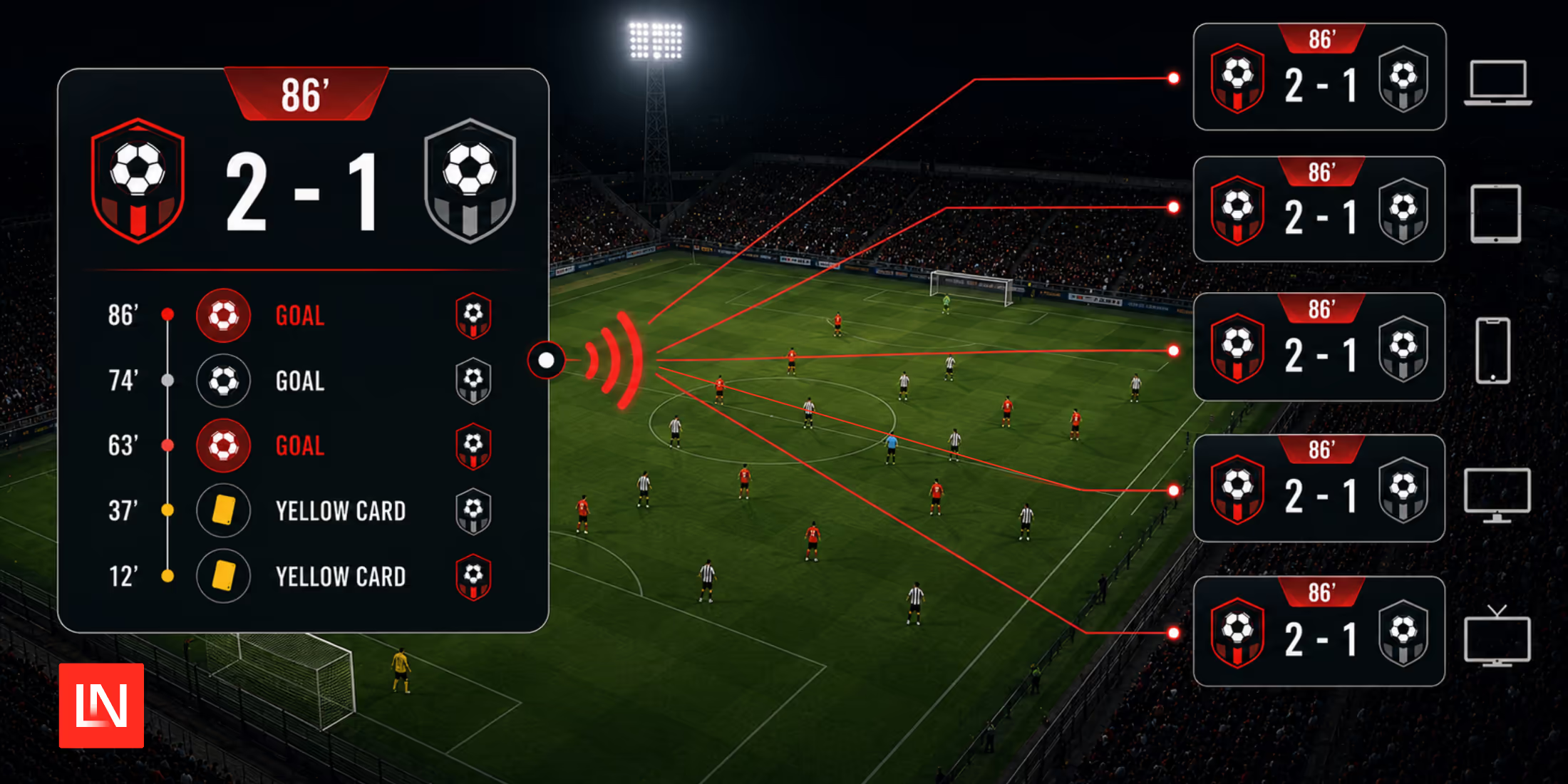
With the World Cup final behind us, plenty of us spent the last month following along through a scores page or a social feed. Unless you were watching live on TV, or lucky enough to have a ticket to a game, a browser tab was your window on the match. On some sites, keeping up meant refreshing: the score is rendered once when the page loads, and you hit F5 or Ctrl-R to see whether anything has changed. On others, the number updates itself while you watch, and it's fair to wonder how it knows to. This tutorial is about building the second kind, where a goal appears on every open tab at once without anyone reaching for the refresh button.
There are two usual ways to pull that off, and it helps to know why we're picking one over the other.
Polling is the one most of us try first. The browser asks the server for the current score every few seconds and repaints if it changed. Any JSON endpoint you already have works; you don't run anything extra, and it copes fine with a connection that drops for a moment. The catch is that every client keeps asking whether or not there's anything new, so a nil-nil game that nobody scores in still generates a steady drip of requests, and the score is only ever as fresh as your interval. Poll every ten seconds and a goal can go unseen for nine of them. Drop to every second, and you've multiplied your traffic tenfold to watch a game where nothing happened.
A WebSocket connection flips that around. The client connects once, and the server sends something only when there's something to send. The wire stays silent through a quiet spell, and the moment a goal goes in, it reaches everyone at once instead of on each client's next poll. You pay for that with a WebSocket server that has to sit there holding all those open connections, and with a bit more work on the frontend. For a scoreboard, where you want the score fast and most minutes are quiet, that cost is worth it, and it's what we're building.
Laravel Reverb is a first-party WebSocket server that speaks the Pusher protocol, so it works with Laravel's broadcasting features and Laravel Echo on the frontend without a third-party service. We'll use it to build the real-time layer for a football (or soccer, depending on where you live) scores app called Kickoff: a global scoreboard listing every game in progress, plus a per-game page that streams the score, the match clock, and a running timeline of goals and cards.
The code comes from a project I'm working on, so it's real code solving a real problem rather than something invented for the article. What I've spent the most time on here are the parts that actually gave me trouble: deciding what to put in a broadcast payload, working out where the events should be dispatched from, and getting the frontend to behave when server-side rendering is turned on.
Installing Reverb
Starting from a Laravel application with broadcasting not yet enabled, the install command sets up Reverb, the broadcasting config, and the Echo scaffolding in one step:
php artisan install:broadcasting --reverbThis publishes config/reverb.php, installs laravel-echo and pusher-js, enables the BroadcastServiceProvider, and writes a block of Reverb credentials into your .env:
BROADCAST_CONNECTION=reverb REVERB_APP_ID=REVERB_APP_KEY=REVERB_APP_SECRET=REVERB_HOST="localhost"REVERB_PORT=8080REVERB_SCHEME=http VITE_REVERB_APP_KEY="${REVERB_APP_KEY}"VITE_REVERB_HOST="${REVERB_HOST}"VITE_REVERB_PORT="${REVERB_PORT}"VITE_REVERB_SCHEME="${REVERB_SCHEME}"The REVERB_* values configure the server; the VITE_REVERB_* copies are the same values exposed to the frontend build, which is where Echo reads them. We'll come back to that when configuring Echo.
During development, you run the WebSocket server alongside the usual processes:
php artisan reverb:startA fresh Laravel app's composer dev script already runs the queue worker, Vite, and the app server together. Add Reverb to that list so a single command boots everything:
"dev": "npx concurrently -k -c \"#93c5fd,#c4b5fd,#fb7185,#d4d4d8,#fdba74\" \"php artisan serve\" \"php artisan queue:listen --tries=1\" \"php artisan reverb:start\" \"php artisan pail\" \"npm run dev\" --names=server,queue,reverb,logs,vite"Laravel 13.16 added a php artisan dev command that does the same job, with the process list living in your code instead of in composer.json. Reverb hooks into it on its own: on a 13.16+ app it registers reverb:start as a dev process, so php artisan dev runs it next to the server, queue, Pail, and Vite with nothing to configure. Run php artisan dev:list to see everything that will start. The composer script still works on every supported version, so reach for whichever fits the version you're on.
Modelling the Match
The scoreboard really only cares about three pieces of state in Kickoff. A Game holds the lifecycle status and the clock, a Result holds the two scores, and a GameEvent records each moment as it happens: a goal, a card, a substitution, a line of commentary. Status is a string-backed enum:
namespace App\Enums; enum GameStatus: string{ case Scheduled = 'scheduled'; case Live = 'live'; case HalfTime = 'half_time'; case FullTime = 'full_time'; case Postponed = 'postponed'; case Cancelled = 'cancelled'; public function isInProgress(): bool { return match ($this) { self::Live, self::HalfTime => true, default => false, }; }}The Game model casts the status and clock columns so the rest of the app works with typed values rather than raw strings:
protected function casts(): array{ return [ 'status' => GameStatus::class, 'current_minute' => 'integer', 'clock_started_at' => 'datetime', ];}Keeping current_minute and clock_started_at as separate columns pays off later on, letting the clock tick along in the browser without us broadcasting every single second. I'll come back to that.
Broadcasting Events
Three things change during a game, so we have three events. Each implements ShouldBroadcastNow instead of the plain ShouldBroadcast. Queued broadcasting is the sensible default most of the time, but a score is time-sensitive, and the payload is tiny, and I don't want a queue worker sitting between someone recording a goal and the score showing up on screen. Broadcasting synchronously cuts out that hop. The trade is that the request now waits for the broadcast to go out, so this only makes sense for small, urgent payloads like these; anything heavier belongs back on the queue.
The score event looks like this:
namespace App\Events; use App\Models\Game;use Illuminate\Broadcasting\Channel;use Illuminate\Broadcasting\InteractsWithSockets;use Illuminate\Contracts\Broadcasting\ShouldBroadcastNow;use Illuminate\Foundation\Events\Dispatchable;use Illuminate\Queue\SerializesModels; class ScoreUpdated implements ShouldBroadcastNow{ use Dispatchable, InteractsWithSockets, SerializesModels; public function __construct(public Game $game) {} /** * @return array<int, Channel> */ public function broadcastOn(): array { return [ new Channel("game.{$this->game->id}"), new Channel('scoreboard.live'), ]; } public function broadcastAs(): string { return 'ScoreUpdated'; } /** * @return array<string, mixed> */ public function broadcastWith(): array { $result = $this->game->result; return [ 'game_id' => $this->game->id, 'home_team_score' => $result?->home_team_score, 'away_team_score' => $result?->away_team_score, 'current_minute' => $this->game->current_minute, 'clock_started_at' => $this->game->clock_started_at?->toISOString(), 'status' => $this->game->status->value, ]; }}A few things in there deserve a note.
It broadcasts on two channels at once. A single game's page subscribes to game.{id}, while scoreboard.live is the shared feed the global board listens on, and one dispatch feeds both. Both are public channels, which suits a scoreboard fine since scores aren't secret. A private or presence channel would only add an authorisation round-trip that a read-only page has no use for, and because these are public we don't define any authorisation callbacks in routes/channels.php for them.
broadcastAs renames the event. Leave it out and Echo listens for the fully namespaced class name, App\Events\ScoreUpdated. A short name keeps the frontend listeners tidy and free of the PHP namespace, and it costs us exactly one line of Echo config later on the client.
broadcastWith is what keeps the payload small. Left to itself, a broadcast serialises the event's public properties. Hence, our public Game $game goes out as the model's attributes plus whatever relations happen to be loaded on it, which is far more than the client needs. Spelling out broadcastWith pins the wire payload to the few fields the scoreboard actually re-renders from. Team names aren't in there on purpose: they don't change mid-game, they're already sitting on the page, and every goal we broadcast is smaller for leaving them out.
The other two events work the same way. GameStatusChanged carries the status and clock and also goes out on both channels, since a game dropping into or out of live changes what the board shows. GameEventRecorded carries one timeline entry and broadcasts on game.{id} alone; the global board doesn't care about individual cards or substitutions, only the score and status.
Dispatching From Observers
Where you dispatch these events matters more than it looks. Fire them inline from a controller and every path that touches a score has to remember to broadcast, which a background job or an artisan command fixing up a result will quietly forget to do. Putting the broadcast in a model observer moves it right next to the data change, so saving a Result at all triggers the push, no matter what saved it:
namespace App\Observers; use App\Concerns\BroadcastsQuietly;use App\Events\ScoreUpdated;use App\Models\Result; class ResultObserver{ use BroadcastsQuietly; public function saved(Result $result): void { $game = $result->game; if ($game === null) { return; } // Reflect the just-saved scores rather than a stale relation // cached on the game. $game->setRelation('result', $result); $this->broadcastQuietly(fn () => ScoreUpdated::dispatch($game)); } public function deleted(Result $result): void { $game = $result->game; if ($game === null) { return; } $game->setRelation('result', null); $this->broadcastQuietly(fn () => ScoreUpdated::dispatch($game)); }}The saved hook fires for both the first insert and later updates, and deleted broadcasts a cleared score as well, since wiping a result still changes what people are looking at. Setting the relation by hand before we dispatch is what makes the payload read the scores that were just written rather than a stale copy Eloquent cached earlier in the request.
GameObserver is choosier. A game row gets updated for all sorts of reasons, and most of them, like editing the kickoff time or fixing a venue, have nothing to do with the live view. So it only broadcasts when a column that actually drives that view changes:
public function updated(Game $game): void{ if ($game->wasChanged(['status', 'current_minute', 'clock_started_at'])) { $this->broadcastQuietly(fn () => GameStatusChanged::dispatch($game)); }}That wasChanged() check is the important part. Without it, editing a game's schedule would show up on the scoreboard as if the match had just kicked off.
Keeping a Broadcast Failure From Failing the Request
Every dispatch above is wrapped in broadcastQuietly, a small trait that treats the real-time push as a best-effort side effect:
namespace App\Concerns; use Closure;use Illuminate\Support\Facades\Log;use Throwable; trait BroadcastsQuietly{ protected function broadcastQuietly(Closure $dispatch): void { try { $dispatch(); } catch (Throwable $e) { Log::warning('Realtime broadcast failed; the underlying change was still saved.', [ 'exception' => $e->getMessage(), ]); } }}The saved result is the source of truth; the broadcast is a nice-to-have on top of it. If Reverb happens to be down when someone enters a goal, the score still has to save, and a viewer's next page load will pick up whatever push they missed. Catching the failure here means a dead socket gets logged instead of blowing up the request that saved the data. That guard matters precisely because ShouldBroadcastNow runs the dispatch inside the request rather than off on a queue, so a WebSocket hiccup would otherwise take the save down with it.
That same in-request timing has one more consequence worth knowing about. If you save scores inside a database transaction, an immediate broadcast can fire before the transaction commits, and a viewer would briefly see a score that then gets rolled back. Kickoff saves each result in a single statement, so it doesn't hit this, but if yours wraps several writes in a transaction, have the event implement ShouldDispatchAfterCommit (or dispatch from a DB::afterCommit callback) so the broadcast waits for the commit.
Register the observers on their models with the #[ObservedBy] attribute:
use App\Observers\ResultObserver;use Illuminate\Database\Eloquent\Attributes\ObservedBy; #[ObservedBy(ResultObserver::class)]class Result extends Model{ // ...}Listening on the Frontend
Kickoff's frontend is Inertia and Vue, using the @laravel/echo-vue package. Echo is configured once, at app startup, with the Reverb broadcaster:
import { configureEcho } from '@laravel/echo-vue'; configureEcho({ broadcaster: 'reverb',});A page then subscribes to a channel with the useEchoPublic composable. There are two problems to fix before calling it directly, though, so Kickoff wraps it in a thin composable of its own:
import { useEchoPublic } from '@laravel/echo-vue'; /** * Subscribe to a public Echo channel, but only in the browser. */export function useEchoPublicClient<T>( channel: string, event: string, callback: (payload: T) => void,): void { if (typeof window === 'undefined') { return; } const exactEvent = event.startsWith('.') || event.startsWith('\\') ? event : `.${event}`; useEchoPublic(channel, exactEvent, callback);}The first problem is server-side rendering. Echo grabs its WebSocket client during component setup, and that means nothing on the server, where there's no window and no socket to grab. Bailing out early on typeof window === 'undefined' lets these pages render their initial snapshot server-side and hook up the live subscription in the browser once hydration finishes.
The second is that broadcastAs name from earlier. Since the events go out under a short name, Echo's default formatter prepends the App.Events namespace and ends up listening for an event that never shows up on the wire. Prefixing the name with a dot tells Echo to use it as-is. Doing that once in the composable keeps the dot out of every call site.
With the composable in hand, the scoreboard page subscribes to scoreboard.live and patches the matching game in place when a score lands:
const games = ref<ScoreboardGame[]>([...props.games]); useEchoPublicClient( 'scoreboard.live', 'ScoreUpdated', (e: { game_id: number; home_team_score: number | null; away_team_score: number | null; current_minute: number | null; clock_started_at: string | null; status: string; }) => { const game = games.value.find((g) => g.id === e.game_id); if (game) { game.home_team_score = e.home_team_score; game.away_team_score = e.away_team_score; game.current_minute = e.current_minute; game.clock_started_at = e.clock_started_at; game.status = e.status; } else if (['live', 'half_time'].includes(e.status)) { // A game we don't yet know about just became relevant. Refetch // to pick up its team names, which the payload doesn't carry. router.reload({ only: ['games'] }); } },);Usually the game is already on the board, so the handler patches those five fields and Vue re-renders its card. The router.reload fallback is there for the one case the payload can't cover on its own: a game that wasn't live when the page loaded and so has no team names on the client yet. An Inertia partial reload pulls down just the games prop to fill in the gap.
Ticking the Clock Without Flooding the Socket
A scoreboard shows a running minute, and the obvious way to keep it ticking is to broadcast a new value every second. Do that and a single quiet game becomes 90 broadcasts to every connected client, all for a number the browser could have worked out itself.
So the server only broadcasts the clock when it genuinely changes: kickoff, halftime, full time. Each of those payloads carries current_minute, the minute the clock read at that moment, and clock_started_at, when it started running. The browser works the live minute out from those two:
export function matchClockMinute( now: number, status: string, baseMinute: number | null, clockStartedAt: string | null,): number | null { if (status !== 'live' || clockStartedAt === null) { return baseMinute; } const elapsedMs = now - new Date(clockStartedAt).getTime(); return (baseMinute ?? 0) + Math.max(0, Math.floor(elapsedMs / 60000));}One now ref, refreshed once a second and shared across every card, drives the whole board. A live game's minute climbs on its own, and at halftime the stored base minute freezes it in place. Guests get the ticking clock just like signed-in users, and the WebSocket stays quiet between actual events. The interval sits inside onMounted, so like the subscription, it only reaches for browser APIs after hydration.
Streaming a Single Game's Timeline
The scoreboard is the global view. The per-game page, the gamecast, is the other half, and it subscribes to that one game's game.{id} channel. Two of its three handlers are ones we have already seen: ScoreUpdated and GameStatusChanged patch the scoreline and status in the page header, the same way they patch a card on the board.
The new one is GameEventRecorded, which drives the timeline of goals, cards, and substitutions:
const channel = `game.${props.game.id}`; // A new timeline entry. The broadcast carries only IDs, so reload the// resolved `events` prop rather than rebuilding name lookups on the client.useEchoPublicClient(channel, 'GameEventRecorded', () => { router.reload({ only: ['events'] });});This is the same decision the scoreboard made with its router.reload fallback, for the same reason. Look back at what GameEventRecorded puts on the wire: team_id, player_id, assist_player_id, and the rest, but no names. That keeps the broadcast small, and the client turns those IDs into a line like "63' Goal, Okafor (assisted by Bello)" by refetching the events prop, where the server has already resolved the relationships into display strings. A partial reload pulls down only that prop, so the rest of the gamecast is left alone.
The same idea runs through both views: put IDs and scalars on the wire, keep the payload small, and let the server resolve names on the occasional refetch. Scores and the clock, which the client can render straight from the payload, never trigger a reload; a new timeline entry, which needs resolved names, does.
Running It
With Reverb up (php artisan reverb:start, or the combined composer dev script) and Vite serving the frontend, open the scoreboard in two tabs and record a result in a third. The score, the status banner, and the timeline all update across every tab at once, and the minute keeps climbing between events without anyone touching the server.
Production needs a little more than reverb:start in a terminal. Three things change:
- Keep the process alive. Reverb is a long-running server, so run it under a process manager like Supervisor (or a systemd unit) that restarts it if it exits. Laravel's deployment notes for Reverb cover a sample Supervisor config and the open-file-limit tuning a busy connection count needs.
- Terminate TLS in front of it. Browsers on an HTTPS page refuse a plaintext
ws://connection, so put Reverb behind a reverse proxy (Nginx, Caddy) that serveswss://and forwards to the local Reverb port. - Give the client its connection details.
configureEcho({ broadcaster: 'reverb' })reads theVITE_REVERB_*values thatinstall:broadcastingwrote to your.env, so the host, port, scheme, and app key have to be set at build time. Point the scheme and host at your public proxy, notlocalhost, or the compiled JavaScript will try to reach a server that isn't there.
If a single Reverb process isn't enough, it scales horizontally over Redis, so the same broadcasting code runs unchanged across several application servers.
There aren't many moving parts. A saved model turns into a broadcast that Reverb fans out to whoever is listening:
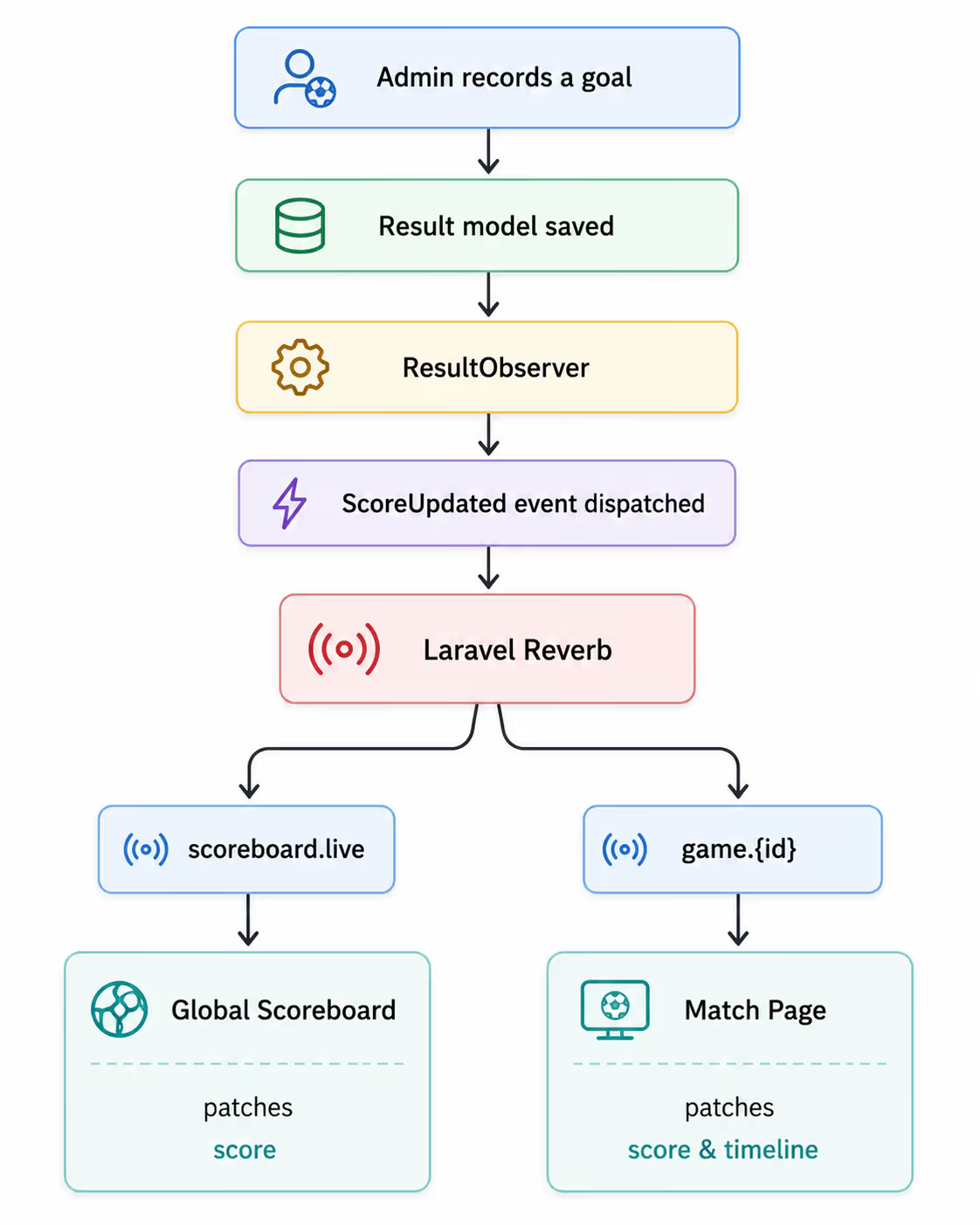
The wiring is the easy part. Most of the thinking went into what travels over it: send only what actually changed, and let the client rebuild the rest from what it already has. That is what keeps traffic low even with a full card of games running at once.
You can read more about the WebSocket server in the Laravel Reverb documentation and about the events that feed it in the broadcasting documentation.