
Laravel Cloud has added a new Path Blocking feature designed to keep hibernated applications from waking up because of unwanted bot traffic.
If you have an app in hibernation, random requests from bots probing common paths like wp-admin, .php, or .env can cause the app to wake up unnecessarily. That means extra wake events from traffic you never wanted in the first place.
With Path Blocking enabled, Laravel Cloud can ignore those requests entirely so they do not trigger wakeups, events, or unnecessary activity.
Editors Note: This is now enabled by default for all new applications on Laravel Cloud.
Why this matters
Bots constantly scan the web looking for common admin URLs, config files, and sensitive endpoints. Even if your Laravel app is not serving those paths, the request itself can still wake a hibernated app.
This new setting acts like a filter in front of those requests so your app stays asleep unless it receives traffic that actually matters.
How to enable Path Blocking
You can enable it from your Laravel Cloud project settings:
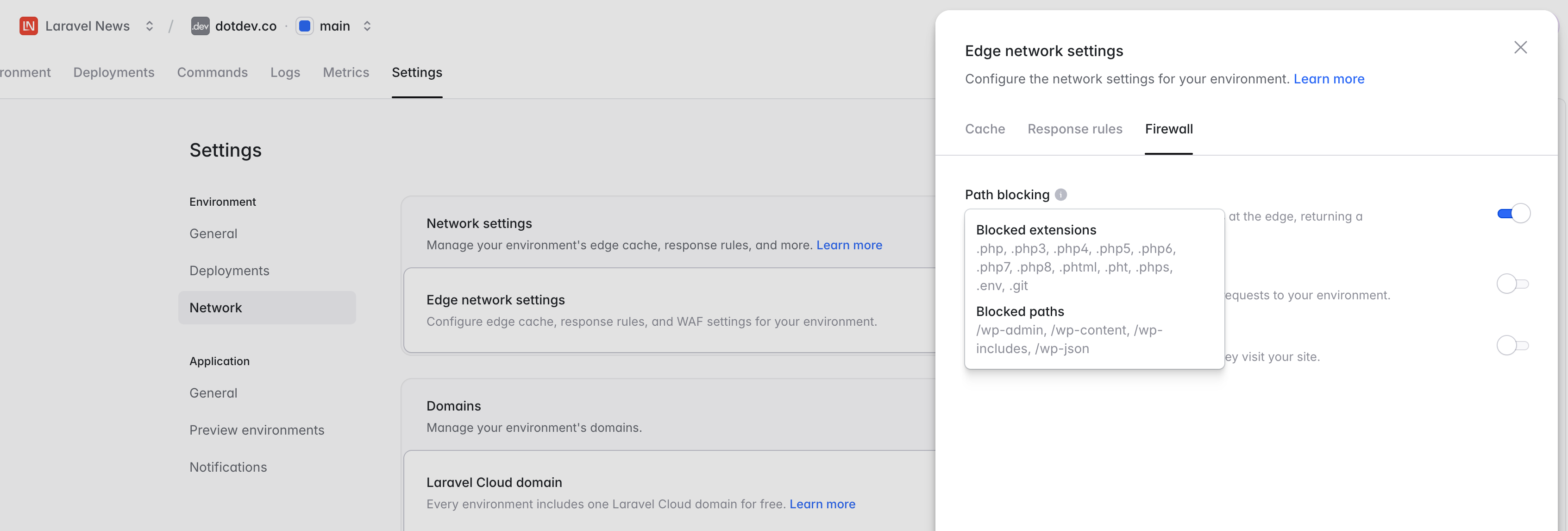 Go to:
Settings -> Network -> Edge Network Settings -> Configure -> Firewall -> Path BlockingThen toggle it on and save. Once enabled, blocked paths and extensions will be ignored and will no longer trigger wakeups.











