Package
Log1X Laravel Webfonts
Download, install, and preload over 1500 Google fonts locally in your Laravel project
Laravel Webfonts



Laravel Webfonts allows you to easily download, install, and preload over 1500 Google fonts locally in your Laravel project.
Features
- 🔍️ Search and install over 1500 Google fonts from the public google-webfonts-helper API.
- ⚡️ Automatically generate
@font-faceCSSat-ruleswhen installing fonts using CLI. - 🧑💻 Supports Vite and Bud out of the box with zero configuration.
- ⚡️ Provides an easy-to-use
@preloadFontsBlade directive to preload fonts found in the Vite/Bud manifest. - 🚀 Automatically injects font preload markup into
wp_headon WordPress sites running Acorn.
Requirements
Installation
Install via Composer:
$ composer require log1x/laravel-webfontsUsage
If you already have fonts locally installed in your project, skip to Preloading Fonts.
Adding Fonts
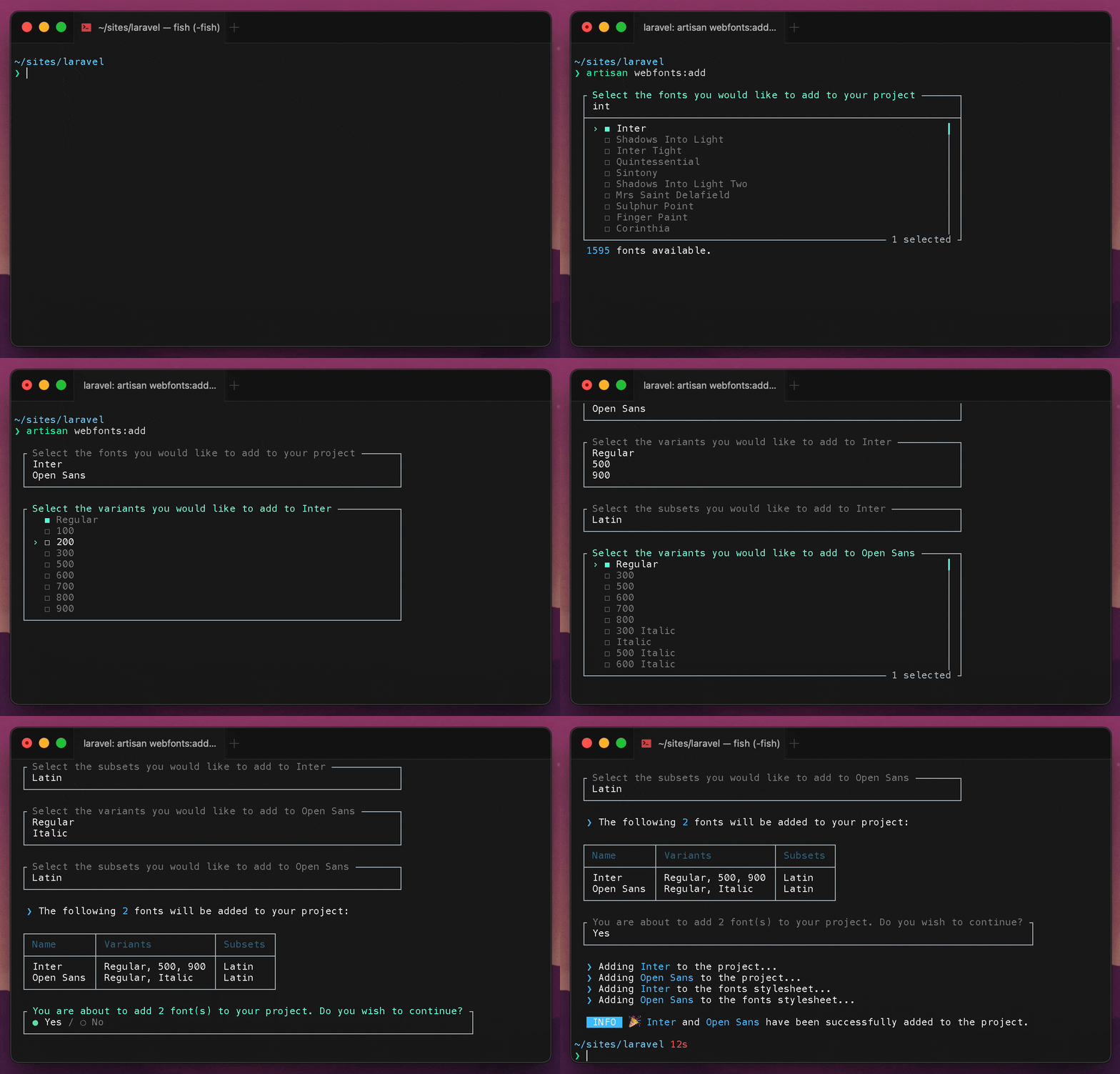
Laravel Webfonts provides a very easy way to install new webfonts to your project using command line:
artisan webfonts:addBy default, installing a font will trigger the following things to happen:
- Download the font archive to a temporary directory in local storage.
- Extract the font archive.
- Move downloaded fonts to
resources/fonts. - Clean up the temporary directory.
- Generate and prepend
@font-faceat-rules to afontsstylesheet.
The fonts stylesheet will reside at the root of your stylesheet directory located in resources/. If the font stylesheet does not already exist, it will be created using the most common stylesheet extension (css, scss, ...) found among your styles.
By default, the resources/css and resources/styles directories are automatically scanned for existing files to find the appropriate place to write the fonts stylesheet.
The generated @font-face at-rules will look like this:
@font-face { font-display: swap; font-family: 'Roboto'; font-style: normal; font-weight: 400; src: url('../fonts/roboto-v30-latin-regular.woff2') format('woff2');} @font-face { font-display: swap; font-family: 'Roboto'; font-style: italic; font-weight: 400; src: url('../fonts/roboto-v30-latin-italic.woff2') format('woff2');}Adding additional fonts will cause them to be prepended to the existing fonts stylesheet.
Importing Fonts
When fonts are installed for the first time, a fonts stylesheet is created in your project's stylesheet folder. In a vanilla Laravel project, this is typically resources/css/fonts.css.
You must import the generated fonts file into your project's primary stylesheet (e.g. app.css). If you're using Tailwind, it would look something like:
@import 'fonts'; @tailwind base;@tailwind components;@tailwind utilities;Preloading Fonts
[!NOTE] If you are using WordPress alongside Acorn, you can ignore this section as preloading is automatically handled for you inside of
wp_headif an asset manifest containing valid fonts is detected.
Laravel Webfonts primary functionality while in production is to provide a simple way to preload your locally hosted webfonts.
This is done by reading the compiled woff2 fonts from your Vite or Bud manifest and generating the appropriate markup for you to place inside of <head>.
In most cases, you can simply use the @preloadFonts Blade directive to handle building and echoing the font preload HTML markup.
Alternatively to the Blade directive, you can access the PreloadFonts class directly using the Webfonts Facade:
use Log1x\LaravelWebfonts\Facades\Webfonts; // Retrieve an array of compiled font paths.$fonts = Webfonts::fonts(); // Build the font preload HTML markup.$html = Webfonts::preload()->build();Bug Reports
If you discover a bug in Laravel Webfonts, please open an issue.
Contributing
Contributing whether it be through PRs, reporting an issue, or suggesting an idea is encouraged and appreciated.
License
Laravel Webfonts is provided under the MIT License.