

Most Laravel applications run on MySQL with default configurations designed for minimal hardware, not production workloads. Laravel's ecosystem creates specific database patterns - Eloquent queries across related tables, queue workers spawning connections, scheduled tasks during peak traffic - that these defaults can't handle efficiently.
Optimizing your Eloquent queries is important (check out Jonathan Reinink's course on Laravel Eloquent performance patterns), but don't forget the database server itself. MySQL has dozens of settings that can dramatically impact your Laravel app's performance and stability.
Common Performance Issues Laravel Developers Face
Pages load painfully slowly: Your homepage loaded in 300ms during development but now takes 4-5 seconds in production. Users abandon pages showing Eloquent relationships because the database reads from disk repeatedly instead of keeping data in memory.
API response times degrade over time: Mobile app endpoints that used to respond in 100ms now take 2-3 seconds as your user base grows, even though your code hasn't changed.
Search becomes unusable with growth: Product search worked perfectly with 1,000 items but times out with 100,000 items. Users abandon searches because results take too long to load.
Laravel jobs fail during peak traffic: Queue workers get stuck in "pending" status when MySQL runs out of connections. Background email jobs that worked fine in staging timeout when real users are browsing your site simultaneously.
Admin panels freeze during business hours: Your Laravel Nova interface loads quickly at 3 AM but becomes unusable when users are active. Simple user listings with joins across orders and payments take 15+ seconds with real data.
Checkout pages timeout during sales: Flash sales bring payment processing to a crawl. MySQL can't handle the burst of writes (inventory updates, new orders) while serving product pages to other customers.
Background jobs kill site performance: Your nightly analytics report makes the entire app slow. Large sorting operations interfere with regular queries because the database spills temporary tables to disk.
So how do you tackle these bottlenecks?
The Manual Tuning Approach
You can fix these issues by analyzing MySQL performance data and adjusting configuration settings. This involves checking SHOW GLOBAL STATUS output and changing variables like buffer sizes, connection limits, and I/O thread counts.
Understanding which specific MySQL variables affect Laravel applications can help you identify bottlenecks and optimization opportunities. Here are the most critical settings that directly impact Laravel workloads:
innodb_buffer_pool_size: This is the most critical setting for Laravel apps heavy with Eloquent queries. It controls how much data InnoDB keeps in memory. For small databases, set this to match your database size. For larger databases, allocate 70-80% of available RAM, ensuring you don't exceed this to prevent OS swapping.
innodb_buffer_pool_instances: For Laravel applications with high concurrency (multiple queue workers, API requests, admin users), splitting the buffer pool into multiple instances reduces contention. Each instance should be at least 1GB in size. Note that this variable is deprecated in MariaDB 10.5+ and removed in MariaDB 10.6+.
innodb_log_file_size: Laravel applications with heavy queue processing or frequent model updates benefit from larger log files. The recommendation is to size these large enough to hold about one hour of write activity. This reduces log flushing overhead during intensive background job processing or data import operations.
innodb_log_buffer_size: This temporary buffer holds transaction data before writing to log files. Laravel applications with bursty write patterns (like processing many queued jobs at once) benefit from buffers sized between 16-64MB, reducing the frequency of disk writes during peak activity.
innodb_flush_log_at_trx_commit: This setting balances performance against data safety. Setting it to 1 ensures maximum durability (every transaction is immediately written to disk), while 2 flushes every second for better performance. Laravel applications handling critical data (payments, user accounts) should use 1, while applications that can tolerate minimal data loss might use 2 for better performance.
innodb_write_io_threads and innodb_read_io_threads: Laravel applications often have mixed read/write patterns - heavy reads during page loads and bursty writes during queue processing. Each thread can handle 256 concurrent I/O requests. Increasing these from the default 4 to 8 or 16 can improve throughput on servers with multiple disks or high I/O capacity.
innodb_thread_concurrency: This controls the maximum number of threads that can execute simultaneously within InnoDB. The default value of 0 means unlimited threads, which works well for most systems. For high-concurrency Laravel applications with resource contention, setting a specific limit can be beneficial, though optimal values vary significantly based on workload patterns.
innodb_purge_threads: Laravel applications that frequently update models (user profiles, inventory, analytics data) generate old row versions that need cleanup. This variable defines how many threads InnoDB uses to purge delete-marked records. Increasing from the default can help maintain performance as your application grows.
innodb_flush_method: This controls how InnoDB writes data to disk. The O_DIRECT setting bypasses the operating system's file cache, which is often beneficial for Laravel applications since InnoDB manages its own buffer pool more efficiently than relying on OS-level caching.
Several tools can help with manual MySQL tuning for Laravel applications
MySQLTuner: A Perl script that analyzes your current MySQL configuration and suggests improvements based on actual usage statistics. It's particularly useful for identifying memory allocation issues that affect Laravel's Eloquent queries.
Tuning-Primer Script: Another diagnostic tool that examines your MySQL setup and provides recommendations for buffer sizes, connection limits, and query cache settings that impact Laravel application performance.
Percona Toolkit: A collection of advanced command-line tools for MySQL performance analysis. Tools like pt-query-digest help identify slow Laravel queries, while pt-mysql-summary provides comprehensive server analysis.
phpMyAdmin Advisor: Built into phpMyAdmin, this feature analyzes your MySQL configuration and suggests optimizations. It's convenient if you're already using phpMyAdmin for database management.
Mysqlreport: Generates detailed reports about MySQL performance statistics, helping identify bottlenecks in areas that commonly affect Laravel applications.
MySQL Memory Calculator: Tools like Releem's MySQL Memory Calculator (https://releem.com/tools/mysql-memory-calculator) help estimate optimal memory allocation across different MySQL buffers based on your server's available RAM.
The process typically involves measuring baseline performance, using these tools to identify issues, adjusting related settings, and testing results. The challenge is that Laravel workloads change as you add features or traffic grows, so you need to repeat this process regularly.
That's why many teams turn to automation.
Automating MySQL Tuning
Rather than manually adjusting the dozens of MySQL variables that affect Laravel performance, you can use automation tools that continuously monitor your application's database patterns and suggest appropriate configurations. These tools analyze factors like CPU usage, memory utilization, query patterns, and connection behavior to recommend tuned values for critical variables.
Releem is one such tool that works by installing a lightweight monitoring agent on your server. It collects workload statistics specific to your Laravel application and provides recommendations for more than 30 MySQL/MariaDB variables mentioned above, and others. The service suggests changes through a web interface with diff previews.
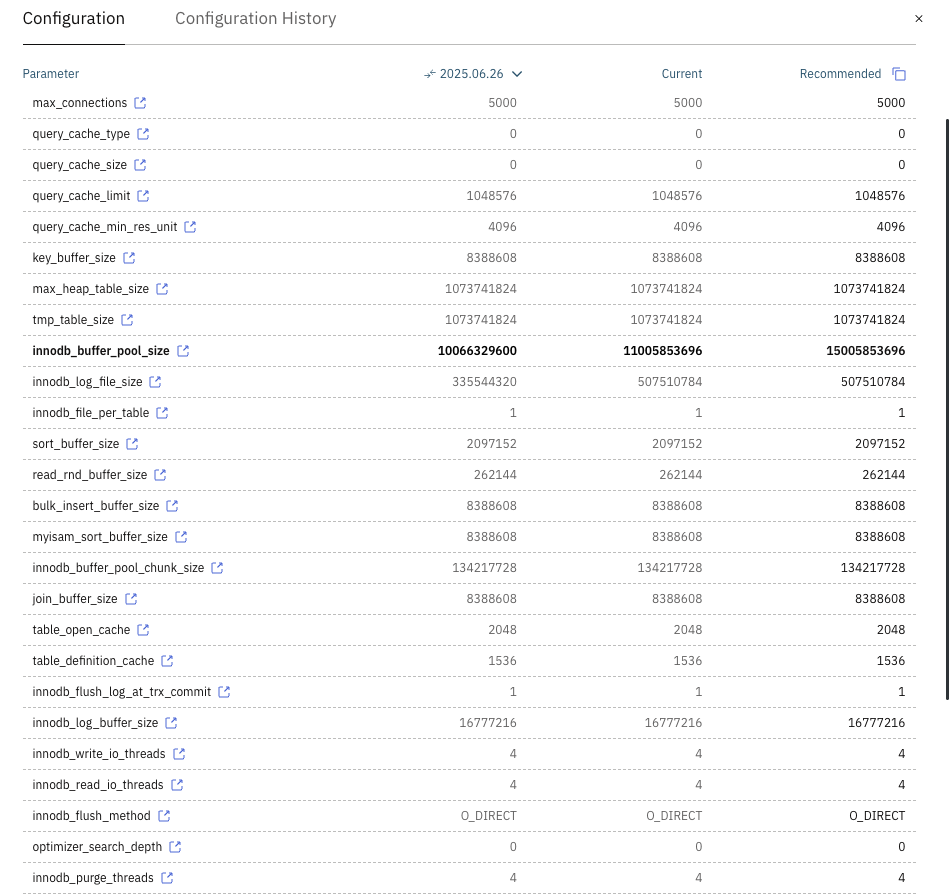
The automation approach handles the complexity of balancing multiple interdependent variables. For example, when increasing innodb_buffer_pool_size, it also considers whether innodb_buffer_pool_instances needs adjustment to maintain optimal concurrency for your Laravel application's connection patterns.
Real-World Results
According to research from Releem and the Laravel community (full study here), MySQL tuning can dramatically improve Laravel performance without code changes.
The study tested Aimeos, a popular Laravel e-commerce framework, on a standard AWS server with default MySQL settings. The application couldn't handle even 10 concurrent users - pages timed out and the database was overwhelmed.
After MySQL tuning, the same application handled the full load easily. Page response times dropped from over 1 second to under 800ms, and database throughput nearly tripled from 12 to 35 queries per second. CPU usage decreased significantly.
The key insight: proper MySQL configuration matching Laravel's actual usage patterns unlocks performance gains that remain hidden with defaults.
Moving Forward
You can tune MySQL by hand, or use automation tools and spend your time building features instead of managing configs.
Releem provides automated MySQL tuning for Laravel applications through workload analysis and configuration recommendations.











