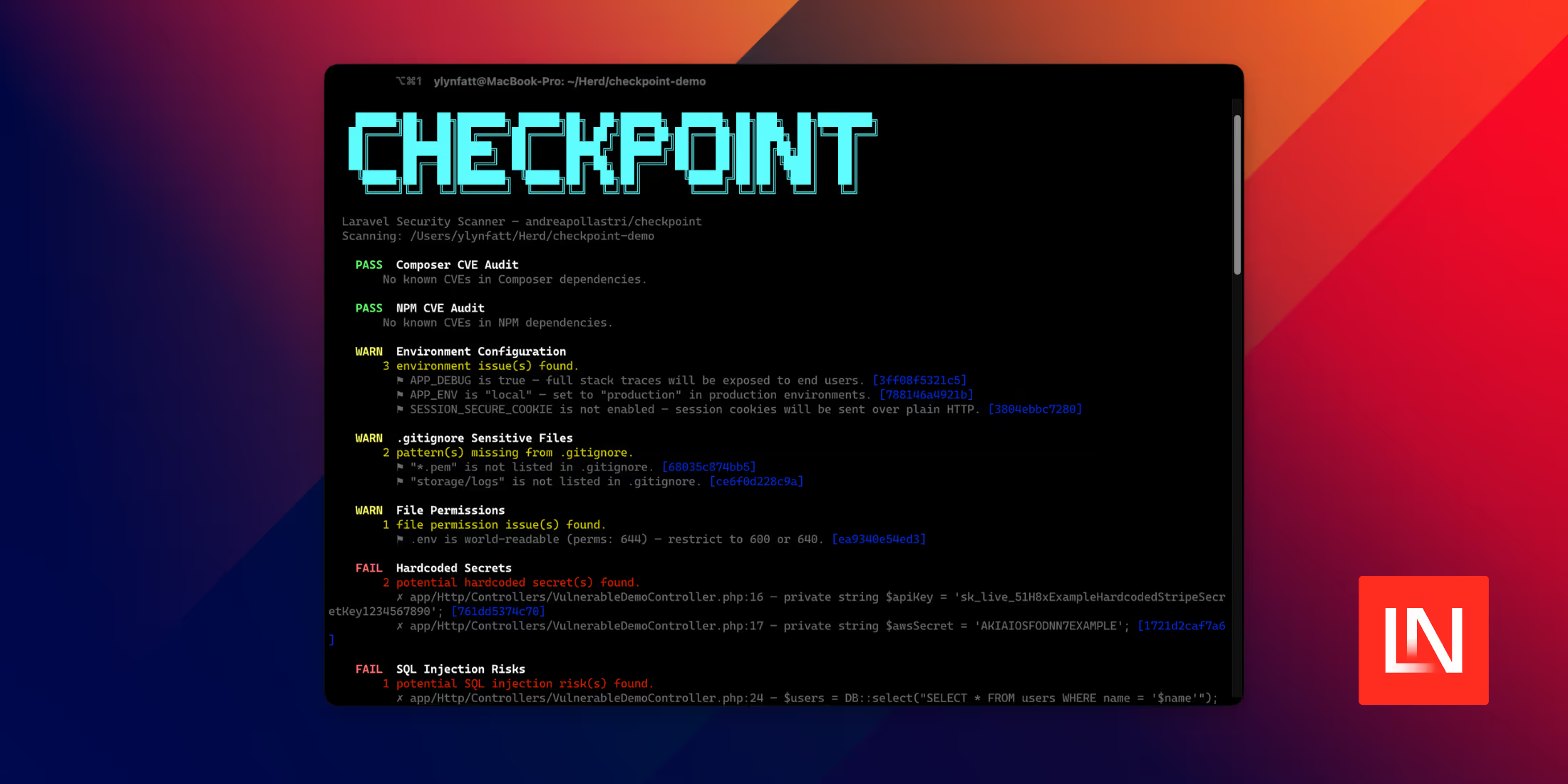
Checkpoint by Andrea Pollastri is a development dependency that scans a Laravel application for security problems and reports them through a single Artisan command. It runs 26 separate checks, ranging from dependency CVE audits to source-level pattern matching for injection bugs, and returns a non-zero exit code when something fails so it can sit in front of a deploy.
Install it as a dev dependency and run the scan:
composer require --dev andreapollastri/checkpoint php artisan checkpoint:scanThe package auto-discovers its service provider, so there is nothing to register. It targets PHP 8.1 and up and supports Laravel 8 through 13.
What the scan looks for
The 26 checks fall into a few groups. On the dependency side, Checkpoint shells out to composer audit and an npm audit to surface known CVEs, flags packages published within the last few days (a common malware signal), and looks for suspicious entries in the vendor autoloader.
For source code, it pattern-matches against the kinds of constructs that tend to introduce vulnerabilities: raw queries with variable interpolation, unescaped Blade output, command injection through functions like exec and shell_exec, path traversal in file operations, SSRF in outbound HTTP calls, insecure deserialization, and open redirects.
A third group inspects application configuration and hygiene: missing CSRF protection, mass-assignment exposure, cookie and session settings, CORS rules, disabled TLS verification, leftover debug calls such as dd() and dump(), weak hashing, insecure random generation, world-readable .env files, and sensitive paths missing from .gitignore.
Each finding prints with a PASS, WARN, or FAIL severity and a stable 12-character hash that identifies it.
Running a subset of checks
You can narrow a run to specific checks with --only, or exclude noisy ones with --skip, passing check names as a comma-separated list:
php artisan checkpoint:scan --only="SQL Injection Risks,CSRF Protection" php artisan checkpoint:scan --skip="NPM CVE Audit,Debug Functions in Production Code"For pipelines, --json swaps the human-readable report for machine output, and the command exits with code 1 if any check fails:
php artisan checkpoint:scan --jsonConfiguration and suppressing findings
Publish the config file to toggle individual checks and tune their behavior:
php artisan vendor:publish --tag=checkpoint-configThe generated config/checkpoint.php lets you disable checks that do not apply, for example turning off the npm audit on a PHP-only project, and adjust the package-freshness threshold:
'checks' => [ Checks\ComposerAuditCheck::class => true, Checks\NpmAuditCheck::class => false,], 'package_freshness' => [ 'minimum_age_days' => 3, 'whitelist' => [ 'andreapollastri/checkpoint', ],],When a check reports something you have reviewed and accepted, add its hash to the suppressed array so it stops failing future runs without silencing the entire check:
'suppressed' => [ '3ff08f5321c5', '788146a4921b',],CI/CD scaffolding and custom checks
Checkpoint can generate the pipeline config for you. php artisan checkpoint:github writes a .github/workflows/checkpoint.yml that runs on pushes and pull requests, and php artisan checkpoint:gitlab produces the GitLab equivalent. The php artisan checkpoint:install-hooks command appends the scan to your Composer post-update-cmd and post-install-cmd scripts.
You can add your own checks by extending AbstractCheck and returning a CheckResult:
use Checkpoint\Checks\AbstractCheck;use Checkpoint\Checks\CheckResult; class MyCustomCheck extends AbstractCheck{ public function name(): string { return 'My Custom Check'; } public function run(): CheckResult { return CheckResult::pass('Everything looks good.'); }}A note on supply-chain safety
The documentation makes a point that applies regardless of whether you adopt Checkpoint: run composer install, npm install, and the scan itself inside a Docker container rather than directly on your machine. Malicious packages run their payloads during post-install scripts, which fire before any scanner gets a chance to inspect the code, so a compromised dependency can act the moment it lands. Andrea also recommends pairing the scan with Safe-Chain, which blocks known malicious npm packages before they install. This is the reasoning behind Checkpoint's package-freshness check, which flags very recently published dependencies as a precaution.
Checkpoint is a static scanner, so it catches patterns rather than proving exploitability, and it works best as one layer alongside dependency pinning and manual review. You can read the documentation and browse the source on GitHub.