
Step into the shoes of one of your website users for a moment.
You’ve landed on a site and you know exactly what you’re looking for. What’s the first thing you do? That’s right, you look for a search bar.
If by chance, you run an e-commerce site, nearly half of your visitors do this first, according to a Forrester report. (1) Having an optimized site search in place – complete with things like autofill and fuzzy matching – helps people find the things they’re looking for quicker.
You may have already built an amazing search experience on your site with TNTSearch and Laravel Scout. Now it’s time to make the most of it.
Introducing TNT Search Analytics
TNT Search Analytics is a browser-based reporting tool the Laravel dev community has long been missing. It’s built on top of TNT Search to provide you with answers to important questions, such as:
- How many people search my site and what are they searching for?
- How quickly are they getting the results back and are they relevant to their queries?
- What keywords and phrases are being searched the most?
With Laravel Scout and TNTSearch, search queries on your website are logged in real time, as your users are typing them in.
Let's do a quick search for some airports and see how the results are presented in TNT Search Analytics. You can try this demo yourself if you want.
These insights matter. They help you understand your users' intent and gauge whether your site search performs well.
TNT Search Analytics has everything you need to fine-tune your search functionality and lead users to the right place, including:
Daily, weekly, and monthly search stats
Discover how many people use the search functionality on your site and get the total number of searches per day, week, or month as well as their average execution time.
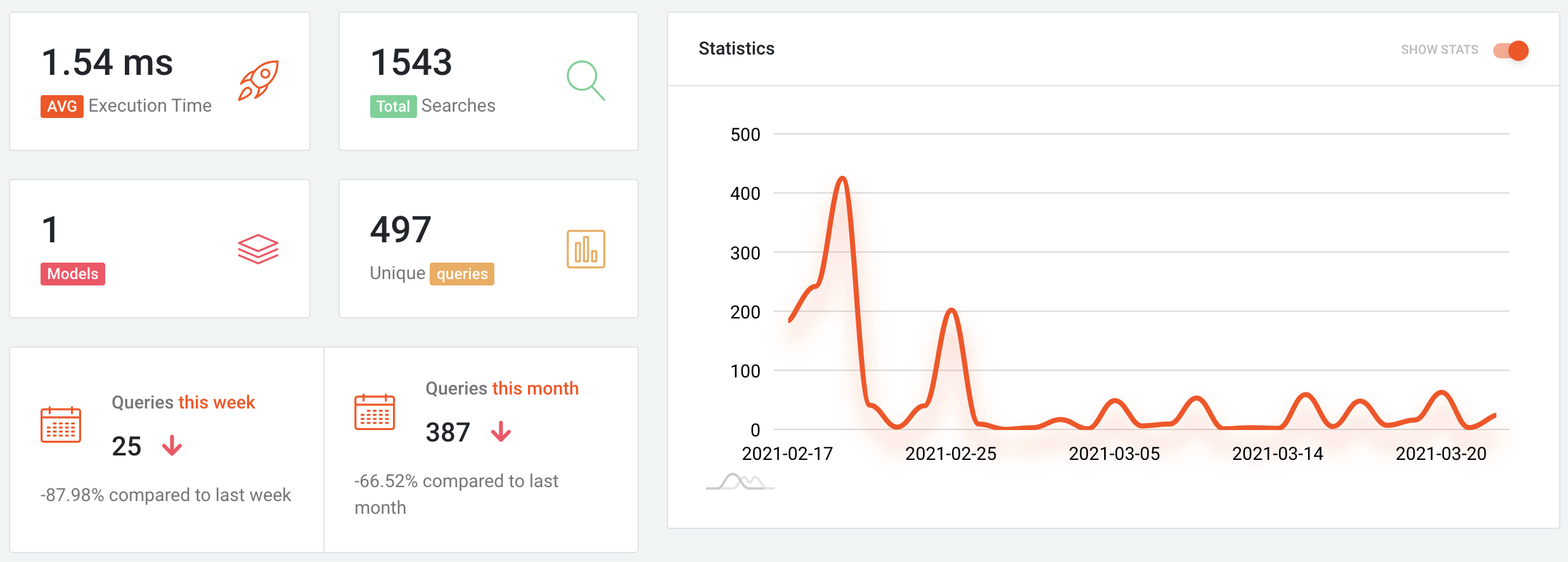
Use this information to figure out the percentage of visitors who use the search functionality on your site.
If you've been thinking of placing the search bar higher up on your homepage where more people can see it, low usage numbers could give you the push you need to make the necessary changes.
Search trends & query expansion
Dig deeper to find out the most sought-for keywords and phrases on your site. This will give you a good idea of what products and services are popular with your users — something you can use to center your marketing efforts around.
You can also analyze the most popular searches that didn't yield any results.
Results not showing up after a search are almost certain to drive some web visitors away from your site. That's why it’ss crucial you take a closer look at them and see if you can fill in the gaps.
For example, if your users have been searching for ''German'', and can't see any flight tickets to Germany they're thinking of buying, then you're running the risk of losing sales.
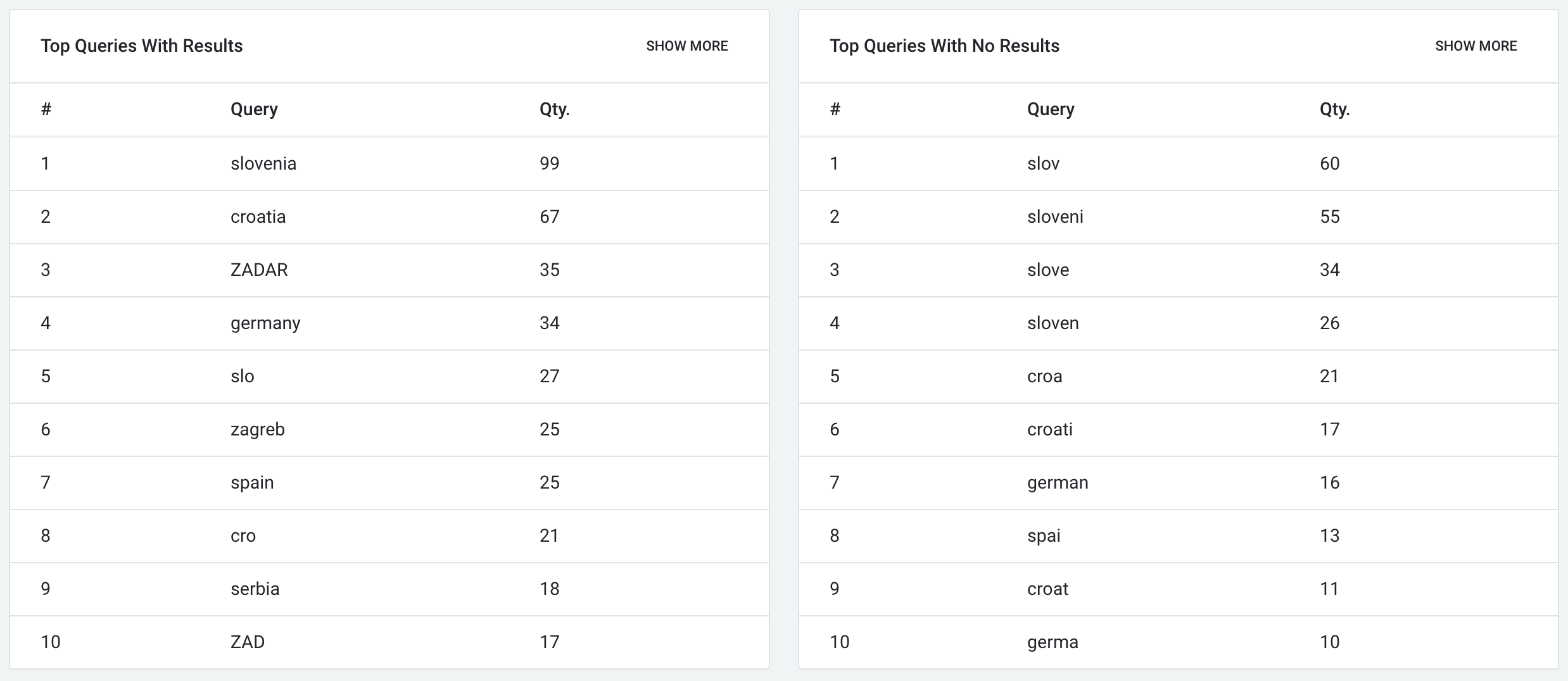
Likewise, if you're in charge of a news site that's covering global politics, a blank results page a user gets after searching the same term could indicate your content is incorrectly tagged or you don't have any articles on the matter.
It's time to either fix your tagging or start producing content that meets the needs of your users.
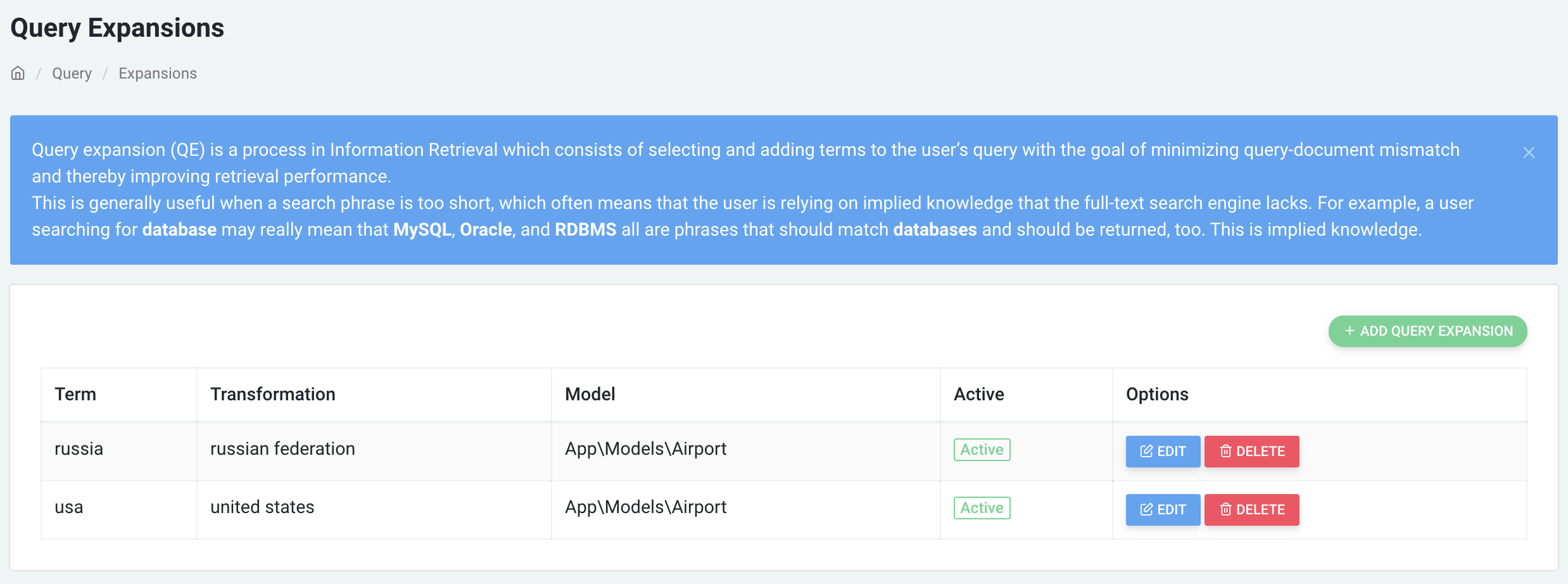
With TNT Search Analytics, you can expand failed queries to return the results users want to see and interact with. It's as simple as editing the term to match the intended result.
Email reports
Maybe you don't feel like opening a new tab whenever you want to check your top-performing searches and opportunities for improvement.
That's fine. You can get site search insights delivered straight to your inbox by scheduling a daily, weekly, or monthly trigger.
Simply add the following cron entry to your server:
* * * * * cd /path-to-your-project && php artisan schedule:run >> /dev/null 2>&1then run:
php artisan schedule:workAnd set your desired frequency, for example:
$schedule->command('tnt-analytics:daily')->daily();Get started
If your site is still missing a search functionality, go ahead and build one with TNTSearch. It's the best full-text search (FTS) engine for Laravel websites out there — and it's free.
Once you're ready to refine the search experience on your site, get TNT Search Analytics. A powerful search engine is only as good as the analytics behind it.