We're excited to announce the release of Filament v4.5!
We hope you had a restful holiday break. While things were quieter over Christmas and New Year, the core team and community have still been shipping. Here's a summary of our favourite new features from v4.4 and v4.5.
Our favourite new features
Here are a few of the highlights we're most excited about.
Rich Editor Mentions
You can now add @mentions to your rich editor content. Users can type a trigger character (like @ or #) to open a dropdown and search for mentions - users, issues, tags, or any records you configure. The selected mention is inserted as a styled inline token.
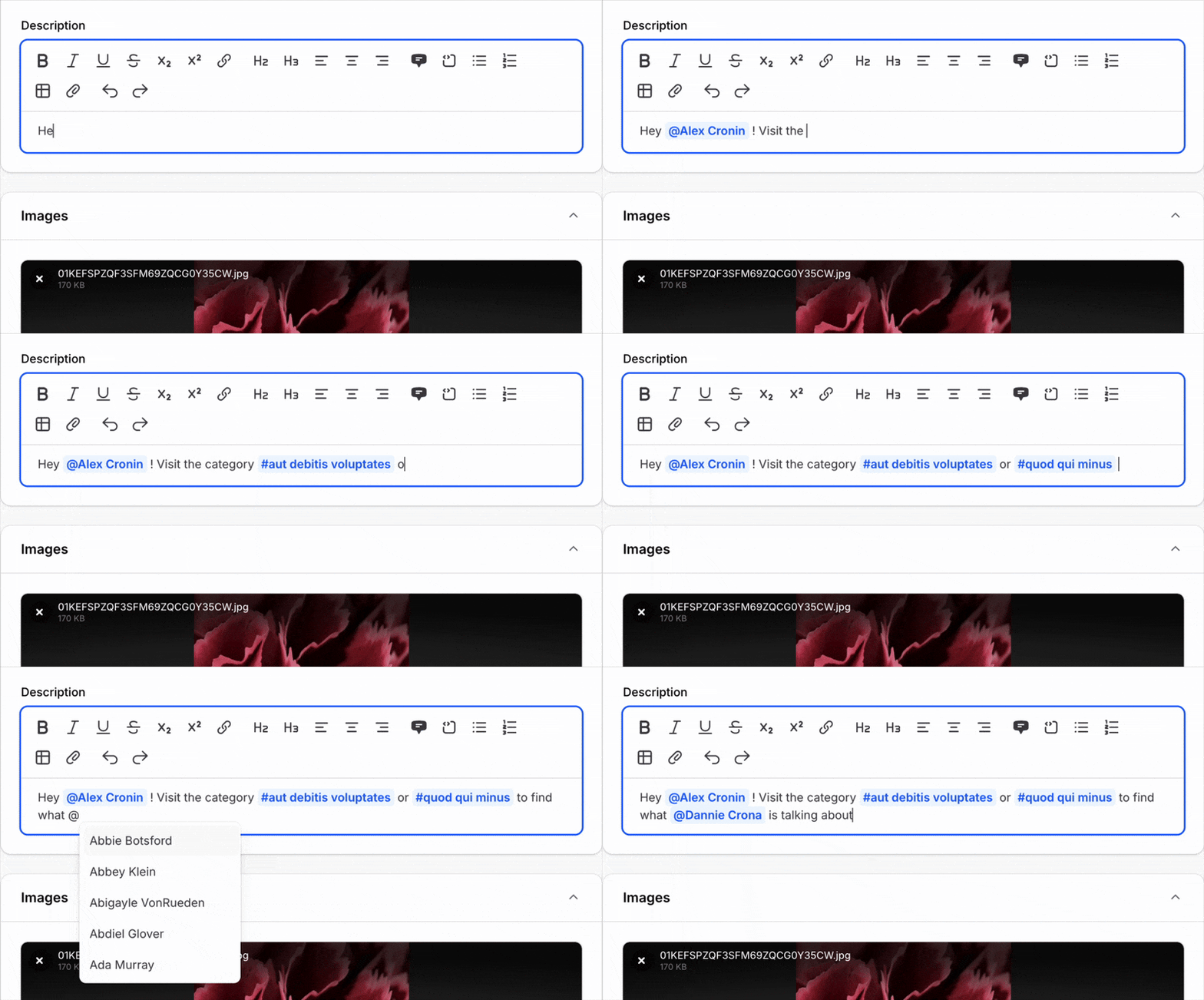
To enable mentions, use the mentions() method with one or more MentionProvider instances:
use Filament\Forms\Components\RichEditor;use Filament\Forms\Components\RichEditor\MentionProvider; RichEditor::make('content') ->mentions([ MentionProvider::make('@') ->items([ 1 => 'Jane Doe', 2 => 'John Smith', ]), MentionProvider::make('#') ->items([ 'bug' => 'Bug', 'feature' => 'Feature', ]), ])For larger datasets, you can fetch mentions dynamically from the database using getSearchResultsUsing() and getLabelsUsing(). When rendering content, you can make mentions link to URLs using the url() method on your MentionProvider.
Rich Editor Image Resizing
Images in the rich editor can now be resized by users. When enabled, users can click on an image and drag the resize handles to change its size. The aspect ratio is always preserved.
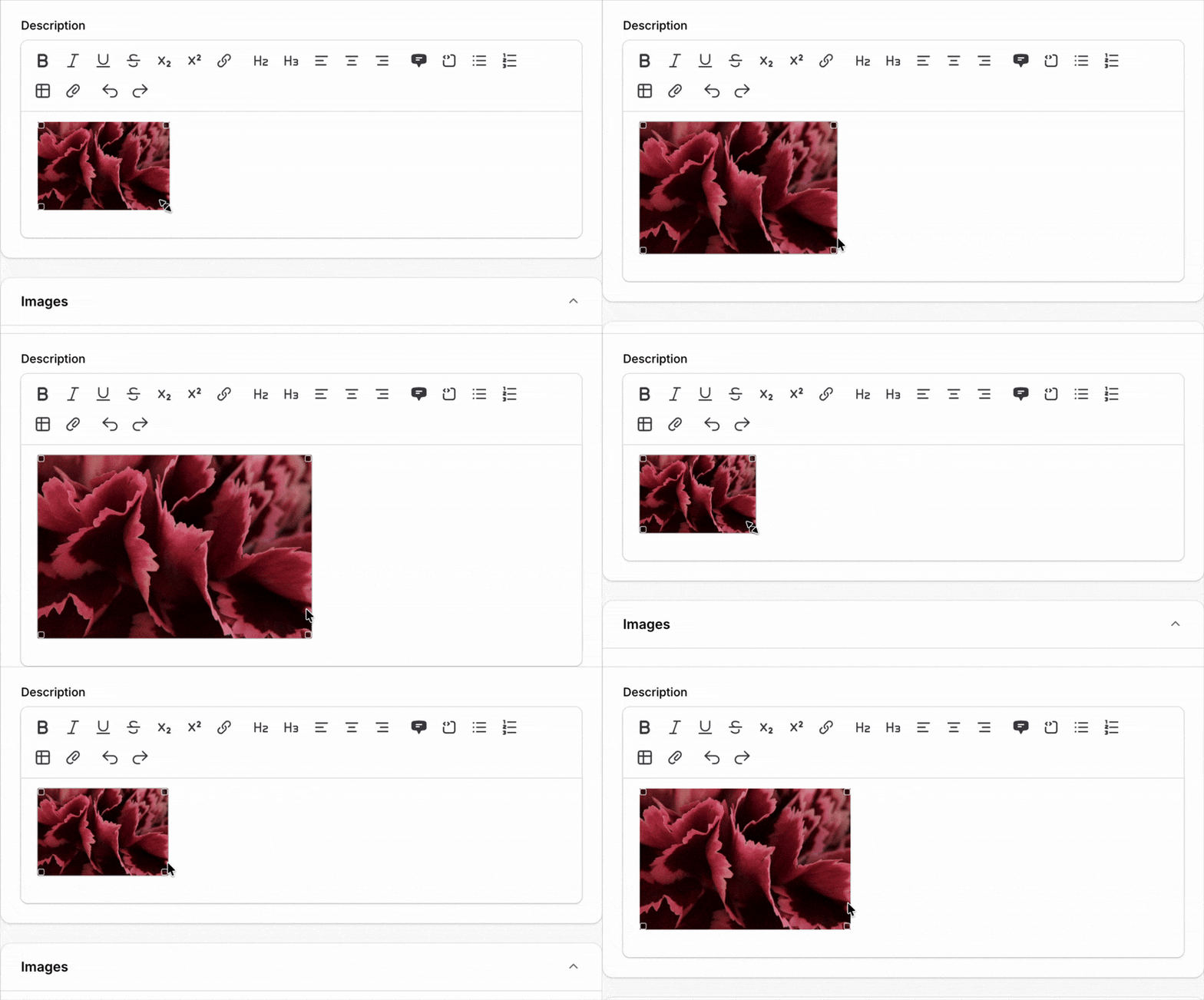
To enable image resizing:
use Filament\Forms\Components\RichEditor; RichEditor::make('content') ->resizableImages()File Upload Aspect Ratio Enforcement
A common request has been the ability to require images to have a specific aspect ratio. In v4.5, you can now validate and enforce aspect ratios on uploaded images.
To validate that uploaded images match a specific aspect ratio:
use Filament\Forms\Components\FileUpload; FileUpload::make('banner') ->image() ->imageAspectRatio('16:9')You can also allow multiple aspect ratios by passing an array: ->imageAspectRatio(['16:9', '4:3', '1:1']).
The really useful part is automaticallyOpenImageEditorForAspectRatio(). When a user uploads an image that doesn't match the required ratio, a simplified cropping editor automatically opens, allowing them to fix it before the upload completes:
use Filament\Forms\Components\FileUpload; FileUpload::make('banner') ->image() ->imageAspectRatio('16:9') ->automaticallyOpenImageEditorForAspectRatio()
The streamlined editor only shows the crop area and save/cancel buttons, focused purely on getting the correct aspect ratio. If you want the full editing controls, enable both imageEditor() and automaticallyOpenImageEditorForAspectRatio().
JavaScript Actions in Schemas
Actions inside schemas (like those in form field slots) can now run JavaScript directly in the browser without making a network request. This is useful for simple interactions like instantly updating form field values:
use Filament\Actions\Action;use Filament\Forms\Components\TextInput; TextInput::make('title') ->live(onBlur: true) ->afterContent( Action::make('generateSlug') ->jsAction(<<<'JS' $set('slug', $get('title').toLowerCase().replaceAll(' ', '-')) JS) ) TextInput::make('slug')The JavaScript string has access to $get() and $set() utilities for reading and modifying form field state. Since there's no network request, the interaction feels instant.
Note that jsAction() is for simple client-side operations only - it cannot load modal content or perform server-side processing.
The saved() method
The new saved() method is a more user-friendly and consistent way to prevent a field from being saved. Unlike dehydrated(false), it ensures that both direct field values and any associated relationships are excluded:
use Filament\Forms\Components\TextInput; TextInput::make('password_confirmation') ->password() ->saved(false)It also works dynamically with closures:
use Filament\Forms\Components\TextInput; TextInput::make('password') ->password() ->saved(fn (?string $state): bool => filled($state))Simpler 2FA Setup with Traits
Setting up multi-factor authentication in Filament v4 was already straightforward, but it required implementing several interface methods manually. In v4.5, we've added traits that provide sensible defaults:
use Filament\Auth\MultiFactor\App\Contracts\HasAppAuthentication;use Filament\Auth\MultiFactor\App\Concerns\InteractsWithAppAuthentication;use Filament\Auth\MultiFactor\App\Contracts\HasAppAuthenticationRecovery;use Filament\Auth\MultiFactor\App\Concerns\InteractsWithAppAuthenticationRecovery; class User extends Authenticatable implements FilamentUser, HasAppAuthentication, HasAppAuthenticationRecovery{ use InteractsWithAppAuthentication; use InteractsWithAppAuthenticationRecovery; // ...}The traits automatically handle column casting, hidden attributes, and implement all the required interface methods. You can still implement the methods yourself if you need custom behavior.
Available traits:
InteractsWithAppAuthentication- for authenticator app (OTP) supportInteractsWithAppAuthenticationRecovery- for OTP recovery codesInteractsWithEmailAuthentication- for email-based 2FA
Modular Architecture (DDD) Documentation
For teams building large-scale applications with Domain-Driven Design principles, we've added comprehensive documentation on integrating Filament with modular architecture packages like InterNACHI/Modular.
The documentation covers:
- Setting up modules with their own Filament plugins
- Registering plugins conditionally for specific panels
- Sharing resources between panels with different configurations
- Recommended directory structures