Deadlocks show up once an app has enough traffic for queries to overlap. They rarely appear in development, which makes them frustrating to understand the first time you see one. Plus, deadlocks are hard to reproduce locally and even harder to diagnose after the fact.
Laravel adds its own twist here. The framework makes parallel work easy with queues, Horizon, scheduled tasks, and event dispatching, but that also means multiple processes start touching the same rows at the same time. A local setup with a single queue worker won’t reveal any of this. Production with 10 Horizon workers running jobs in parallel will.
This guide explains what a deadlock is, why it happens in Laravel workloads, and how to debug and reduce it without turning your codebase upside down.
Table of contents
- What is a deadlock?
- Common deadlock patterns in MySQL
- What do developers see in Laravel?
- 6 Reasons why deadlocks happen in Laravel apps
- Why deadlocks feel random in production
- How to debug deadlocks in production
- How to reduce and prevent deadlocks in Laravel
- Tools that help monitor and understand deadlocks
- Where this leaves you
What is a deadlock?
A deadlock happens when two transactions hold locks that the other needs. Both stop and wait. Neither can progress, so MySQL cancels one to break the stall and keep the server moving. The canceled query receives a deadlock error, and the other continues normally.
A basic example:
- Transaction A updates row 1, then waits on row 2.
- Transaction B updates row 2, then waits on row 1.
They are stuck. The fix is not manual unlocking. MySQL automatically ends the cheaper transaction and logs the cycle. Deadlocks are normal, not a sign that the database is breaking down. They’re a side effect of concurrency and the way InnoDB enforces isolation.
Common deadlock patterns in MySQL
MySQL tends to reveal a handful of recurring deadlock shapes or types. Each comes from the way workers, queues, and HTTP requests interact with the same tables under load.
Here are the deadlock types you’ll see most often:
- Update-Update: two transactions update related rows in opposite order.
- Select-for-Update conflicts: one worker locks rows for processing while another tries to modify them.
- Auto-increment inserts: concurrent inserts collide with follow-up updates or related-table writes.
- Gap-lock collisions: range queries or non-selective indexes lock more rows than expected.
- Insert intent conflicts: multiple workers inserting into the same index gap at once.
- Same-PK inserts: two writers try to insert the same PRIMARY KEY at the same time.
- Foreign-key interactions: parent/child updates and deletes taken in different order.
- Long transactions: broad locking footprints collide with fast writes.
What do developers see in Laravel?
When a deadlock occurs, Laravel doesn’t show the lock cycle or the conflicting query. It only reports the error returned by MySQL:
SQLSTATE[40001]: Deadlock found when trying to get lock; try restarting transactionThis is the message teams see in Laravel application logs, Horizon failed jobs, queue worker output, Sentry, Bugsnag, or other APM tools. It confirms that one transaction was rolled back, but it doesn’t tell you:
- Which transaction it conflicted with
- Which table or index was involved
- Which rows MySQL locked
- Why the lock order diverged
Most Laravel deadlocks come from two recurring patterns:
1. Queries lock more rows than expected
This often happens when a query scans more of the table than intended. Maybe because an index is missing or not selective enough or because Eloquent issues an implicit SELECT before the update, or because REPEATABLE READ expands the locked range.
2. Queries touch tables in a different order
If two workers update the same models but reach the underlying tables in different sequences, MySQL ends up with a mismatched lock order and cancels one of them.
The next section shows how these patterns appear in real Laravel code and the adjustments you can make to reduce them.
6 Reasons why deadlocks happen in Laravel apps
Laravel code doesn’t cause deadlocks by itself. The framework generates straightforward SQL. The problems start when the same table or row is touched by several workers at the same time. Small differences in timing create new lock sequences.
1. Jobs or requests update the same rows
Symptom
If two workers touch the same row in a different order, a deadlock can form.
Example
// Worker AOrder::where('id', $id)->update(['status' => 'processing']); // Worker B (same row, different path)Order::find($id)->update(['last_checked_at' => now()]);Cause
Tables like orders, invoices, carts, and inventory often receive overlapping updates from web requests, queue workers, and scheduled tasks. Laravel makes these updates simple to express with Eloquent, but each update may include hidden reads or joins that widen the lock scope.
When two execution paths update the same record but reach it in different sequences, MySQL ends up with a mismatched lock order. If you’re also loading related models (->with(...)), the initial SELECT may lock more rows than expected.
Fix
- Use consistent update paths for high-traffic tables.
- Add the exact index your lookup uses (id, id,status, etc.) to keep row locks narrow.
- Consider SELECT . . . FOR UPDATE if you truly need exclusive access.
2. Long transactions with multiple queries
Symptom
Deadlocks occur inside DB::transaction() even though each query seems harmless on its own.
Example
DB::transaction(function () use ($order, $inventory) { $order->update(['status' => 'paid']); $inventory->decrement('count'); // touches a second table});Another worker might execute the same two statements but in the opposite order.
Cause
A DB::transaction() block is convenient and usually correct, but it also groups several operations under the same lock footprint. If one worker updates orders then inventory, while another updates inventory then order, the locking order diverges and a deadlock becomes possible.
The more steps there are inside a transaction, the more places this can happen.
Fix
- Keep transactions short and narrow.
- Always touch tables in the same order throughout the app.
- Move slow operations (API calls, heavy queries) outside the transaction.
3. Hidden locking from Eloquent
Symptom
A simple model update deadlocks, even though you’re updating by primary key.
Example
$user = User::where('email', $email)->first();$user->update(['last_login_at' => now()]);The first query may scan more rows than expected if the column isn’t indexed.
Cause
Eloquent often performs a SELECT before it performs an UPDATE. If the SELECT touches more rows than you expect (because an index is missing or not selective enough), the transaction holds locks longer and on more rows. Range locks give deadlocks room to form.
Fix
- Add the missing index (in this example, an index on email).
- Avoid first() + update() patterns on non-indexed columns.
- Use whereKey() or direct update() calls when possible.
4. High concurrency on a busy queue or Horizon setup
Symptom
Deadlocks appear only when Horizon or queue workers are scaled up.
Example
$product->increment('views');LogView::create([...]);With the same job running in parallel, each worker may hit products and log_views in different sequences depending on load, caching, or conditional code branches.
Cause
Queue workers running the same job type at the same time take different execution paths. The code is the same, but the order of queries is not guaranteed. High concurrency exposes lock order issues that do not show up locally.
Fix
- Use dedicated queues for heavy write operations so they run serially.
- Audit your jobs for conditional branching that changes query order.
- If writes are frequent, consider moving them into batched updates or a single “writer” service.
5. Schema shape that increases lock ranges
Symptom
Deadlocks point to unexpected rows or ranges in the lock graph, even though the code only touches one model.
Example
Post::where('category_id', $id)->update(['updated_at' => now()]);Searching on a non-selective column forces a range scan. In this case, if category_id isn’t indexed or is low-cardinality, MySQL may lock a much broader range.
Cause
Sometimes the deadlock has nothing to do with code structure. Missing or incomplete indexes may force MySQL to choose a less efficient path. Under REPEATABLE READ that can mean gap locks, next-key locks, or broad range locks that collide with other updates – even unrelated ones.
Fix
- Add the right composite indexes for your most common lookup patterns.
- Avoid large range updates. Break them into smaller batches if possible.
- Review slow queries to confirm the optimizer has a narrow path.
6. Model events, mutators, and touches() adding hidden queries
Symptom
An update() call deadlocks even though the row being updated is indexed and the query looks simple.
Example
class Comment extends Model{ protected $touches = ['post'];} $comment->update(['body' => $newBody]);This single update silently triggers another update on the related posts row.
Cause
Eloquent model events (saving, saved, updating, etc.), attribute mutators, and touches() relationships all introduce extra queries behind the scenes. If two workers update different comments attached to the same post, you now have multiple hidden writes targeting posts.id. Those extra writes widen the lock footprint and create new lock-order paths that weren't obvious from the code.
Fix
- Disable touches() for high-write tables.
- Audit model events for extra queries and move heavy logic into jobs.
- Use inline DB::table()->update() where you need a truly minimal write.
Why deadlocks feel random in production
Developers often report that deadlocks “come out of nowhere.” The behavior feels random because the timing is influenced by factors you don’t see during local testing. The lock sequence changes slightly with each request, which makes the incidents look unrelated even when they come from the same pattern.
Situations that create this “random” behavior include:
- Request traffic arriving in a slightly different order
- Queue workers finishing tasks at different speeds
- Query plans shifting when MySQL adjusts cost estimates
- Background jobs overlapping with normal writes
- Large reads that occasionally scan more rows than expected
These changes reorder the locks taken inside MySQL. You may never see the same pattern twice, but the underlying cause is usually stable. It only appears chaotic because the lock collisions depend on micro timing that varies under load.
How to debug deadlocks in production
Laravel’s exception messages help you detect a deadlock, but the real source of truth is the MySQL deadlock report. MySQL logs the full lock cycle so you can see what happened. The more you read these traces, the faster you can spot the problem.
1. Pull the deadlock details from MySQL
Use one of these methods:
-
SHOW ENGINE INNODB STATUS – returns the most recent deadlock
-
Performance Schema:
- events_transactions_history_long
- data_locks
- data_lock_waits
-
MySQL error logs if deadlock logging is enabled
2. Read the lock information
Look closely for three parts:
- The victim query
- The conflicting query
- The locked index and row ranges
- The order in which each transaction acquired locks
A real deadlock report looks like this
------------------------LATEST DETECTED DEADLOCK------------------------*** (1) TRANSACTION:TRANSACTION 123456, ACTIVE 0 sec starting index readmysql tables in use 1, locked 1LOCK WAIT 5 lock struct(s)MySQL thread id 98, OS thread handle 140294query id 5542 Update order_items set quantity = 3 where id = 42 *** (1) WAITING FOR THIS LOCK TO BE GRANTED:RECORD LOCKS space id 27 page no 123 n bits 72index `PRIMARY` of table `order_items` trx id 123456 lock mode X locks rec but not gapRecord lock, heap no 8 PHYSICAL RECORD: n_fields 5; (...) *** (2) TRANSACTION:TRANSACTION 123457, ACTIVE 0 sec starting index readmysql tables in use 1, locked 15 lock struct(s)MySQL thread id 99, OS thread handle 140310query id 5543 Update orders set status = 'paid' where id = 10 *** (2) HOLDS THE LOCK(S):RECORD LOCKS space id 27 page no 123 n bits 72index `PRIMARY` of table `order_items` trx id 123457 lock mode X *** WE ROLL BACK TRANSACTION (1)Transaction 1 was rolled back, so it’s the victim query. Transaction 2 continued on, so it was the conflicting (and winning) query. The query id tells you exactly which statements were involved in the locking.
Deadlocks are often caused by the database needing to lock more rows than expected. If you see a large range on a table that should be handled by a narrow index, that is a hint.
3. Check the order of operations
Compare the order of queries between the transactions. If they touch rows in a different sequence, that’s often the direct cause.
For example, if one part of the code updates a parent model before its related child, and another updates the child before the parent, the lock order shifts.
4. Try to reproduce locally
A small script with parallel workers often reveals the inconsistent locking order. Even if you don’t hit the deadlock, the mismatched query order becomes visible.
If you want to go deeper into how MySQL records deadlocks internally and how to interpret these reports in more detail, take a look at a separate guide on MySQL deadlock detection.
How to reduce and prevent deadlocks in Laravel
You cannot remove deadlocks completely, but you can reduce how often they happen and how long they take to debug. Most fixes come from tightening transaction scopes and improving lock predictability.
1. Keep transactions short
Wrap only the queries that truly need to happen together. Every extra query widens the lock footprint.
DB::transaction(function () use ($id) { Order::where('id', $id)->update(['confirmed' => true]);});Avoid loading relationships or running expensive SELECTs inside the transaction when possible.
2. Update rows in a consistent order
If two parts of your app modify related rows, standardize the order. For example, always update the parent before the child or always update by primary key in ascending order. When updates always lock rows in the same sequence, deadlocks drop sharply.
3. Use row-level locks where needed
Laravel’s query builder supports row-level locking with lockForUpdate():
$item = Inventory::where('sku', $sku)->lockForUpdate()->first();$item->decrement('quantity');Important: This requires a unique index on 'sku' to lock a single row. Without it, MySQL may lock a range of rows, increasing deadlock risk.
This helps when concurrent workers modify the same inventory, balance, or counter rows. It narrows the lock to the exact row instead of a larger range.
4. Add the right indexes
Deadlocks often come from queries that lock many rows. Missing or weak indexes enlarge those ranges. Look for:
- Queries scanning a full table to find a single record
- Updates that use a non-selective index
- JOINs that lock broader ranges than expected
Better indexing means fewer rows touched, which means fewer collisions.
5. Avoid unnecessary reads inside writes
If a write operation requires a read, try to move the read outside the transaction or rely on known primary keys instead of scanning.
6. Implement retry logic for deadlock-prone operations
Deadlocks are transient errors—the rolled-back transaction can usually succeed if retried immediately. Laravel supports automatic retries in transactions:
// Laravel 8+DB::transaction(function () use ($order) { $order->update(['status' => 'paid']); $order->inventory()->decrement('count');}, attempts: 3); For more control, use manual retry logic: use Illuminate\Database\QueryException; retry(3, function () { DB::transaction(function () { // your logic here });}, sleepMilliseconds: 100, when: function ($exception) { return $exception instanceof QueryException && str_contains($exception->getMessage(), 'Deadlock found');});This approach is especially useful for queue jobs that process high-contention rows like inventory counts or user balances.
Tools that help monitor and understand deadlocks
To debug deadlocks properly, you need visibility into both sides of the conflict:
- Which queries were running
- Which tables and indexes were locked
- How MySQL’s lock order diverged
Many teams rely on logs, APM tools, or exception trackers to spot deadlocks. APM systems like Sentry are great for surfacing the exception, but they don’t record the conflicting transaction, the locked index, or the range of rows involved. It’s incomplete information.
Database monitoring platforms add a bit more depth:
- Percona Monitoring and Management (PMM) collects MySQL deadlock events and shows the raw InnoDB report
- MONyog pulls MySQL deadlock details and provides alerts, but focuses on event detection rather than suggesting fixes.
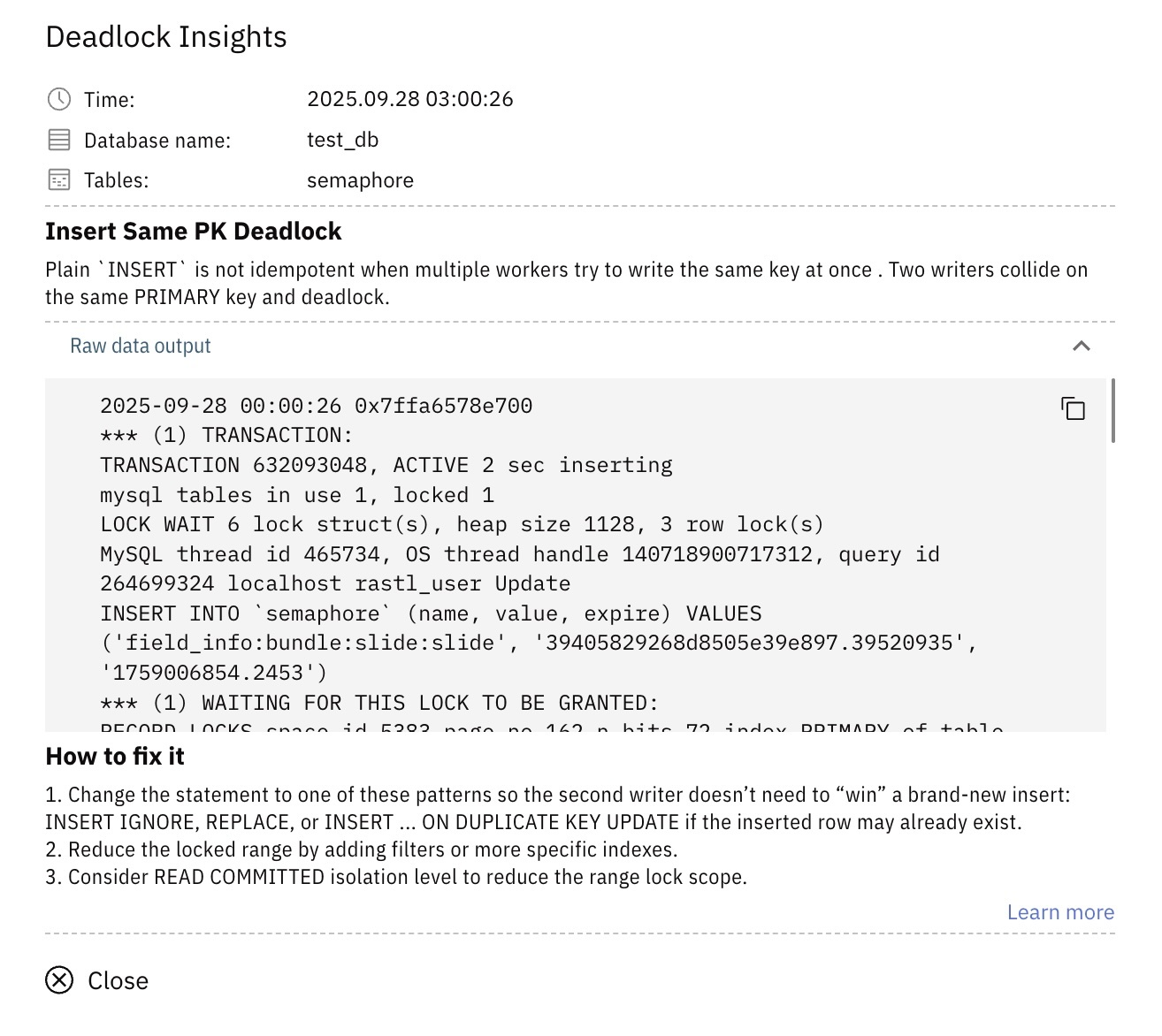
- Releem captures every deadlock, stores the full history, classifies the deadlock type, and provides guidance on how to resolve the underlying lock pattern like on screenshot.
Where this leaves you
Your first Laravel deadlock can be a bit of a surprise. It typically appears when your application scales with Horizon workers, queued jobs, and scheduled tasks all touching the same rows. It feels unpredictable until you learn to read MySQL's lock report, but even then you only see one incident at a time.
To actually prevent these patterns, you need ongoing visibility into how transactions overlap and what queries keep causing pressure.
Some teams use tools like Releem to keep this visibility continuously, so deadlock patterns are easier to spot before they turn into recurring incidents.