For websites with advanced ACL functionality, developers often find themselves manually logging in as a different user, then switching back to their own account. This can prove to be a tedious process, especially when trying to debug a problem.
Digital agency VIA Creative aims to solve that problem with its latest package: Sudo Su.
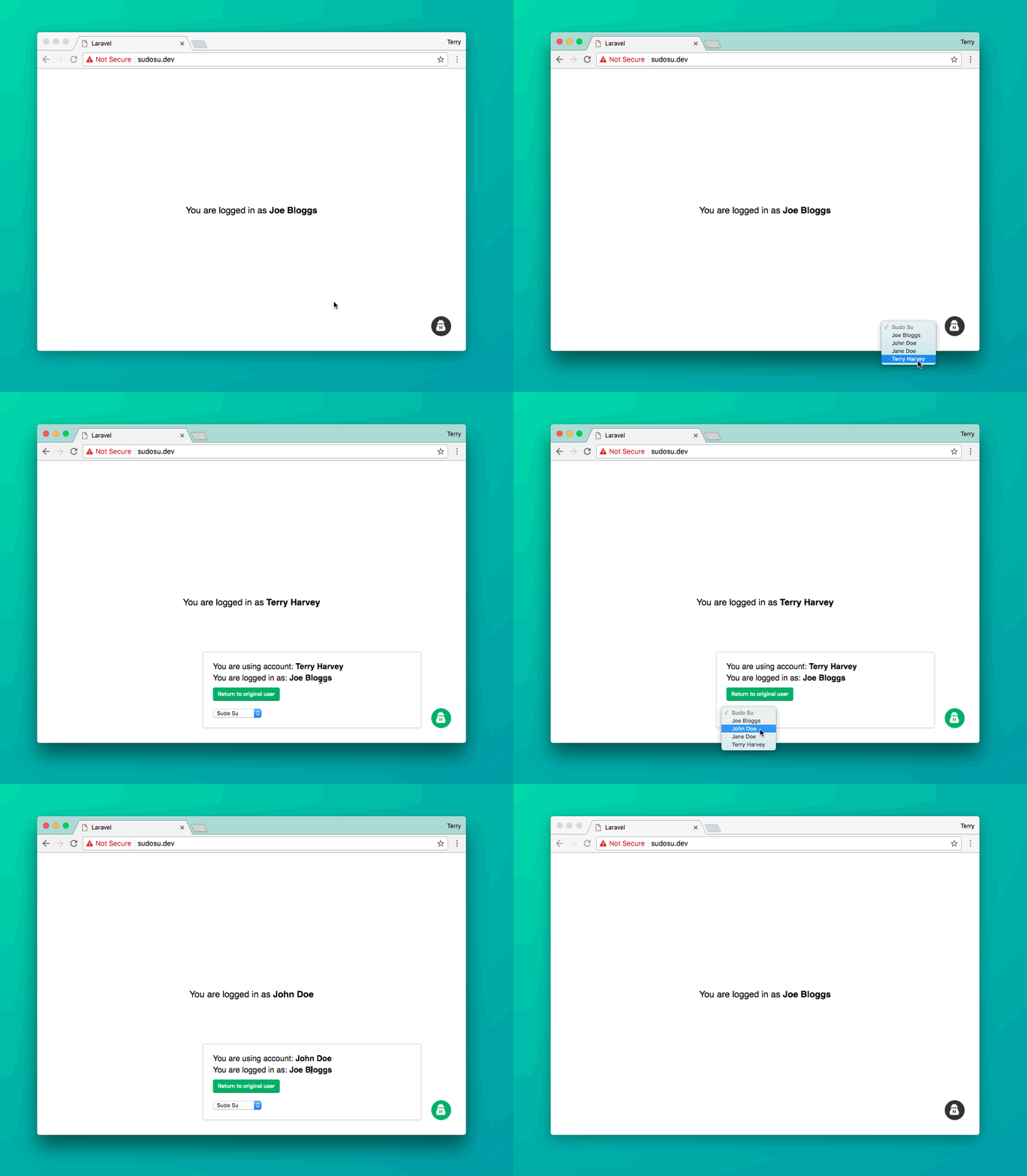
Sudo Su injects a small button into the corner of every page which, when clicked, reveals a list of users.
Selecting a user from this list will automatically log you in as that user, while also preserving the original user ID in the session. This feature allows you to quickly switch back to the original account at the click of a button.
Once you have logged in, the button will turn green to indicate it has been activated. By clicking again, you can immediately revert to your original user account.
Here is an animated Gif showing this in action:
The package can be installed in three easy steps:
1. Pull the package in via Composer.
composer require viacreative/sudo-su2. Register the service provider.
class AppServiceProvider extends ServiceProvider{ public function register() { if (env('APP_DEBUG')) { $this->app->register('VIACreative\SudoSu\ServiceProvider'); } }}⚠️ Warning: you should not register the provider globally like usual in the config/app.php file.
3. Publish the package’s config file (the package won’t work without it).
php artisan vendor:publish⚠️ Warning!
This package can pose a serious security issue if used incorrectly, as anyone will be able to take control of any user’s account. Please ensure the service provider is only registered when the app is in a debug/local environment.
By default, the package will disable itself on any domains that don’t have a TLD of .dev or .local. This is a security measure to reduce the risk of accidentally enabling the package in production. If you have a different TLD in development, you can edit the config option sudosu.allowed_tlds.
—
To keep up to date with VIA Creative, you can either follow them at @viacreative or visit their website.