Laravel One Time Operations
Laravel One Time Operations stats
- Downloads
- 146.3K
- Stars
- 292
- Open Issues
- 10
- Forks
- 13
Run operations once after deployment - just like you do it with migrations!
One-Time Operations for Laravel
Run operations once after deployment - just like you do it with migrations!
Take your CI/CD to the next Level with One-Time Operations for Laravel! 🚀
Create specific classes for a one-time usage, that can be executed automatically after each deployment. Same as migrations they get processed once and then never again. Perfect for seeding or updating some data instantly after some database changes or feature updates.
This package is for you if...
- you regularly need to update specific data after you deployed new code
- you often execute jobs just only one single time after a deployment
- you sometimes forget to execute that one specific job and stuff gets crazy
- your code gets cluttered with jobs, that are not being used anymore
- your co-workers always need to be reminded to execute that one job after some database changes
- you often seed or process data in a migration file (which is a big no-no!)
Installation
Require this package with composer:
composer require timokoerber/laravel-one-time-operationsCreate the required table in your database:
php artisan migrateNow you're all set!
Commands
Create operation files
php artisan operations:make <operation_name> // create new operation filephp artisan operations:make <operation_name> -e|--essential // create file without any attributesProcess operations
php artisan operations:process // process all new operation files php artisan operations:process --sync // force syncronously executionphp artisan operations:process --async // force asyncronously executionphp artisan operations:process --test // dont flag operations as processedphp artisan operations:process --isolated // run command isolated php artisan operations:process --queue=<name> // force queue, that the job will be dispatched tophp artisan operations:process --tag=<tagname> // only process operations, that have the given tag php artisan operations:process <operation_name> // re-run one specific operationShow operations
php artisan operations:show // show all operationsphp artisan operations:show pending // show pending operationsphp artisan operations:show processed // show processed operationsphp artisan operations:show disposed // show disposed operations php artisan operations:show pending processed disposed // use multiple filtersTutorials
CI/CD & Deployment-Process
The One-Time Operations work exactly like Laravel Migrations. Just process the operations after your code was deployed and the migrations were migrated. You can make it part of your deployment script like this:
... - php artisan migrate - php artisan operations:process...Edit config
By default, the following elements will be created in your project:
- the table
operationsin your database - the directory
operationsin your project root directory
If you want to use a different settings just publish and edit the config file:
php artisan vendor:publish --provider="TimoKoerber\LaravelOneTimeOperations\Providers\OneTimeOperationsServiceProvider"This will create the file config/one-time-operations.php with the following content.
// config/one-time-operation.php return [ 'directory' => 'operations', 'table' => 'operations',];Make changes as you like.
Create One-Time Operation files

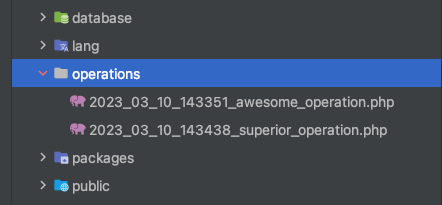
To create a new operation file execute the following command:
php artisan operations:make AwesomeOperationThis will create a file like operations/XXXX_XX_XX_XXXXXX_awesome_operation.php with the following content.
<?php// operations/XXXX_XX_XX_XXXXXX_awesome_operation.php use TimoKoerber\LaravelOneTimeOperations\OneTimeOperation; return new class extends OneTimeOperation{ /** * Determine if the operation is being processed asyncronously. */ protected bool $async = true; /** * The queue that the job will be dispatched to. */ protected string $queue = 'default'; /** * A tag name, that this operation can be filtered by. */ protected ?string $tag = null; /** * Process the operation. */ public function process(): void { // }};Provide your code in the process() method, for example:
// operations/XXXX_XX_XX_XXXXXX_awesome_operation.php public function process(): void{ User::where('active', 1)->update(['status' => 'awesome']) // make active users awesome}By default, the operation is being processed asyncronously (based on your configuration) by dispatching the job OneTimeOperationProcessJob.
By default, the operation is being dispatched to the default queue of your project. Change the $queue as you wish.
You can also execute the code syncronously by setting the $async flag to false.
(this is only recommended for small operations, since the processing of these operations should be part of the deployment process)
Hint: If you use syncronous processing, the $queue attribute will be ignored (duh!).
Create a cleaner operation file
If you don't need all the available attributes for your operation, you can create a cleaner operation file with the --essential or -e option:
php artisan operations:make AwesomeOperation --essentialphp artisan operations:make AwesomeOperation -eProcessing the operations
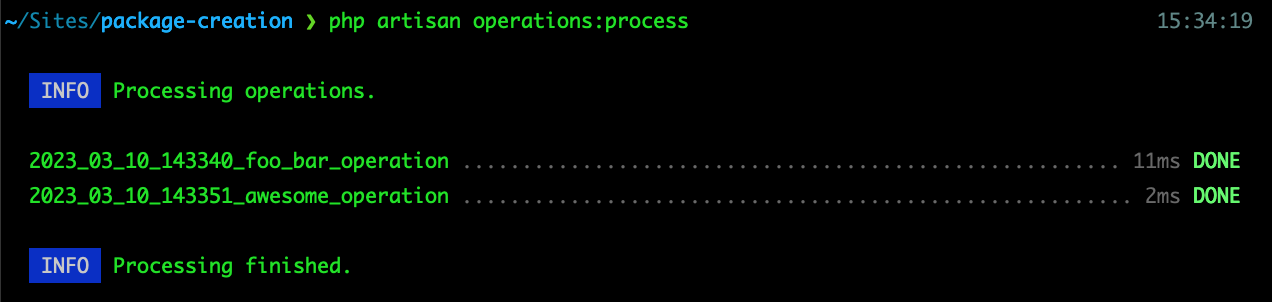
Use the following call to process all new operation files.
php artisan operations:processYour code will be executed, and you will find all the processed operations in the operations table:
| id | name | dispatched | processed_at |
|---|---|---|---|
| 1 | XXXX_XX_XX_XXXXXX_awesome_operation | async | 2015-10-21 07:28:00 |
After that, this operation will not be processed anymore.
Dispatching Jobs syncronously or asyncronously
For each operation a OneTimeOperationProcessJob is being dispatched,
either with dispatch() oder dispatchSync() based on the $async attribute in the operation file.
By providing the --sync or --async option with the operations:process command, you can force a syncronously/asyncronously execution and ignore the attribute:
php artisan operations:process --async // force dispatch()php artisan operations:process --sync // force dispatchSync()Hint! If operation:process is part of your deployment process, it is not recommended to process the operations syncronously,
since an error in your operation could make your whole deployment fail.
Force different queue for all operations
You can provide the --queue option in the artisan call. The given queue will be used for all operations, ignoring the $queue attribute in the class.
php artisan operations:process --queue=redis // force redis queueRun commands isolated on Multi-Server Architecture
If you work with a Multi-Server Architecture you can use --isolated option to make sure to only run one instance of the command (Laravel Isolatable Commands).
php artisan operations:process --isolatedRun only operations with a given tag
You can provide the $tag attribute in your operation file:
<?php// operations/XXXX_XX_XX_XXXXXX_awesome_operation.php protected ?string $tag = "awesome";};That way you can filter operations with this specific tag when processing the operations:
php artisan operations:process --tag=awesome // run only operations with "awesome" tagThis is quite usefull if, for example, you want to process some of your operations before and some after the migrations:
- php artisan operations:process --tag=before-migrations- php artisan migrate- php artisan operations:processYou can also provide multiple tags:
php artisan operations:process --tag=awesome --tag=foobar // run only operations with "awesome" or "foobar" tagHint! operations:process (without tags) still processes all operations, even if they have a tag.
Re-run an operation
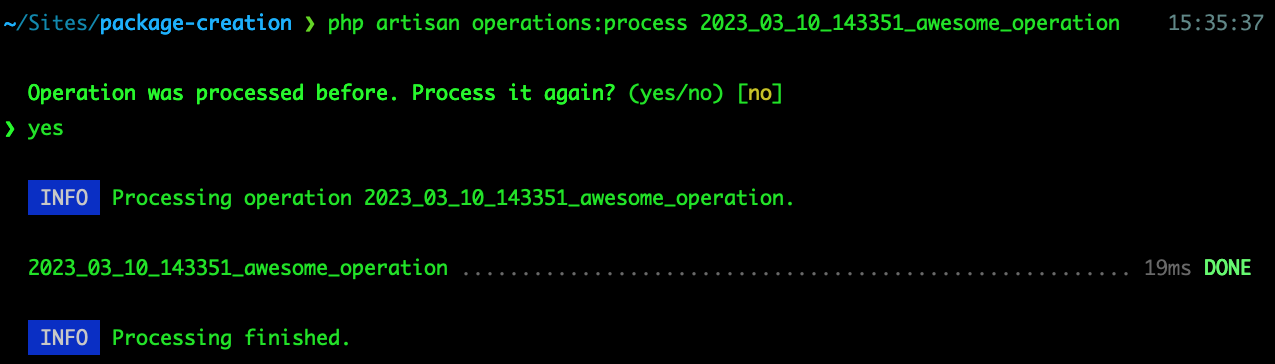
If something went wrong (or if you just feel like it), you can process an operation again by providing the name of the operation as parameter in operations:process.
php artisan operations:process XXXX_XX_XX_XXXXXX_awesome_operationTesting the operation
You might want to test your code a couple of times before flagging the operation as "processed". Provide the --test flag to run the command again and again.
php artisan operations:process --testShowing all operations

So you don't have to check the database or the directory for the existing operations,
you can show a list with operations:show.
Filter the list with the available filters pending, processed and disposed.
pending- Operations, that have not been processed yetprocessed- Operations, that have been processeddisposed- Operations, that have been processed and the files were already deleted
php artisan operations:show pending // show only pending operationsphp artisan operations:show pending disposed // show only pending and disposed operationsDeleting operations
The whole idea of this package is, that you can dispose the operations once they were executed, so your project won't be cluttered with files and code, you won't be using anymore.
So you just need to delete the files from your repository
The deleted operations will be shown as DISPOSED when you call operations:show, so you still have a history on all the processed operations.
Testing
composer testLicense
Copyright © Timo Körber | www.timokoerber.com
"One-Time Operations for Laravel" is open-sourced software licensed under the MIT license.