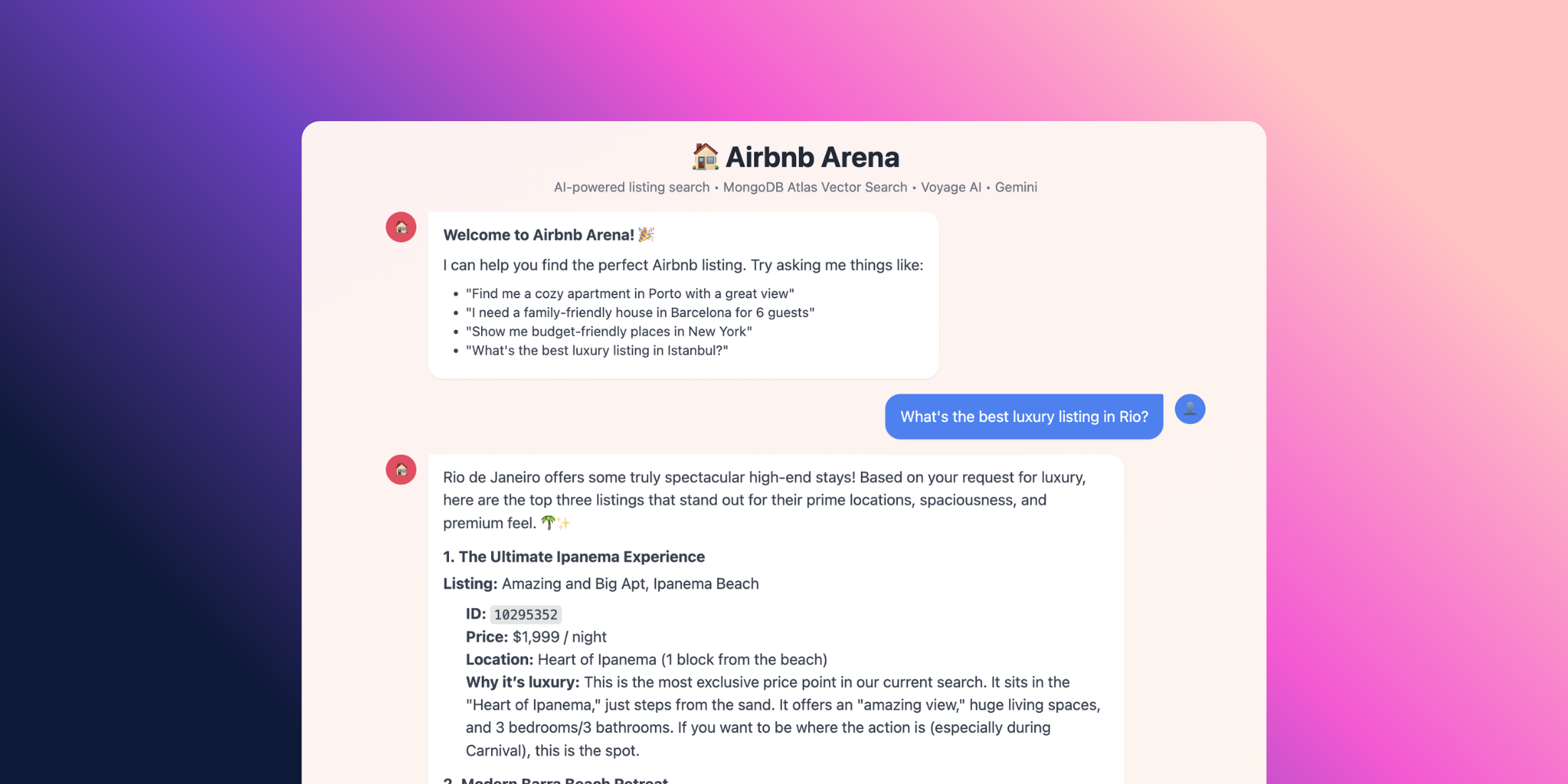
I had a problem last week.
I was staring at the sample_airbnb dataset in my MongoDB Atlas cluster -over 5,500 listings across dozens of cities - and I wanted a way to search it that didn't feel like 2015. Not dropdowns. Not filter checkboxes. Not WHERE property_type = 'Apartment' AND bedrooms >= 2.
I wanted to type: "Find me a cozy place in Porto with a great view" — and get back results that actually understood what I meant.
So I built it. In Laravel. Over a few hours.
This is the story of how Airbnb Arena came together - a RAG-powered chat agent that uses Voyage AI embeddings, MongoDB Atlas Vector Search, and Google Gemini.
But here's the best part: I didn't have to write any complex API plumbing or tool-calling loops myself. I used the new Laravel AI SDK (laravel/ai).
It turns what used to be hundreds of lines of "prompt engineering" and HTTP client code into clean, object-oriented PHP classes.
Let's build it.
What we're building
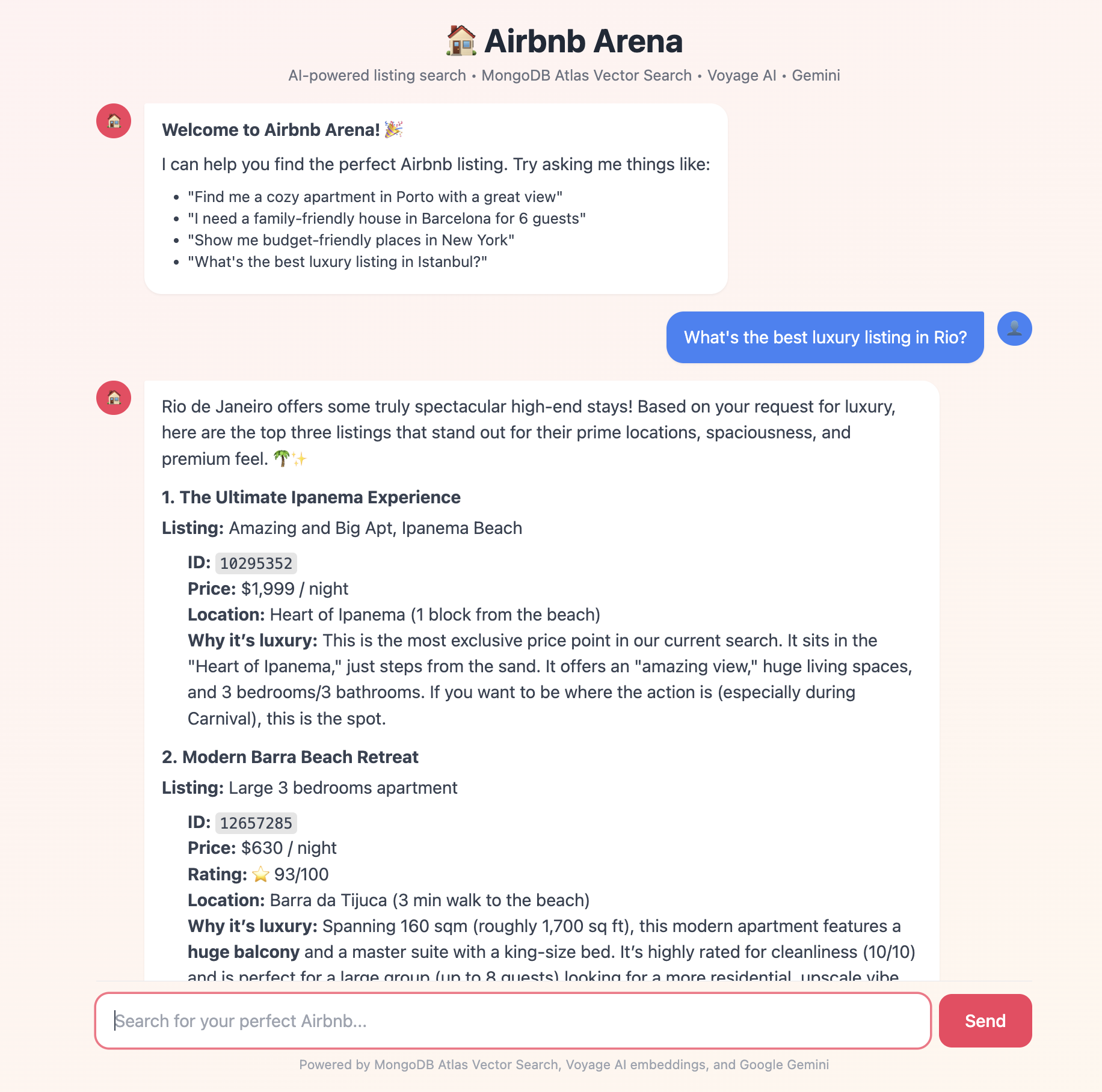 Here's the flow, end to end:
User → Chat UI → ChatController → AirbnbAgent (Laravel AI Agent) ↓ ListingSearchTool → Voyage AI (via SDK) ↓ MongoDB Atlas $vectorSearch ↓ Matching Listings → Gemini → ResponseA user types a question. The AirbnbAgent (powered by Gemini) reads it. If it needs to search, it calls the ListingSearchTool. That tool uses the SDK's Embeddings API to vector-encode the query with Voyage AI, runs a $vectorSearch against MongoDB, and hands the results back. Gemini then synthesizes a natural language answer.
The key pieces:
- Laravel AI SDK: The glue that connects our code to Gemini and Voyage AI.
- Voyage AI: Generates vector embeddings for listings and search queries.
- MongoDB Atlas: Stores data and runs $vectorSearch natively.
- Google Gemini: The reasoning engine that decides which tools to call.
Why this stack?
MongoDB Atlas is doing double duty. It's both the document store (flexible JSON data) and the vector database. No syncing data between two systems. One cluster, one collection.
Voyage AI offers "retrieval-optimized" embeddings. It distinguishes between documents (what you store) and queries (what users ask), which significantly improves search relevance compared to generic models.
It’s easy to think “any state‑of‑the‑art embedding model will do,” but Voyage‑4 on MongoDB Atlas gives you a few very practical advantages for production RAG and agents.
Shared embedding space & asymmetric retrieval
The entire Voyage‑4 family — voyage‑4‑large, voyage‑4, voyage‑4‑lite, and voyage‑4‑nano — shares a single embedding space. All four models produce compatible embeddings, so you can mix and match models for documents and queries without re‑vectorizing your corpus.
That means you can:
- Embed your Airbnb listings once with voyage‑4‑large for maximum retrieval quality.
- Use voyage‑4‑lite (or even voyage‑4‑nano) for query embeddings to keep per‑request latency and cost low.
- Upgrade query accuracy later by switching to voyage‑4 or voyage‑4‑large — without touching the stored vectors.
This “asymmetric retrieval” pattern (large model for documents, lighter model for queries) is a perfect fit for Atlas Vector Search: documents change rarely, queries run all the time.
2. Flexible dimensionality & lower vector costs
Voyage‑4 models support multiple embedding dimensionalities (256–2048) via Matryoshka learning and can be quantized (e.g., 8‑bit, binary) with minimal quality loss.
On Atlas, that translates directly into:
- Smaller index size (fewer dimensions and lower precision).
- Lower memory and storage footprint for your vector index.
- The ability to dial in the right accuracy vs. cost/latency tradeoff for each workload.
For something like sample_airbnb, you can comfortably stay in the 512–1024‑dim range and still get excellent retrieval quality.
3. Unified Atlas API, billing, and operations
Through the Embedding and Reranking API on MongoDB Atlas, Voyage AI models are exposed as a native, serverless API inside the Atlas ecosystem — not as “yet another external service” you have to integrate and monitor yourself.
Concretely, you get:
- Unified billing: Voyage usage is billed through your existing Atlas billing profile, with the same payment method and organization‑level limits.
- Consolidated monitoring and governance: one place for audit, limits (TPM/RPM), and access control, alongside your databases and Vector Search clusters.
- Generous free tier: access to the latest Voyage models (including Voyage‑4) with hundreds of millions of free tokens during preview, so you can prototype aggressively before optimizing.
This fits nicely with the Laravel AI SDK story in your article: Atlas becomes the central “AI data plane” (storage + vector search + embeddings + reranking), while Laravel focuses on orchestration and UX.
Laravel AI SDK is one of the game changers here. Instead of manually constructing JSON schemas for tools and parsing LLM responses, you just define a PHP class with a description() method. The SDK handles the rest—serializing parameters, invoking the method, and feeding the result back to the model.
Setting up the foundation
Start fresh:
composer create-project laravel/laravel airbnb-arenacd airbnb-arenaInstall the MongoDB driver and the Laravel AI SDK:
pecl install mongodbcomposer require mongodb/laravel-mongodb:5.x-dev laravel/aiPublish the Laravel AI configuration:
php artisan ai:installYou'll also need a MongoDB Atlas cluster with the Sample Dataset loaded (which gives you the sample_airbnb database).
Configure your .env:
MONGODB_URI=mongodb+srv://user:pass@cluster.mongodb.net/?retryWrites=true&w=majorityMONGODB_DATABASE=sample_airbnbGEMINI_API_KEY=your-gemini-api-keyVOYAGEAI_API_KEY=your-voyage-ai-keyAnd update config/ai.php to set your defaults:
// config/ai.php'default' => 'gemini','default_for_embeddings' => 'voyageai',The Listing Model & Embeddings
First, we need a model that represents our Airbnb listings.
<?php namespace App\Models; use MongoDB\Laravel\Eloquent\Model; class Listing extends Model{ protected $connection = 'mongodb'; protected $table = 'listingsAndReviews'; protected $fillable = [ 'name', 'summary', 'description', 'property_type', 'room_type', 'accommodates', 'bedrooms', 'beds', 'price', 'amenities', 'address', 'review_scores', 'embedding', // <-- Vector stored here ]; public function toEmbeddingText(): string { $market = $this->address['market'] ?? $this->address['country'] ?? ''; return implode('. ', array_filter([ $this->name, $this->summary, $this->property_type ? "Property type: {$this->property_type}" : null, $market ? "Location: {$market}" : null, ])); }}Now, let's generate embeddings. We'll create a simple service that wraps the Laravel AI SDK's Embeddings facade. This keeps our code clean and testable.
<?php namespace App\Services; use Laravel\Ai\Embeddings; class EmbeddingService{ // Voyage-3 uses 1024 dimensions private int $dimensions = 1024; public function embedMany(array $texts): array { // The SDK handles batching and API calls for us $response = Embeddings::for($texts) ->dimensions($this->dimensions) ->generate(provider: 'voyageai'); return $response->embeddings; } public function embedQuery(string $query): array { $response = Embeddings::for([$query]) ->dimensions($this->dimensions) ->generate(provider: 'voyageai'); return $response->embeddings[0]; }}Notice how simple this is? Embeddings::for($texts)->generate(). No cURL requests, no JSON decoding. The SDK abstracts the provider differences away.
Creating the Search Tool
In the old way of doing things, you'd write a massive JSON schema describing your function to the LLM. With Laravel AI, you just write a class that implements Tool.
Here's our ListingSearchTool. The agent uses this to find properties.
<?php namespace App\Tools; use App\Models\Listing;use App\Services\EmbeddingService;use Illuminate\Contracts\JsonSchema\JsonSchema;use Illuminate\Support\Facades\Log;use Laravel\Ai\Contracts\Tool;use Laravel\Ai\Tools\Request;use Stringable; /** * ListingSearchTool — Performs semantic vector search on Airbnb listings. * * Implements the Laravel AI SDK Tool interface so the agent can * automatically invoke it when users ask about listings. * * Uses the mongodb/laravel-mongodb Eloquent vectorSearch() method to find * listings that are semantically similar to the user's natural language query. * The query is embedded via Voyage AI (through the SDK), then matched * against pre-computed listing embeddings stored in MongoDB Atlas. */class ListingSearchTool implements Tool{ /** @var array Structured listing data from the last search */ private array $lastResults = []; public function __construct( private EmbeddingService $embeddingService ) {} /** * Describe what this tool does — the agent reads this to decide when to use it. */ public function description(): Stringable|string { return 'Search for Airbnb listings using semantic vector search. ' . 'Use this to find properties matching a natural language description ' . 'like "cozy apartment in Barcelona with pool" or "family-friendly house near the beach".'; } /** * Define the parameters the agent can pass to this tool. */ public function schema(JsonSchema $schema): array { return [ 'query' => $schema->string() ->description('Natural language search query describing the desired listing') ->required(), 'limit' => $schema->integer() ->description('Maximum number of results to return (default: 5)'), ]; } /** * Get structured listing data from the last search execution. */ public function getLastResults(): array { return $this->lastResults; } /** * Execute the search when the agent invokes this tool. */ public function handle(Request $request): Stringable|string { $query = (string) $request->string('query'); $limit = $request->integer('limit', 5) ?: 5; Log::info('ListingSearchTool: Searching', ['query' => $query, 'limit' => $limit]); try { // Step 1: Generate a query embedding using Voyage AI (via SDK) $queryEmbedding = $this->embeddingService->embedQuery($query); // Step 2: Use the Eloquent vectorSearch() method from mongodb/laravel-mongodb // Materialize results into a collection once to avoid double cursor iteration $results = Listing::vectorSearch( index: 'vector_index', path: 'embedding', queryVector: $queryEmbedding, numCandidates: $limit * 10, limit: $limit, ); // Step 3: Single-pass — build both structured frontend data and agent text $agentLines = []; $this->lastResults = []; foreach ($results as $index => $listing) { $address = (array) ($listing->address ?? []); $reviewScores = (array) ($listing->review_scores ?? []); $images = (array) ($listing->images ?? []); $price = $listing->price; if (is_object($price)) { $price = (string) $price; } $score = round(($listing->vector_search_score ?? 0) * 100, 1); $location = $address['market'] ?? $address['country'] ?? 'Unknown'; $rating = $reviewScores['review_scores_rating'] ?? 'N/A'; $summary = $listing->summary ?? ''; // Structured data for the frontend $this->lastResults[] = [ 'id' => (string) $listing->_id, 'name' => $listing->name ?? 'Unnamed', 'summary' => $summary, 'property_type' => $listing->property_type ?? 'Property', 'room_type' => $listing->room_type ?? '', 'accommodates' => $listing->accommodates ?? null, 'bedrooms' => $listing->bedrooms ?? null, 'beds' => $listing->beds ?? null, 'bathrooms' => isset($listing->bathrooms) ? (string) $listing->bathrooms : null, 'price' => $price, 'location' => $location, 'country' => $address['country'] ?? '', 'street' => $address['street'] ?? '', 'image_url' => $images['picture_url'] ?? null, 'rating' => $reviewScores['review_scores_rating'] ?? null, 'cleanliness' => $reviewScores['review_scores_cleanliness'] ?? null, 'score' => $score, ]; // Formatted text for the agent/LLM $agentLines[] = sprintf( "%d. **%s** (ID: %s)\n 📍 %s | 🏠 %s | 👥 %s guests | 🛏️ %s beds\n ⭐ Rating: %s/100 | 💰 $%s/night | 🎯 Match: %s%%\n %s", $index + 1, $listing->name ?? 'Unnamed', (string) $listing->_id, $location, $listing->property_type ?? 'Property', $listing->accommodates ?? '?', $listing->beds ?? '?', $rating, $price ?? '?', $score, $summary ? mb_substr($summary, 0, 150) . '...' : 'No description' ); } if (empty($agentLines)) { return "No listings found matching your search. Try a different query."; } $count = count($agentLines); return "Found {$count} matching listings:\n\n" . implode("\n\n", $agentLines); } catch (\Exception $e) { Log::error('ListingSearchTool error', ['error' => $e->getMessage()]); return "Error searching listings: {$e->getMessage()}"; } }}This is the power of the SDK. We define the schema in PHP and the execution logic in the same class. Dependency injection works automatically (EmbeddingService is injected).
The Agent
Now we bring it all together with an Agent. An Agent is essentially a "persona" with a specific set of tools and instructions.
<?php namespace App\Agents; use App\Tools\ListingDetailsTool;use App\Tools\ListingSearchTool;use Laravel\Ai\Attributes\MaxSteps;use Laravel\Ai\Attributes\Timeout;use Laravel\Ai\Contracts\Agent;use Laravel\Ai\Contracts\HasTools;use Laravel\Ai\Promptable; /** * AirbnbAgent — The AI-powered travel concierge for Airbnb Arena. * * Implements the Laravel AI SDK Agent interface with tool-calling support. * The agent uses Gemini as its LLM provider and has access to two tools: * * - ListingSearchTool: Semantic vector search via MongoDB Atlas $vectorSearch * - ListingDetailsTool: Fetch full listing details by MongoDB document ID * * The SDK handles the entire tool-calling loop automatically: * 1. Send user message to Gemini with tool definitions * 2. If Gemini requests a tool call, execute it * 3. Send tool results back to Gemini * 4. Repeat until Gemini returns a final text response */#[MaxSteps(10)]#[Timeout(120)]class AirbnbAgent implements Agent, HasTools{ use Promptable; /** * The system prompt that defines the agent's personality and rules. */ public function instructions(): string { return <<< PROMPTYou are the **Airbnb Arena Host** — an enthusiastic, knowledgeable travel concierge AI powered by MongoDB Atlas Vector Search and Voyage AI embeddings. Your role:- Help users find the perfect Airbnb listing from the sample_airbnb dataset- Use the search_listings tool to find properties matching user descriptions- Use the get_listing_details tool when users want more info about a specific listing- Compare listings when users are deciding between options- Provide personalized recommendations based on preferences Personality:- Friendly and enthusiastic about travel 🌍- Knowledgeable about different neighborhoods and property types- Helpful with practical advice (best for families, couples, budget, luxury, etc.)- Use emojis sparingly but effectively- Format responses with markdown for readability Important rules:- Always use the search tool to find real listings — never make up properties- When showing search results, highlight the key differentiators- If the user's query is vague, ask clarifying questions- Mention the listing IDs so users can ask for more detailsPROMPT; } /** * The tools available to this agent. * The SDK automatically generates the JSON schema for Gemini * from each tool's description() and schema() methods. */ public function tools(): iterable { return [ app(ListingSearchTool::class), new ListingDetailsTool(), ]; }}That's it. No while loops. No checking finish_reason. No parsing JSON tool calls. The SDK handles the entire "Reasoning Loop":
- Send user input and tools definition to Gemini.
- Gemini responds with a tool call request.
- SDK executes the tool.
- SDK sends the tool output back to Gemini.
- Gemini generates the final answer.
The Controller
Finally, we expose this to the frontend.
<?php namespace App\Http\Controllers; use App\Agents\AirbnbAgent;use App\Tools\ListingSearchTool;use Illuminate\Http\Request;use Illuminate\Support\Facades\Log; /** * ChatController — Handles the Airbnb Arena chat interface. * * Uses the Laravel AI SDK's Agent pattern to connect users to Gemini. * The SDK handles tool-calling automatically — when Gemini decides * it needs to search or fetch details, the SDK executes the tools * and feeds results back to the model. * * Architecture: * 1. User sends a message * 2. AirbnbAgent (via SDK) sends it to Gemini with tool definitions * 3. Gemini may call tools (search/details) — SDK executes them * 4. SDK sends tool results back to Gemini for final response * 5. Return the formatted response to the user */class ChatController extends Controller{ /** * Show the chat UI. */ public function index() { return view('arena'); } /** * Handle a chat message from the user. */ public function chat(Request $request) { // Allow up to 2 minutes for the agent loop (embedding + vector search + LLM reasoning) set_time_limit(120); $request->validate([ 'message' => 'required|string|max:2000', 'history' => 'array', ]); $userMessage = $request->input('message'); $history = $request->input('history', []); try { // Build the prompt with conversation history for context $prompt = $this->buildPrompt($userMessage, $history); // Create the agent (via make() for dependency injection) and send the prompt $agent = AirbnbAgent::make(); $response = $agent->prompt($prompt, provider: 'gemini'); // Collect any structured listing data from the search tool $searchTool = app(ListingSearchTool::class); $listings = $searchTool->getLastResults(); return response()->json([ 'reply' => (string) $response, 'listings' => $listings, 'success' => true, ]); } catch (\Exception $e) { Log::error('ChatController error', ['error' => $e->getMessage()]); return response()->json([ 'reply' => "Sorry, I encountered an error: {$e->getMessage()}", 'success' => false, ], 500); } } /** * Build the prompt string with conversation history for context. * The agent's instructions (system prompt) are defined in AirbnbAgent. */ private function buildPrompt(string $userMessage, array $history): string { if (empty($history)) { return $userMessage; } // Include recent conversation history so the agent understands context // (e.g., "Tell me more about the second one" refers to previous results) $context = collect($history)->map(function ($msg) { $role = $msg['role'] === 'user' ? 'User' : 'Assistant'; return "{$role}: {$msg['content']}"; })->implode("\n\n"); return "{$context}\n\nUser: {$userMessage}"; }}It's deceptively simple. $agent->prompt($message) does all the heavy lifting of the RAG pipeline.
Wrapping Up
We built a full RAG agent with vector search, semantic understanding, and autonomous tool use.
The Laravel AI SDK drastically simplifies building these kinds of applications. By standardizing Agents and Tools, it lets us focus on the business logic (the search query, the result formatting) rather than the plumbing of communicating with LLMs.
Combined with MongoDB Atlas for data+vectors and Voyage AI for high-quality embeddings, you have a production-ready stack for intelligent search.
The full source code is available on GitHub. Happy coding!