4,000 emails/month for free | Mailtrap sends real emails now!

Simplify Password Requirement Displays with Laravel's appliedRules() Method

Last updated on by

Simplify Password Requirement Displays with Laravel's appliedRules() Method image

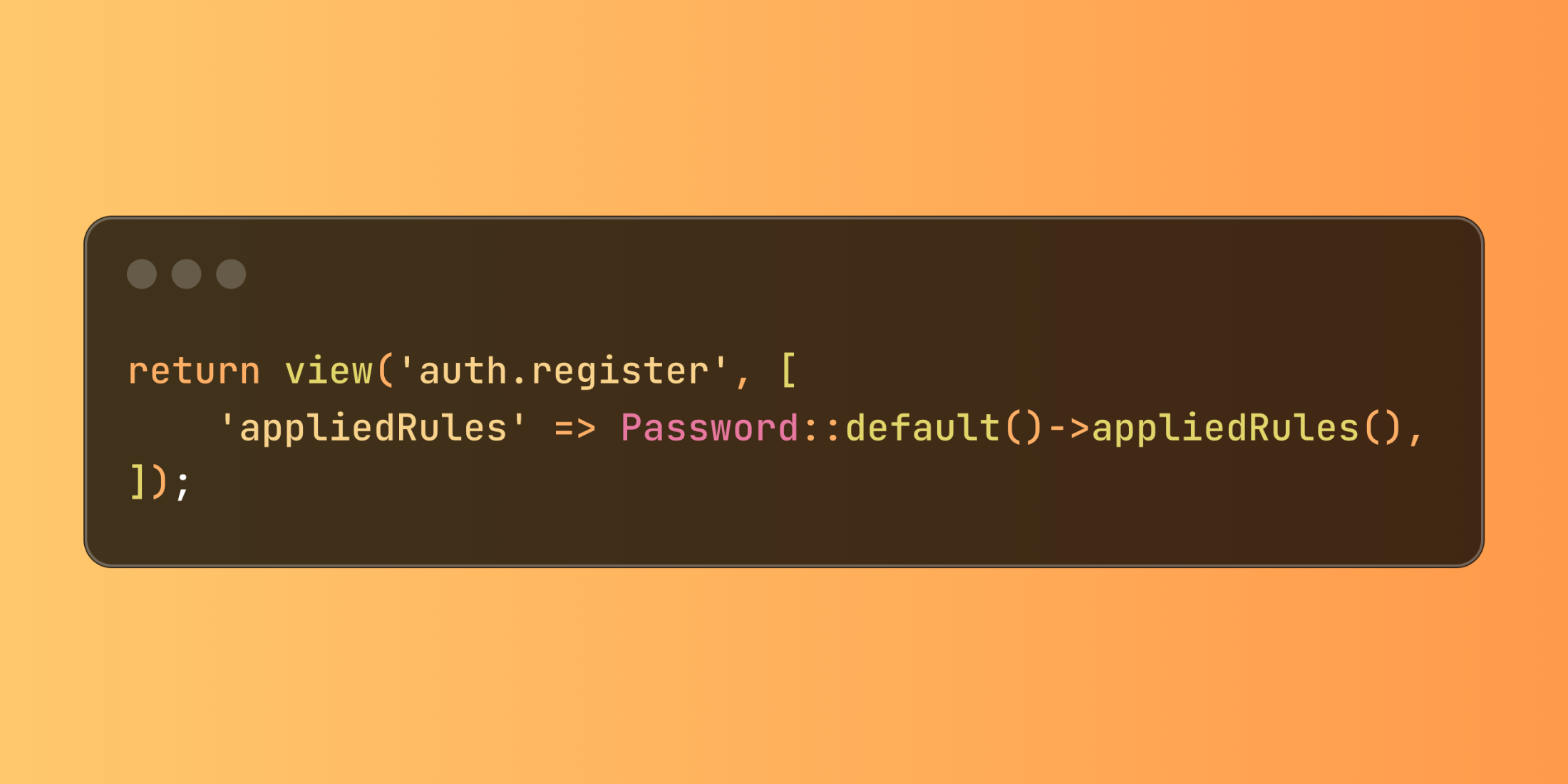
Laravel introduces the appliedRules() method for the Password validation builder, making it significantly easier to create user-friendly password requirement indicators. This feature provides direct access to password validation rules for seamless display in views.

When designing registration or password reset forms, clearly communicating password requirements enhances user experience. Previously, developers needed to maintain these requirements in both validation rules and views separately. The new appliedRules() method eliminates this redundancy by providing direct access to all currently applied password rules:

// In your controller
return view('auth.register', [
'appliedRules' => Password::default()->appliedRules(),
]);

The method returns an array containing all available password rules and their current status (true if applied, false or a specific value if not).

This approach particularly shines when creating dynamic password requirement lists that automatically stay synchronized with validation logic:

// In AppServiceProvider or another service provider
Password::defaults(function () {
return Password::min(10)
->letters()
->mixedCase()
->numbers();
});
 
// In your controller
class AccountController extends Controller
{
public function showPasswordForm()
{
return view('account.password', [
'appliedRules' => Password::default()->appliedRules(),
]);
}
}

In your Blade view, you can then dynamically display the requirements:

<div class="password-requirements">
<h4>Your password must meet these requirements:</h4>
<ul>
<li class="{{ $appliedRules['min'] ? 'requirement-active' : 'requirement-inactive' }}">
Contains at least {{ $appliedRules['min'] }} characters
</li>
 
@if ($appliedRules['letters'])
<li>Includes letters</li>
@endif
 
@if ($appliedRules['mixedCase'])
<li>Contains both uppercase and lowercase letters</li>
@endif
 
@if ($appliedRules['numbers'])
<li>Includes at least one number</li>
@endif
 
@if ($appliedRules['symbols'])
<li>Contains at least one special character</li>
@endif
</ul>
</div>

The appliedRules() method creates a more consistent user experience by ensuring interface elements accurately reflect actual validation requirements, reducing user frustration and support requests related to password creation.
Harris Raftopoulos photo

Senior Software Engineer • Staff & Educator @ Laravel News • Co-organizer @ Laravel Greece Meetup

Cube

Laravel Newsletter

Join 40k+ other developers and never miss out on new tips, tutorials, and more.

image
Laravel Code Review

Get expert guidance in a few days with a Laravel code review

Visit Laravel Code Review
Curotec logo

Curotec

World class Laravel experts with GenAI dev skills. LATAM-based, embedded engineers that ship fast, communicate clearly, and elevate your product. No bloat, no BS.

Curotec
Bacancy logo

Bacancy

Supercharge your project with a seasoned Laravel developer with 4-6 years of experience for just $3200/month. Get 160 hours of dedicated expertise & a risk-free 15-day trial. Schedule a call now!

Bacancy
Tinkerwell logo

Tinkerwell

The must-have code runner for Laravel developers. Tinker with AI, autocompletion and instant feedback on local and production environments.

Tinkerwell
Get expert guidance in a few days with a Laravel code review logo

Get expert guidance in a few days with a Laravel code review

Expert code review! Get clear, practical feedback from two Laravel devs with 10+ years of experience helping teams build better apps.

Get expert guidance in a few days with a Laravel code review
PhpStorm logo

PhpStorm

The go-to PHP IDE with extensive out-of-the-box support for Laravel and its ecosystem.

PhpStorm
Laravel Cloud logo

Laravel Cloud

Easily create and manage your servers and deploy your Laravel applications in seconds.

Laravel Cloud
Kirschbaum logo

Kirschbaum

Providing innovation and stability to ensure your web application succeeds.

Kirschbaum
Shift logo

Shift

Running an old Laravel version? Instant, automated Laravel upgrades and code modernization to keep your applications fresh.

Shift
Harpoon: Next generation time tracking and invoicing logo

Harpoon: Next generation time tracking and invoicing

The next generation time-tracking and billing software that helps your agency plan and forecast a profitable future.

Harpoon: Next generation time tracking and invoicing
Lucky Media logo

Lucky Media

Get Lucky Now - the ideal choice for Laravel Development, with over a decade of experience!

Lucky Media
SaaSykit: Laravel SaaS Starter Kit logo

SaaSykit: Laravel SaaS Starter Kit

SaaSykit is a Multi-tenant Laravel SaaS Starter Kit that comes with all features required to run a modern SaaS. Payments, Beautiful Checkout, Admin Panel, User dashboard, Auth, Ready Components, Stats, Blog, Docs and more.

SaaSykit: Laravel SaaS Starter Kit

The latest

View all →
Laravel Fuse: A Circuit Breaker Package for Queue Jobs image

Laravel Fuse: A Circuit Breaker Package for Queue Jobs

Read article
Generate Complete Application Modules with a Single Command using Laravel TurboMaker image

Generate Complete Application Modules with a Single Command using Laravel TurboMaker

Read article
`hasSole()` Collection Method in Laravel 12.49.0 image

`hasSole()` Collection Method in Laravel 12.49.0

Read article
Install Laravel Package Guidelines and Skills in Boost image

Install Laravel Package Guidelines and Skills in Boost

Read article
Bagisto Visual: Theme Framework with Visual Editor for Laravel E-commerce image

Bagisto Visual: Theme Framework with Visual Editor for Laravel E-commerce

Read article
Clawdbot Rebrands to Moltbot After Trademark Request From Anthropic image

Clawdbot Rebrands to Moltbot After Trademark Request From Anthropic

Read article