
Showcase Your PhpStorm Expertise on LinkedIn

Published on by

Showcase Your PhpStorm Expertise on LinkedIn image

PhpStorm users can now highlight their real-world experience with the IDE on LinkedIn through JetBrains' new LinkedIn Connected Apps integration. A new free plugin connects your activity in PhpStorm and other JetBrains IDEs to a badge that updates automatically as you work.

If you spend your day in PhpStorm building Laravel apps, this gives you a way to surface that on LinkedIn. JetBrains joins early Connected Apps partners including Descript, Duolingo, Lovable, Relay.app, and Replit.

How It Works

You install the LinkedIn Connected Apps plugin, and it watches how you use the IDE. It examines patterns such as code editing, debugging, version control, and AI-assisted workflows, then generates a statement that reflects your practical experience. The badge updates automatically as your usage changes.

The plugin supports IntelliJ IDEA, PyCharm, WebStorm, PhpStorm, Rider, GoLand, CLion, RustRover, and RubyMine, with DataGrip coming soon.

What the Badge Is, and What It Isn't

The early reaction has been mixed, and a lot of it comes down to a misreading of what the badge actually claims. It is not a certification, a test, or a ranking. JetBrains is direct about this, and says the system is "designed to represent your practical use of JetBrains tools, not to rank developers or certify skill levels."

So the badge says you use the debugger, not that you are good at debugging. It is a usage signal, just as "5 years with Laravel" is on a resume. Whether that is useful to you depends on what you want your profile to say, and that is worth deciding before you connect it.

Your Data

JetBrains says your IDE usage data stays on your machine. Only the information needed for your connected account and your usage statement is shared with LinkedIn and JetBrains. Detection occurs within the IDE, so usage by external AI tools or the terminal is not captured yet. The plugin needs to stay installed to keep tracking and updating your profile.

How to Connect It
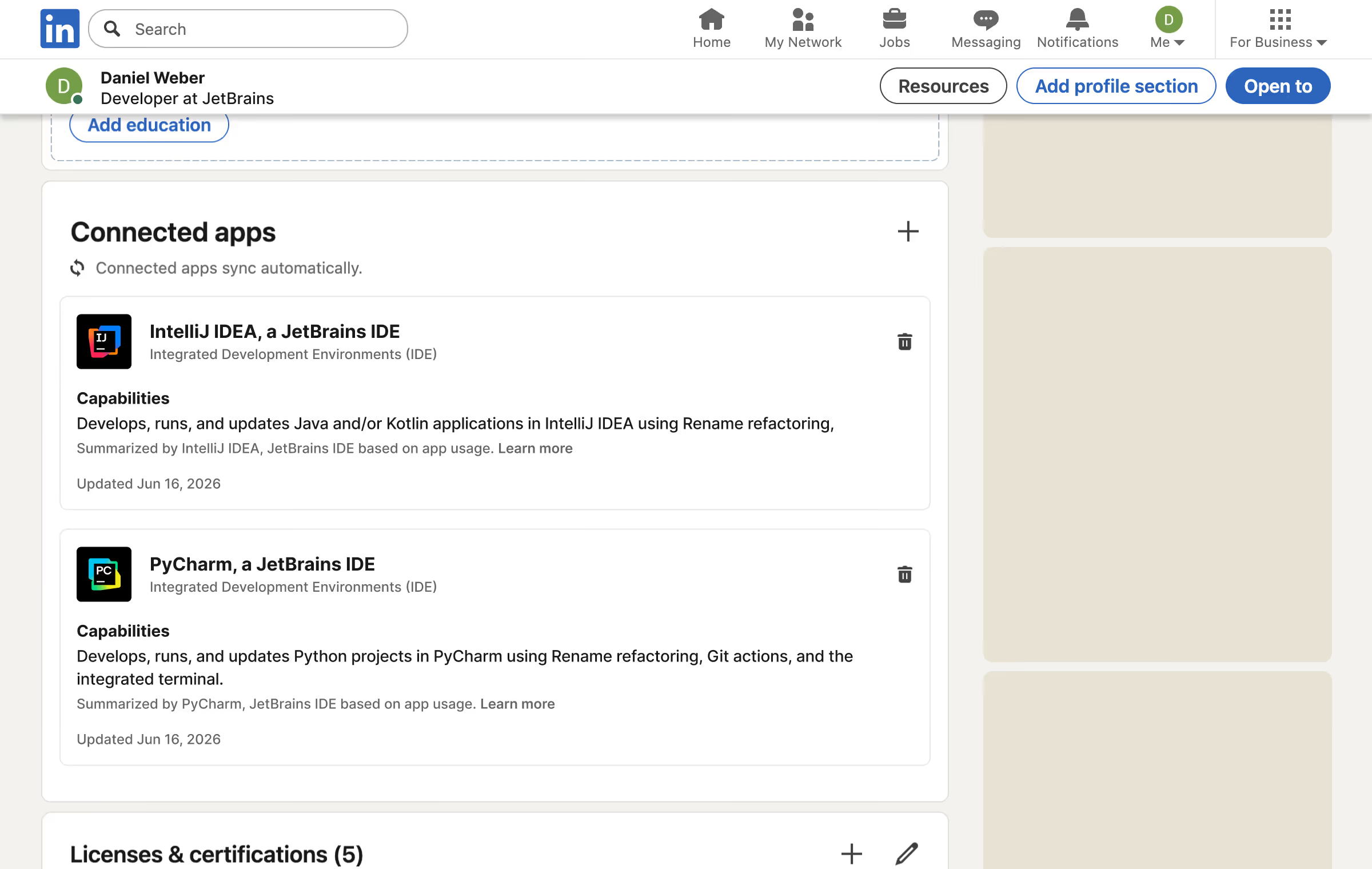
  1. Open your JetBrains IDE.
  2. Go to Settings, then Plugins.
  3. Search the Marketplace for "LinkedIn Connected Apps" and install it.
  4. Let the plugin collect your local usage data.
  5. When you are ready, connect your LinkedIn account to share your badge.

A next version is planned for later in 2026 with better representation of AI features and DataGrip support.

Read more

For the full announcement and the details on what gets shared, see the JetBrains blog post.

Eric L. Barnes photo

Eric is the creator of Laravel News and has been covering Laravel since 2012.

Filed in:
Cube

Laravel Newsletter

Join 40k+ other developers and never miss out on new tips, tutorials, and more.

image
Laravel Cloud

Easily create and manage your servers and deploy your Laravel applications in seconds.

Visit Laravel Cloud
PhpStorm logo

PhpStorm

The go-to PHP IDE with extensive out-of-the-box support for Laravel and its ecosystem.

PhpStorm
No Compromises logo

No Compromises

Joel and Aaron, the two seasoned devs from the No Compromises podcast, are now available to hire for your Laravel project. ⬧ Flat rate of $9500/mo. ⬧ No lengthy sales process. ⬧ No contracts. ⬧ 100% money back guarantee.

No Compromises
SaaSykit: Laravel SaaS Starter Kit logo

SaaSykit: Laravel SaaS Starter Kit

SaaSykit is a Multi-tenant Laravel SaaS Starter Kit that comes with all features required to run a modern SaaS. Payments, Beautiful Checkout, Admin Panel, User dashboard, Auth, Ready Components, Stats, Blog, Docs and more.

SaaSykit: Laravel SaaS Starter Kit
Lucky Media logo

Lucky Media

Get Lucky Now - the ideal choice for Laravel Development, with over a decade of experience!

Lucky Media
Shift logo

Shift

Running an old Laravel version? Instant, automated Laravel upgrades and code modernization to keep your applications fresh.

Shift
Laravel Cloud logo

Laravel Cloud

Easily create and manage your servers and deploy your Laravel applications in seconds.

Laravel Cloud
Tinkerwell logo

Tinkerwell

The must-have code runner for Laravel developers. Tinker with AI, autocompletion and instant feedback on local and production environments.

Tinkerwell
Kirschbaum logo

Kirschbaum

Providing innovation and stability to ensure your web application succeeds.

Kirschbaum
Harpoon: Next generation time tracking and invoicing logo

Harpoon: Next generation time tracking and invoicing

The next generation time-tracking and billing software that helps your agency plan and forecast a profitable future.

Harpoon: Next generation time tracking and invoicing
Acquaint Softtech logo

Acquaint Softtech

Acquaint Softtech offers AI-ready Laravel developers who onboard in 48 hours at $3000/Month with no lengthy sales process and a 100 percent money-back guarantee.

Acquaint Softtech

The latest

View all →
Privacy Filter: Detect PII in Text from Laravel image

Privacy Filter: Detect PII in Text from Laravel

Read article
NationForge: A Self-Hosted Admin Panel for Civic Organizations image

NationForge: A Self-Hosted Admin Panel for Civic Organizations

Read article
Monitor Laravel Queues, Commands, and Schedulers on Any Driver with Vigilance image

Monitor Laravel Queues, Commands, and Schedulers on Any Driver with Vigilance

Read article
Watch the Teaser for 'The Story of PHP' Documentary image

Watch the Teaser for 'The Story of PHP' Documentary

Read article
Ship AI with Laravel: Give Your AI Agent Live Web Search image

Ship AI with Laravel: Give Your AI Agent Live Web Search

Read article
Lattice: Describe Inertia UIs in PHP image

Lattice: Describe Inertia UIs in PHP

Read article







