
The Laravel Cookie Guard package provides a simple cookie consent window through which users can specify the cookies they want to allow. After the user submits the modal, these cookies are ready for use on the frontend.
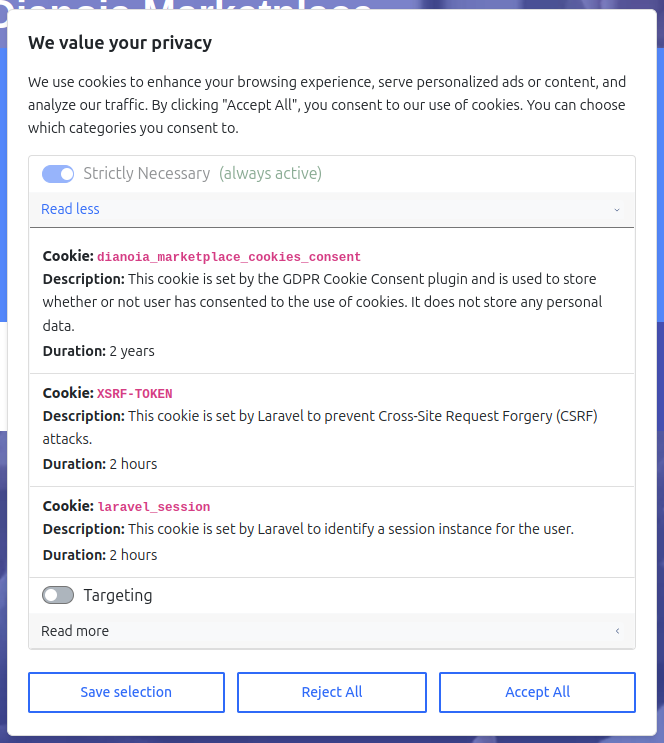
Once you've configured this package and defined the cookies you want on your site, you can check to see if a given cookie category is allowed. The readme example uses PHP's $_COOKIE superglobal, however, you could build a helper for this package to simplify consent cookie checks:
<!-- Check the 'targeting' cookie: -->@if(isset($_COOKIE[config('cookies_consent.cookie_prefix') . 'cookies_consent'])) @php $cookiesConsent = json_decode($_COOKIE[config('cookies_consent.cookie_prefix') . 'cookies_consent'], true); @endphp @if(isset($cookiesConsent['targeting']) && $cookiesConsent['targeting'] && config('app.google_analytics_id')) <!-- Google Analytics --> <script defer async> (function (i, s, o, g, r, a, m) { i['GoogleAnalyticsObject'] = r; i[r] = i[r] || function () { (i[r].q = i[r].q || []).push(arguments) }, i[r].l = 1 * new Date(); a = s.createElement(o), m = s.getElementsByTagName(o)[0]; a.async = 1; a.src = g; m.parentNode.insertBefore(a, m) })(window, document, 'script', 'https://www.google-analytics.com/analytics.js', 'ga'); window.ga('create', '{{ config('app.google_analytics_id') }}', 'auto'); window.ga('set', 'anonymizeIp', true); window.ga('send', 'pageview'); </script> @endif@endifNote: the readme example depends on server-rendered HTML that is not cached.
On the frontend, you can use window.localStorage to check for appropriate cookies defined in the configuration file. That will allow you to dynamically write cookie consent logic on the frontend.
Main Features
- Customizable cookie categories
- 3 Different integration options: All-in-one dialog, internal page, external separate page,
- A clean and intuitive UI for the cookies consent modal.
- A sticky cookies button and footer link that allows users to change their cookies preferences at any time. This button is optional, and it's existence can be tweaked in the configuration file.
- A separate page for the cookie preferences, where users can read more about each cookie category and change their preferences.
- Multilingual support. The plugin comes with 6 built-in languages: English, Greek, Spanish, German, Italian, and Swedish. You can add your own language by publishing the translations and editing/adding your own translations.
You can learn more about this package, get full installation instructions, and view the source code on GitHub.
Also, you can install and configure this package using Composer and Artisan:
composer require scify/laravel-cookie-guardphp artisan vendor:publish \--provider="SciFY\LaravelCookiesConsent\LaravelCookiesConsentServiceProvider" \--tag="cookies-consent-public" \--tag="cookies-consent-config"