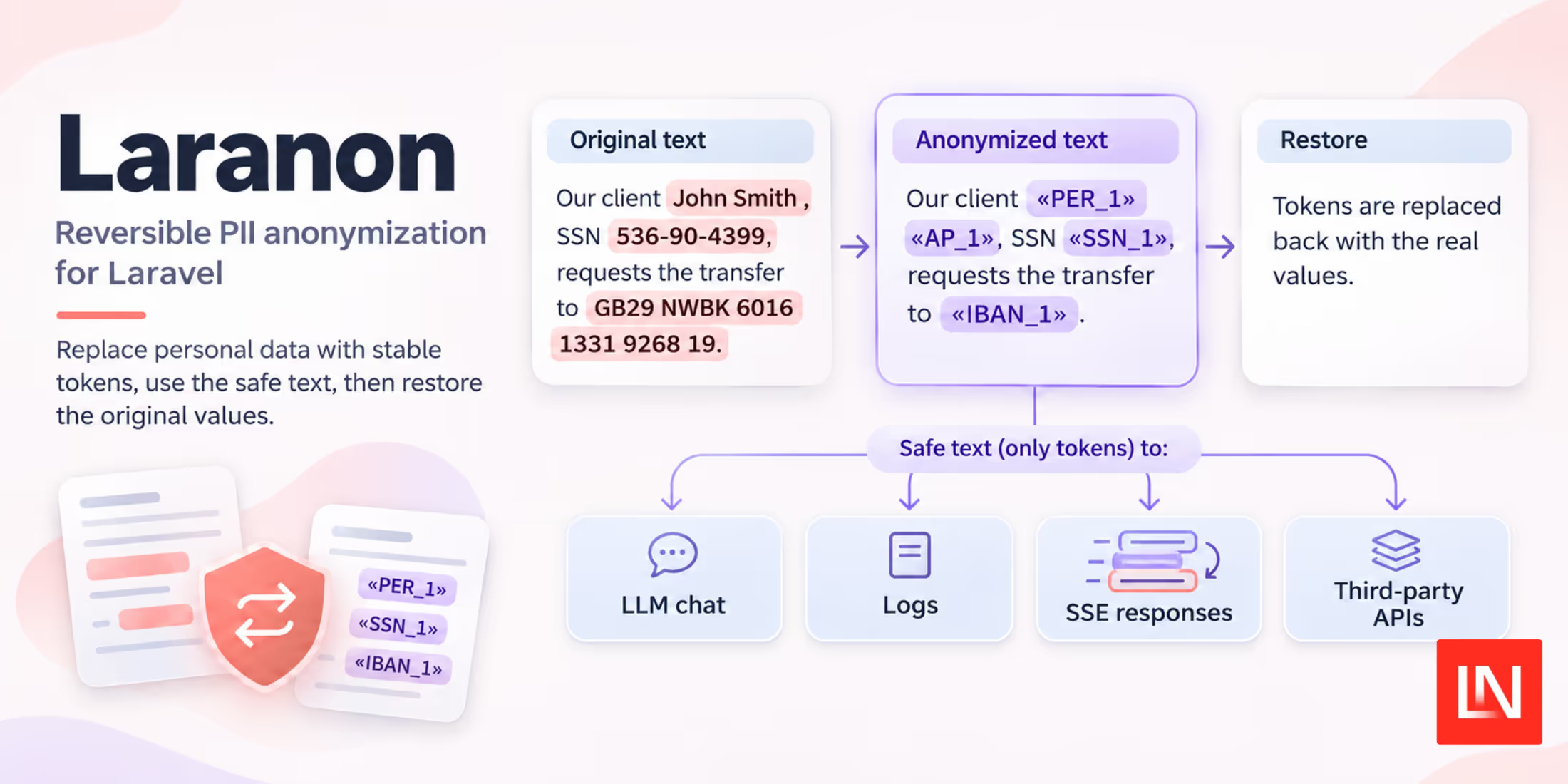
Laranon is a package by Eduardo Lázaro that removes personal data from text before you send the text to an LLM. It replaces names, ID numbers, and bank details with placeholder tokens. A map of each token to its real value stays on your server. When the model replies, you use the map to put the real values back.
The package includes detection packs for Spanish and English. It has no dependencies other than Laravel.
Laranon also includes these features:
- Checksum validation for IBANs, credit card numbers, and the Spanish DNI, NIE, CIF, NSS, and CCC formats. Laranon ignores a DNI that has a wrong control letter.
- Per-word name tokens. "Smith" gets the same token in "John Smith" and in "Mr. Smith".
- Scoped token maps that Laranon encrypts and saves in the cache or the database. Use them for chats and queued jobs that run across more than one request.
- Known entities. You give Laranon values to replace, or you load them from Eloquent models with the
Anonymizabletrait. - Streaming restore for SSE responses. A token can arrive in two chunks, and Laranon still restores it.
- Log and HTTP scrubbing with the
ScrubLogsTaplogging tap and theHttp::scrubPii()macro. - The
laranon:scancommand. It lists each value in a file that Laranon would replace.
Anonymizing an LLM Prompt
Call Laranon::anonymize() with your text. It returns the anonymized text and the token map. Send the text to the model. Then call restore() on the model's reply:
use EduLazaro\Laranon\Laranon;

$result = Laranon::scope("chat-{$sessionId}")->anonymize(
    'Our client John Smith, SSN 536-90-4399, requests the transfer to GB29 NWBK 6016 1331 9268 19.'
);

$result->text;
// "Our client «PER_1» «AP_1», SSN «SSN_1», requests the transfer to «IBAN_1»."

$llmResponse = $chat->send($result->text);

$result->restore($llmResponse);
The model sees only the tokens. If the reply contains «PER_1», restore() changes it back to "John". You can also use the anon() and deanon() helper functions.
Sessions and Scopes
One chat turn can contain the user's message, retrieved documents, and tool results. Each part must use the same tokens. For this case, the README recommends an Anonymizer session. A session keeps its map in memory and does not save it. The map is gone when the request ends.
use EduLazaro\Laranon\Anonymizer;

$anon = Anonymizer::create();

$messages = $anon->anonymize($messages, 'content');

// The model asks for a tool call. Restore the arguments first,
// so the tool searches with the real values.
$args = $anon->restore($response->toolCall, 'arguments');
$result = runTool($args);

$messages[] = ['role' => 'tool', 'content' => json_encode($result)];
$messages = $anon->anonymize($messages, 'content');

// Restore the final reply before you show it to the user.
$reply = $anon->restore($response->content);
The second argument is the key that Laranon anonymizes in each array element. You can give a nested key such as 'payload.text'. You can also give an array of keys, or a wildcard path such as 'tool_calls.*.arguments'. Laranon changes only the strings at those keys. It does not change other values, such as the message role.
You can keep the chat history with the real values in your database. On each turn, create a new session and anonymize the full history again. Laranon assigns tokens in the order the values appear. Each value gets the same token on each turn.
Some work runs across more than one request, for example a queued job. For this work, use a scope. By default, Laranon saves the scope's map in the cache for six hours. You can change the store to the database, or to an array that lasts for one request. In the cache and the database, Laranon encrypts the map with your app key.
Laranon::scope('chat-42')->anonymize('SSN 536-90-4399');      // «SSN_1»
Laranon::scope('chat-42')->anonymize('On file: 536-90-4399'); // «SSN_1»

Laranon::scope('chat-42')->restore($llmResponse);

Laranon::scope('chat-42')->forget();
The forget() method deletes the map. After you call it, nobody can restore the tokens in the data you sent.
Name Detection
Laranon gives each word in a name its own token. It does not try to match a name to a person. For example, a document contains "John Smith" and "John Baker":
- "John Smith" becomes
«PER_1» «AP_1». - "John Baker" becomes
«PER_1» «AP_2». "John" keeps its token, and "Baker" gets a new token. - "Mr. Baker" becomes
Mr. «AP_2». Laranon does not replace titles such as "Mr." or "Dr.". - "John de la Cruz" becomes
«PER_1» de la «AP_3». Laranon does not replace the words "de la".
Laranon uses the title to decide the type of a single name word. A word after Mr., Mrs., Dr., Sr., or Sra. is a surname. A word after D., Dña., Don, Doña, Sir, or Lady is a given name.
Some names have no title. In this case, Laranon looks for two or more capitalized words in a row. The first word must be in its list of given names. The package includes these lists:
- 16,600 Spanish given names and 24,300 Spanish surnames from the INE census
- 7,300 English given names from US Social Security baby name data
- 162,000 surnames from the 2010 US Census
Some names are also common words, for example "Rose" and "Luz". Laranon replaces these names only when a surname comes after them or a title comes before them. It does not replace "Luz" alone. It replaces "Luz Martínez" and "Dña. Luz".
Replacement Strategies
Laranon has three replacement strategies. The default is token. To use a different strategy, call strategy():
Laranon::strategy('faker')->anonymize($text);
Laranon::strategy('redact')->anonymize($text);
tokenwrites placeholders such as«DNI_1». You can restore them. Use this strategy for LLM requests.fakerwrites fake values in the same format, for example a valid fake DNI. You can restore these values too. Use this strategy when the output must read like a normal document.redactwrites labels such as[DNI]. Laranon does not save a map, so you cannot restore the values. Use this strategy for logs and for data that you send out.
Scrubbing Logs and HTTP Requests
The logging tap and the HTTP macro both use redact. To scrub a log channel, add the tap in config/logging.php:
'stack' => [
    'driver' => 'stack',
    'tap' => [\EduLazaro\Laranon\Integrations\ScrubLogsTap::class],
],
To scrub an outgoing request, call Http::scrubPii()->post($url, $payload). Laranon redacts the request body before Laravel sends it. Exception messages can also contain personal data. To hide it there, you can mask query bindings in exception messages.
Supported Data Types
| Pack | Types |
|---|---|
| Universal | Email, IBAN, credit cards, international phone numbers, IPv4 and IPv6, URLs, BIC/SWIFT, known entities |
Spanish (es) |
DNI, NIE, CIF, NSS, CCC, phone numbers, postal codes, license plates, court references, person names |
English (en) |
SSN, UK National Insurance numbers, passports, US and UK phone numbers, ZIP codes, person names |
Laranon matches postal codes, five-digit ZIP codes, and passport numbers only when nearby words identify them. This gives fewer false matches.
To detect only some types, call only(['dni', 'iban']). To skip a type, call except('url'). Before you use Laranon in production, run the scan command on a sample of your own data:
php artisan laranon:scan storage/corpus.txt --types=dni,iban,person
The command prints a table of each match with its type, value, offset in the file, and confidence score. It then prints the total number of matches and a count for each type.
To add a new detector, locale pack, strategy, or map store, implement the related contract from the package.
Privacy Filter is another package that finds personal data in text. If you build AI agents, the Intercept package adds middleware guardrails to them.
Installation
Laranon requires PHP 8.2 or later and Laravel 12 or later. Install it with Composer:
composer require edulazaro/laranon
To change the settings, publish the config file. If you save scope maps in the database, also publish the migration:
php artisan vendor:publish --tag=laranon-config
php artisan vendor:publish --tag=laranon-migrations
The source code and documentation are in the Laranon repository on GitHub.