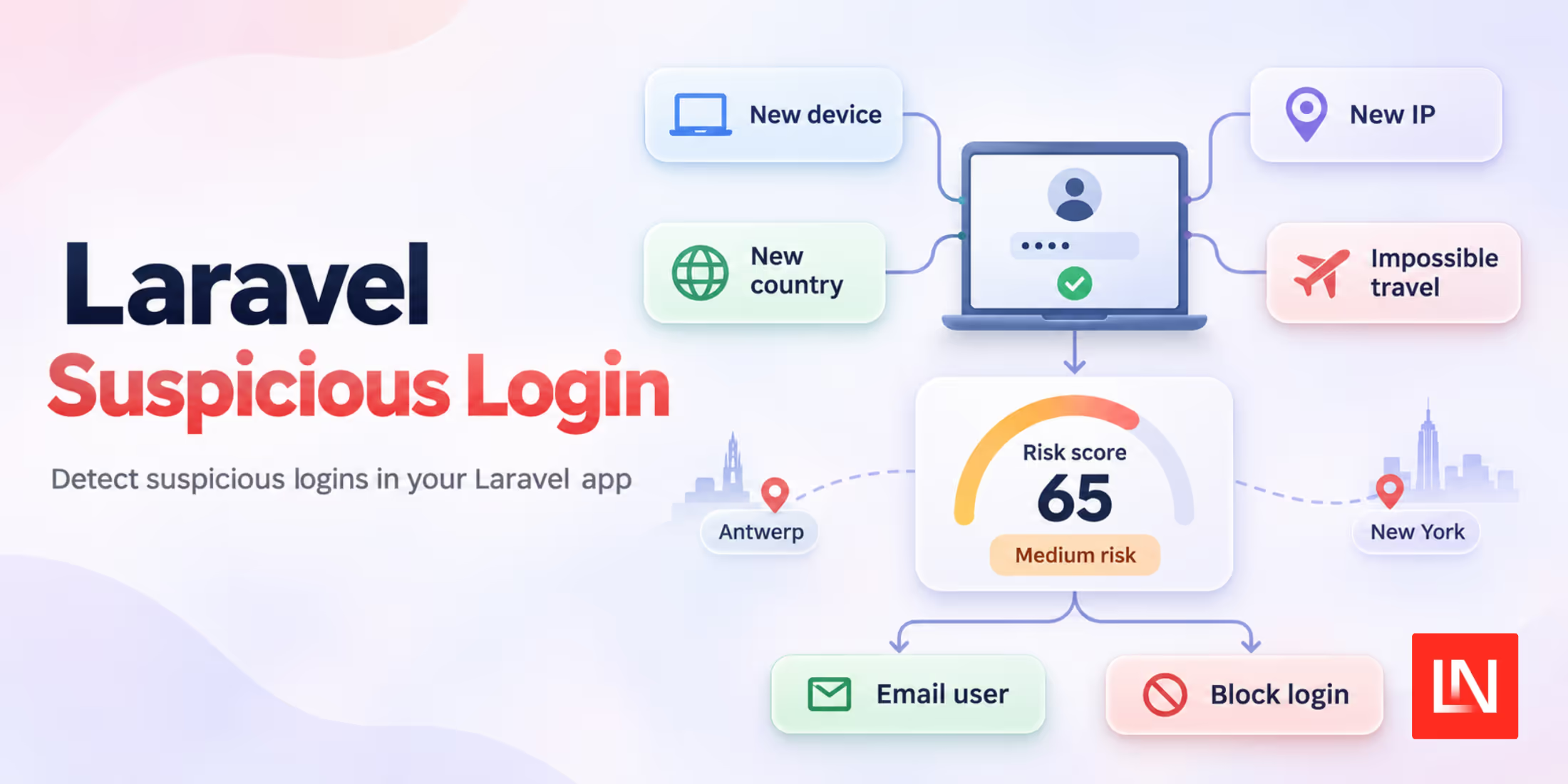
Laravel Suspicious Login is a new package from Spatie, written by Freek Van der Herten. It gives each successful login a risk score. The score comes from the device, the IP address, the location, and the user's login history. You decide what happens at each risk level. The package can email the user, block the login, or run an action that you write.
Say a user always logs in from Toronto. One morning, the account logs in from a new phone in Lisbon. With the default preset and geolocation enabled, the package scores that login like this:
New device                        +25
New IP address (203.0.113.42)     +10
New country (PT)                  +30
                                  ---
Risk score                         65   medium risk, so the user gets an email
The default thresholds are 40 for medium risk and 70 for high risk, but you can change them in config/suspicious-login.php:
'risk_thresholds' => [
    'medium' => 40,
    'high' => 70,
],
Presets: Checks, Scores, and Actions
A preset is a class that lists the checks to run and the score for each check. It also sets the actions for medium and high risk. The package includes three presets:
DefaultPresetruns the standard checks and emails the user on medium riskMonitorOnlyPresetrecords scores and fires events, but does not email or block anyoneNonePresetrecords the login and firesLoginAttemptRecordedEvent, but skips location lookups, scoring, and actions
To write your own preset, ensure it extends Preset. Take a payroll app where all staff work in Canada or the United States. This preset gives 20 points to a new device and 50 points to a login from any other country. It gives 70 points when the user would have had to travel faster than 900 km/h between two logins. At medium risk, the user gets an email. At high risk, the user gets an email, and the login is blocked:
namespace App\SuspiciousLogin;

use Spatie\SuspiciousLogin\Actions\Action;
use Spatie\SuspiciousLogin\Actions\BlockLoginAction;
use Spatie\SuspiciousLogin\Actions\NotifyUserAction;
use Spatie\SuspiciousLogin\Checks\CountryCheck;
use Spatie\SuspiciousLogin\Checks\ImpossibleTravelCheck;
use Spatie\SuspiciousLogin\Checks\NewDeviceCheck;
use Spatie\SuspiciousLogin\Presets\Preset;

class PayrollPreset extends Preset
{
    public function checks(): array
    {
        return [
            NewDeviceCheck::new()->score(20),
            CountryCheck::new()->onlyAllow(['CA', 'US'])->score(50),
            ImpossibleTravelCheck::new()->maxSpeedInKilometersPerHour(900)->score(70),
        ];
    }

    public function onMediumRisk(): Action|array
    {
        return NotifyUserAction::new();
    }

    public function onHighRisk(): Action|array
    {
        return [
            NotifyUserAction::new(),
            BlockLoginAction::new()->message('We blocked this sign-in. Contact your admin if this was you.'),
        ];
    }
}
With the default thresholds, a known device logging in from Mexico scores 50 and the user gets an email. A new device in Mexico scores 70, so the package emails the user and blocks the login.
Register the preset in config/suspicious-login.php:
'preset' => App\SuspiciousLogin\PayrollPreset::class,
A preset can also set its own $mediumRiskThreshold or $highRiskThreshold property. That value will replace the config value for that preset only.
There is also a MultipleCountriesCheck. It flags logins from two countries within one hour, even when the user has logged in from both countries before.
Use a Different Preset for Each User
In the payroll app, you might want the strict preset only for staff who sign in through a separate staff guard. A shared demo account used in sales calls might need no checks at all. Register a callback in a service provider's boot() method. The callback gets the login attempt and returns a preset class name:
use App\SuspiciousLogin\PayrollPreset;
use Spatie\SuspiciousLogin\Facades\SuspiciousLogin;
use Spatie\SuspiciousLogin\Models\LoginAttempt;
use Spatie\SuspiciousLogin\Presets\DefaultPreset;
use Spatie\SuspiciousLogin\Presets\NonePreset;

SuspiciousLogin::determinePresetUsing(function (LoginAttempt $attempt): string {
    if ($attempt->guard === 'staff') {
        return PayrollPreset::class;
    }

    if ($attempt->authenticatable->email === 'demo@example.com') {
        return NonePreset::class;
    }

    return DefaultPreset::class;
});
The staff guard and the demo address come from this example app, not from the package. The package runs the callback before the location lookups, and the callback can read the attempt's user, guard, and custom properties. It must always return a class name. It cannot return null.
Blocking Logins and Writing Your Own Actions
An action is a class with an execute() method. That method receives the LoginAttempt model. The BlockLoginAction does four things:
- Marks the attempt as blocked
- Fires
SuspiciousLoginBlockedEvent - Logs the user out of the guard they used
- Throws a
ValidationException
The login runs inside Auth::attempt(), so your login form shows the exception as a normal validation error. By default, the error is on the email field. If your login form uses a username field, call ->errorKey('username'). The PayrollPreset above sets its own text with ->message().
Put BlockLoginAction last in the list of actions. It throws an exception, so actions after it do not run. To return a different response but keep the logout, extend BlockLoginAction and override its respond() method.
You write your own action the same way. For example, an action could require a second factor or alert your security team. Extend Action and implement execute(). The new() method resolves the action from the container so that you can inject dependencies in the constructor. Custom checks are similar. Extend Check, then return $this->pass() or $this->flag($reason) from evaluate().
If your app already has Fortify two-factor authentication or passkeys, this package does not replace them. It scores a login after the login succeeds.
How Devices Are Identified
By default, the package stores an encrypted cookie in the browser to identify the device. It does not need JavaScript. Two browsers with the same user agent get different identities. A browser update keeps the same identity. If the user clears their cookies, the next login counts as a new device.
Your login routes need Laravel's web cookie middleware for this to work. Stateless apps can use the user-agent fingerprinter or supply their own identifier.
Installation and Defaults
The package requires PHP 8.4 and supports Laravel 11, 12, and 13. Install it with Composer and run the install command:
composer require spatie/laravel-suspicious-login
php artisan suspicious-login:install
The install command publishes the config file and the migration for a login_attempts table. It then asks if you want to run your migrations.
The package listens for Laravel's Login and Failed auth events. It works with Breeze, Jetstream, Fortify, and your own login controllers without code changes. It does not record logins restored from a "remember me" cookie.
Before you enable it in production, check these defaults:
- Geolocation. The
ipinfodriver looks up public IP addresses without an API token. Lookups are cached for a week, and ipinfo's rate limits apply. To keep IP addresses away from an external service, set the driver to'null'. To use MaxMind, installgeoip2/geoip2 - Email. The default mailable goes to the user's
emailattribute. It is queued, so you need a queue worker unless you use thesyncconnection. You can publish the Markdown view, set your own mailable class in the config, or use a Laravel notification through a custom action - Existing apps. Start with
MonitorOnlyPreset. You can then review the scores for real logins before you email or block any users
The package also includes guidelines and a detecting-suspicious-logins skill for Laravel Boost. Run php artisan boost:install and select the package to give your coding agent its API and extension points.
The documentation covers querying login attempts, custom properties, and events. The source is on GitHub at spatie/laravel-suspicious-login.