Laravel Scalpel is an intrusion evidence scanner from Harry Agustiana. It runs inside a Laravel application and checks the filesystem for signs such as rogue PHP files, obfuscated code, altered server directives, and changes since a known-good snapshot.
Tools such as Ward and Checkpoint inspect source code, configuration, and dependencies for security problems. Scalpel has a different job: finding evidence that files in a deployed application have already been added, changed, or removed.
Filesystem Scanners
The scalpel:scan command runs six scanners by default. Five inspect the current files. The Baseline Diff scanner compares them with a saved snapshot.
The structural scanner looks for executable PHP files in directories where PHP should not appear. By default, these directories are public/ and storage/. It detects .php files and less common extensions such as .phtml, .pht, and .phar, along with double extensions such as shell.php.jpg. The scanner allows public/index.php, public/vendor/, and Laravel's compiled views and cache by default. You can change the scanned directories and add your own files and directories to the allow lists.
The obfuscated-code scanner checks PHP files for common backdoor patterns. These include eval(base64_decode(...)), compressed payload execution, dynamic function calls, direct evaluation of request input, and long encoded strings. If legitimate code produces a finding, you can turn off that pattern in config/scalpel.php.
The .htaccess scanner reports handler and MIME type mappings that let the web server execute Python, Perl, CGI, or other scripts. It also flags Options +ExecCGI, rewrite rules that redirect to external URLs, and PHP directives such as auto_prepend_file. The .user.ini scanner reports per-directory PHP directives including auto_prepend_file, auto_append_file, include_path, and disable_functions. An attacker can use auto_prepend_file there to run a hidden file on every request.
The environment scanner reports a .env file that is missing, empty, or unreadable, and any .env file placed under public/. On Unix-like systems, it also checks whether the file is world-readable. It reports an empty APP_KEY, then compares the keys in .env with .env.example. This overlaps with tools that check environment keys across multiple files, but Scalpel treats unexpected or missing keys as possible intrusion evidence. When APP_ENV is production, the scanner flags APP_DEBUG=true. The --production option applies that check whatever APP_ENV says, and also flags APP_ENV=local.
You can run every scanner or select a subset:
php artisan scalpel:scanphp artisan scalpel:scan --only=structural,obfuscatedphp artisan scalpel:scan --only=useriniBaseline Comparisons
The scalpel:baseline command records each included file's SHA-256 hash, size, and modification time. The scalpel:diff command then compares the current files with that record and reports added, modified, and deleted files:
php artisan scalpel:baselinephp artisan scalpel:diffCreate the baseline only after the application is in a state you trust. Until a baseline exists, scalpel:scan and scalpel:diff report a MEDIUM finding that tells you to create one. After each deployment, the project suggests running php artisan optimize and then scalpel:baseline --force to replace the old baseline.
The default exclusions leave out frequently changing paths such as logs, sessions, compiled views, and storage/app. The vendor/ directory is skipped by content scans but remains part of baseline comparisons, so a file added to an installed package still shows up in the diff.
By default, Scalpel runs in strict mode and hashes every file during each comparison. The --fast option first compares file size and modification time, then reuses the old hash when both match. This reduces hashing work, but the baseline comparison can miss a changed file when an attacker preserves its size and modification time. Another scanner could still report the file based on its contents or location.
Scalpel can HMAC-sign baselines and JSON reports when SCALPEL_SIGNING_ENABLED is true and SCALPEL_SIGNING_KEY holds a dedicated key that is not your APP_KEY. The diff command verifies a signed baseline before it uses it and reports an invalid or missing signature as CRITICAL. This detects a baseline regenerated without the signing key, but it cannot protect the baseline when an attacker can read that key or change the scanner itself. Turn on signing before you create the first baseline. The scalpel:verify command checks the signature of a saved JSON report.
A Test Scan
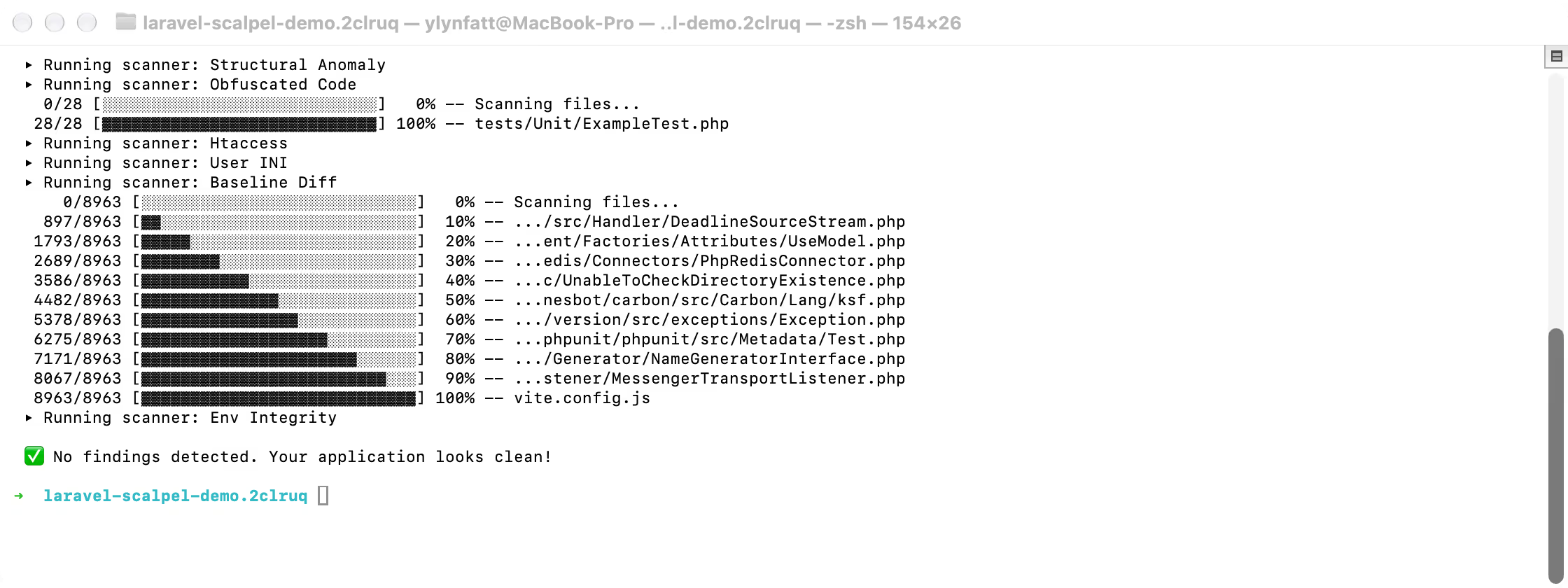
I tested Scalpel 1.9.0 in a fresh Laravel 13.31 application. With the .env permissions set to 0600 and a baseline in place, the default scan had no findings.
I then added four harmless fixtures: an eval(base64_decode(...)) call inside an if (false) block, a file named avatar.php.jpg, an .htaccess handler mapping, and a .user.ini file with auto_prepend_file.
Running the four content scanners kept the output short:
php artisan scalpel:scan \ --only=structural,obfuscated,htaccess,userini \ --no-banner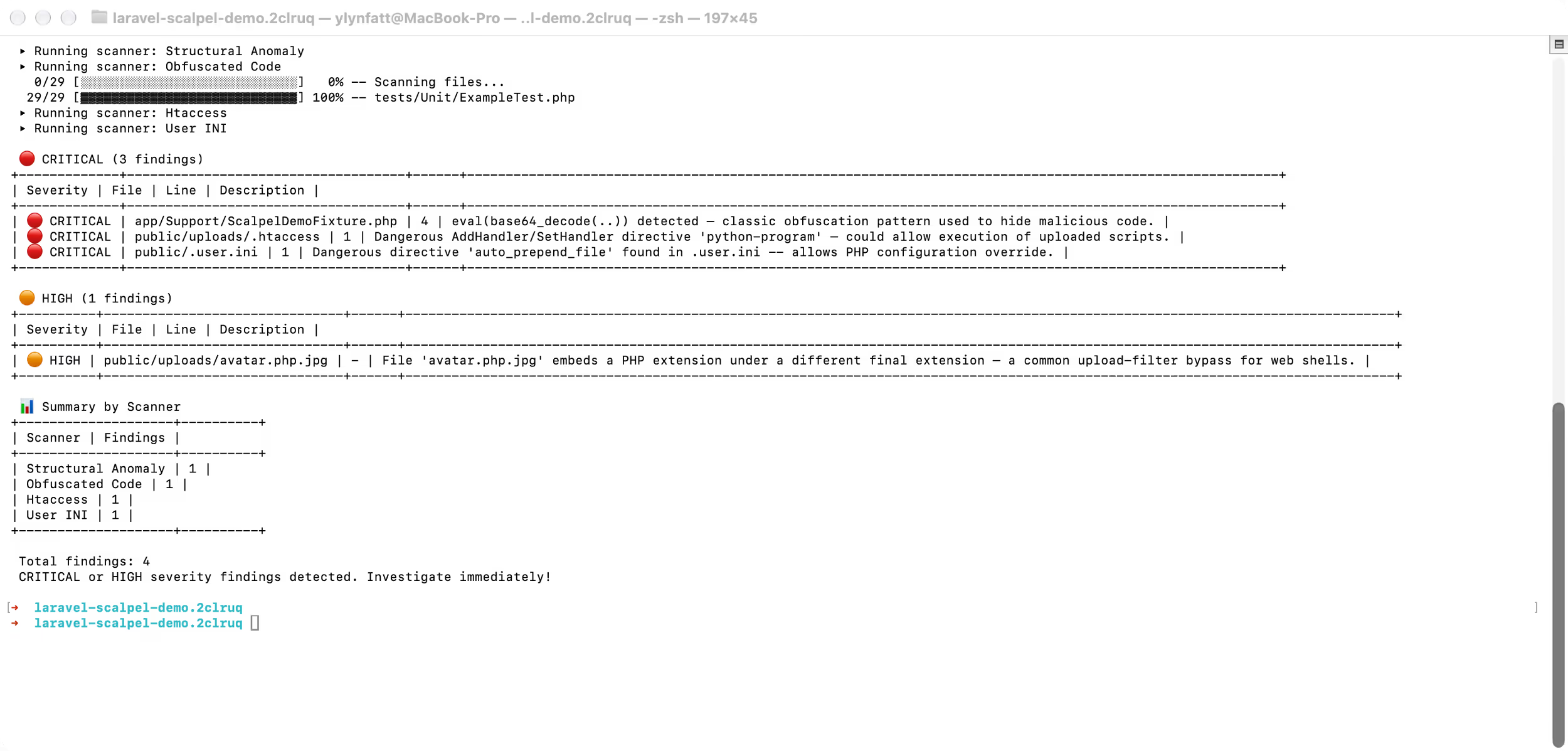
A full scan returned nine findings because the baseline scanner also reported the four new files and a changed routes/web.php file.
The same test found a default-settings issue to account for in CI. Running php artisan optimize compiled framework views under storage/framework/views. The next scan reported 100 MEDIUM variable-variable findings and two HIGH backtick findings in those generated files. After php artisan optimize:clear and recreating the baseline, the scan completed with no findings.
The structural scanner allows Laravel's compiled-view directory, but the obfuscated-code scanner still reads its contents. An application that caches views in production should test this path before adding Scalpel to a deployment gate. Adding storage/framework/views to content_scan_excluded_paths avoids those findings, at the cost of skipping content checks for every compiled view.
CI Output and Laravel Events
Both scalpel:scan and scalpel:diff support table, JSON, GitHub Actions annotation, and SARIF output. The --fail-on option sets the lowest severity that fails a CI job. The default is HIGH.
php artisan scalpel:scan --format=sarif --fail-on=MEDIUMExit code 0 means the scan completed and found nothing. Code 1 means at least one finding is at or above the --fail-on severity. Code 2 covers findings below that severity or an incomplete scan, so an unreadable directory does not produce a clean status.
After scalpel:scan or scalpel:diff, the package dispatches a ScanFinished event. The event contains the findings, the command that ran (scan or diff), and the duration in milliseconds. An application can listen for that event and send its own mail, Slack, or webhook alert without parsing command output.
Installation
Laravel Scalpel requires PHP 8.2 or later and supports Laravel 10 through 13. Install it with Composer, then publish its configuration:
composer require hryagstn/laravel-scalpel php artisan vendor:publish --tag=scalpel-configThe scanner runs in the same process and with the same filesystem permissions as the Laravel application. An attacker who can change application code could also alter the scanner or its configuration. The project recommends external scan triggers, read-only code directories, and sending results to storage outside the compromised server. Scalpel detects evidence of an intrusion; it does not provide firewall or containment protection.
You can browse the source and full command reference on GitHub, or try the command simulator on the Laravel Scalpel website.